To change the Blade Oset covered in Section 2.2.2, click on Properties and select the Cut tab . Enable
the setting called Knife Oset and enter a new setting, using inches as the units.
NOTE: If you have activated the SHOW POINT option, you can press the middle button after setting a new
origin point and the x and y values at that position will update to 0,0. As you move the tool carriage away from
this origin point, the x and y values will show exactly how far away from this new origin point the tool carriage
has moved. More details on the SHOW POINT option are covered in Section 1.8.3.
2.5 Cutting from Vinyl Express LXi 19 to the Muse
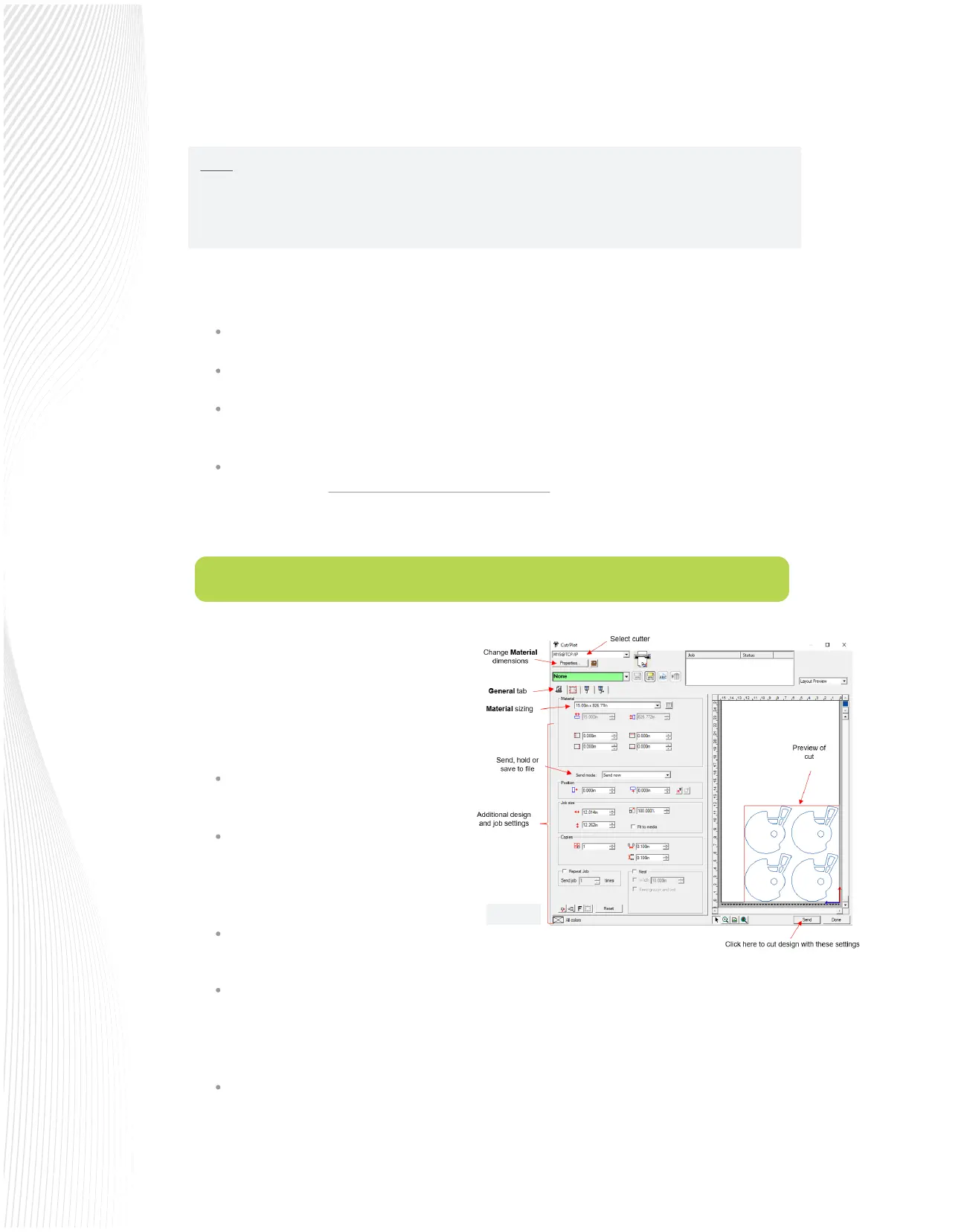
When you are ready to cut, click the Cut/Plot icon
to launch the Production Manager and open the
following Cut/Plot window:
For a simple cut you only need to address the
following on the General tab:
While there are quite a number of other cutting features you may need for your applications, take note of
several common ones:
Calibrate the camera for contour cutting (refer to Section 3.1).
When you are ready to set an origin, press SET>CAMERA>SCAN>OK.
A photo will be taken. In that photo, press the corner of the reg mark or whatever other indicator you
are using for an origin. This will move the red “+” to that position.
Again, press OK. For a contour cut, that should be close enough for the camera to nd the rst
registration mark. However, if you need a very precise origin, such as for engraving a charm, continue
the steps until the dashed lines are dead center with your indicator.
Make sure the correct cutter is selected at
the top of the Cut/Plot window.
Verify the Material sizing is correct. If not,
you can click on Properties, enter new
dimensions and they will appear in the
drop-down menu for Material.
Check the Preview to make sure it seems
correct.
Make sure Send mode is set to Send now if you are cutting directly to the Muse immediately.
Fig. 2.5.1
You can also use the Muse’s camera to set a very precise origin for applications such as when engraving metal
charms or for the placement of the blade holder over the rst registration mark in contour cutting:


 To Next Page
 Loading...
