EasyManua.ls Logo

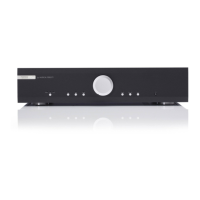
Musical Fidelity A300 - User Manual

Musical Fidelity A300
9 pages
Print Icon
To Next Page IconTo Next Page
Loading...
A300 Instructions for Use. Page 1
of 9
INTRODUCTION
INSTRUCTIONS FOR USE
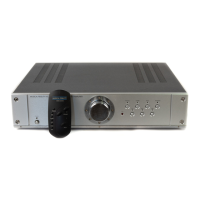
Thank you for purchasing the Musical Fidelity
A300 remote control integrated Amplifier.
Used properly and carefully, it should give you many
years of outstanding musical reproduction.
The A300 operates in Class A/B which in our experience
offers the ultimate in musical accuracy and pleasure.
The A300 is based on ideas and principles developed
in the legendary XA1 Integrated amplifier
but with subtle changes and improvements.
Aesthetically, the A300 is a perfect match for the
A3 CD player and the A3 FM Tuner.
Together, they form one of the finest hi-fi systems
that you can own today.
Dust regularly with a soft duster or soft brush but be
careful using cleaning or polishing agents - they may
harm the surface finish.
If you have any questions about anything in your
audio system, please consult your dealer who is there to
help and advise you.
A300
DUAL MONO INTEGRATED AMPLIFIER
issue 3/13.07.2000

Questions and Answers

  • Z
    zachary24Jul 27, 2025
    What to do if my Musical Fidelity Amplifier has no sound?
    • K
      Karen WilsonJul 27, 2025
      If your Musical Fidelity Amplifier isn't producing sound, there could be several reasons: * Ensure the volume isn't set to the minimum. * Verify the correct input is selected. * Check if mute is activated on the remote. * Wait 10-15 seconds after powering on for the unit to unmute. * Make sure the Tape Monitor button is not depressed. * Inspect speaker cables for proper connection. * Confirm speakers are connected in phase correctly.
  • M
    Mary RamirezAug 5, 2025
    Why isn't my Musical Fidelity Amplifier remote control working?
    • L
      Lisa MendozaAug 5, 2025
      If your Musical Fidelity Amplifier remote control isn't working, consider these possible causes: * Ensure the POWER switch on the back is set to ON. * Check if batteries are inserted correctly. * Replace the batteries if they are flat. * Make sure there is a clear line of sight between the remote control and the IR receiver lens on the amplifier.
  • M
    Melissa BrockAug 16, 2025
    Why has the range of my Musical Fidelity Amplifier remote control dramatically reduced?
    • J
      Joseph MooreAug 16, 2025
      If the range of your Musical Fidelity Amplifier remote control has significantly decreased, the most likely cause is that the batteries are running low. Try changing the batteries.

Summary

SAFETY INFORMATION

Mains Lead and Plug Safety Precautions

Outlines safety procedures for handling the mains lead, plug, and safe disposal of cut-off plugs.

Earthing and Wire Colour Coding

Explains the importance of earthing and how to correctly connect wires based on colour coding.

RFI and Lightning Protection Advice

Addresses potential RFI susceptibility and protection against lightning during storms.

CONNECTIONS

Electrical Safety During Connections

Warns against touching speaker terminals when the unit is in use to prevent electric shock.

TROUBLESHOOTING

Power and Sound Output Issues

Addresses common problems like no power, no sound, and inaccurate audio output with remedies.

Remote Control and Audio Quality Problems

Helps resolve remote control malfunctions and issues with bass or stereo imaging.

SPECIFICATIONS

Performance Metrics

Lists key performance data including power output, THD, and frequency response.

Musical Fidelity A300 Specifications

General IconGeneral
Signal to Noise Ratio>96dB 'A' weighted
TypeIntegrated Amplifier
Input Impedance47 kOhms
Dimensions440 x 380 x 120mm
Power Output150 watts per channel into 8 Ohms

Related product manuals