EasyManua.ls Logo

Musical Fidelity A3cr - User Manual

Musical Fidelity A3cr
9 pages
Print Icon
To Next Page IconTo Next Page
Loading...
A3
CR
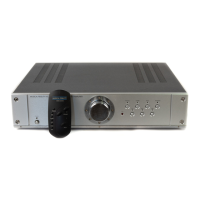
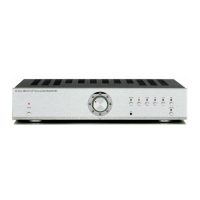
preamplifier Instructions for Use. Page 1 of 9
INTRODUCTION
INSTRUCTIONS FOR USE
Thank you for purchasing the Musical Fidelity
A3
CR
remote control preamplifier.
Used properly and carefully, it should give you many
years of outstanding musical reproduction.
The A3
CR
preamplifier has been designed to operate
comfortably with the sonic capabilities of the new
SACD format. (Super Audio CD)
Aesthetically, the A3
CR
preamplifier is a perfect match for the
A3
CR
power amplifier, A3 CD player and the A3 Tuner.
Together, they form one of the finest hi-fi systems
that you can own today.
Dust regularly with a soft duster or soft brush but be
careful when using cleaning or polishing agents - they may
harm the surface finish.
If you have any questions about anything in your
audio system, please consult your dealer who is there to
help and advise you.
A3
CR
PREAMPLIFIER
issue 2/12.10.2000

Questions and Answers

  • C
    corey58Jul 26, 2025
    How to fix a Musical Fidelity A3cr Amplifier that has no power?
    • K
      Kimberly GeorgeJul 26, 2025
      If your Musical Fidelity Amplifier isn't powering on when you press the POWER button, the mains plug might not be correctly inserted. Ensure that the plug is securely plugged in.
  • A
    Amy FriedmanAug 3, 2025
    Why is there no sound coming from my Musical Fidelity A3cr Amplifier?
    • N
      Nathan DillonAug 3, 2025
      If your Musical Fidelity Amplifier produces no sound, there might be several reasons: 1. The volume control might be set to the minimum. In this case, simply turn up the volume. 2. The wrong input might be selected. Choose the correct input. 3. The mute function could be activated. Deactivate it by pressing the mute button on the remote control. 4. The unit might still be in power-up mute. Wait 10-15 seconds after powering on for the unit to unmute. 5. The Tape Monitor button could be depressed. Press the Tape Monitor button to disengage it.
  • B
    brandon80Aug 10, 2025
    What to do if the Musical Fidelity A3cr Amplifier remote control is not working?
    • B
      Bradley BrownAug 11, 2025
      If the remote control for your Musical Fidelity Amplifier isn't working, consider these potential causes: 1. The POWER switch might be set to OFF. Ensure it is set to ON. 2. Batteries might be missing. Insert batteries into the remote control unit. 3. The batteries might be flat. Try changing the batteries. 4. The remote control might not be pointed at the IR receiver lens. Ensure there is a clear line of sight between the remote control and the IR receiver lens, without any obstructions.
  • C
    Cynthia BlakeAug 18, 2025
    Why has the range of my Musical Fidelity Amplifier remote control dramatically reduced?
    • B
      Barbara CarterAug 18, 2025
      If the range of your Musical Fidelity Amplifier's remote control has significantly decreased, the batteries are likely running low. Replacing the batteries should restore the remote control's normal range.

Summary

INTRODUCTION

SAFETY INFORMATION

EARTHING SAFETY

Appliance must be earthed as per wire colour coding for safety.

RADIO FREQUENCY INTERFERENCE (RFI)

Product tested for RFI, advice for abnormal levels and lightning protection.

GENERAL ADVICE

ENVIRONMENTAL CONDITIONS AND PLACEMENT

Operates within specified temperature/humidity ranges; avoid water, heat, and direct sunlight.

CARE AND MAINTENANCE

Dust with soft cloth; avoid cleaning agents. Refer fuse/service issues to dealer.

GENERAL SAFETY PRECAUTIONS

Keep away from naked flames and children; dispose of batteries per manufacturer instructions.

CONNECTIONS AND FACILITIES

FRONT PANEL LAYOUT

Details of front panel buttons, LEDs, and controls like power, volume, and input selection.

REAR PANEL LAYOUT

Details of rear panel inputs, outputs, earth connection, and power inlet.

CONNECTIONS

INPUT CONNECTIONS

All connections should be made with power OFF. Details MM/MC phono input and 5 line-level inputs.

OUTPUT CONNECTIONS

Connect right and left line outputs to the power amplifier's inputs.

BEFORE YOU SWITCH ON

Routine for making connections and initial power-up: check connections, set volume minimum, switch on, wait for mute.

OPERATION

REMOTE CONTROL

Controls amplifier functions remotely; mute function indicated by red LED status.

PHONO INPUT OPERATION

Details MM/MC phono input and cartridge selection switch. Do not operate switch with volume up.

TAPE RECORDING

Connect tape machine outputs to 'Tape' input and inputs to 'Tape Record' output for recording.

OFF TAPE MONITORING

Allows comparison of recorded sound to original during recording using a 3-head cassette deck.

TROUBLESHOOTING

COMMON TROUBLESHOOTING ISSUES

Addresses common problems like no power, no sound, and remote control malfunctions with causes and remedies.

SPECIFICATIONS

Musical Fidelity A3cr Specifications

General IconGeneral
BrandMusical Fidelity
ModelA3cr
CategoryAmplifier
LanguageEnglish

Related product manuals