11
Operation
General System Operation
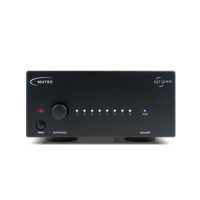
Operating the REF10, respectively REF10 SE120 is very
straight-forward! Apart from the two power switches there is
only a single push button rotary encoder (»OUTPUT SELECT«)
used to individually turn the eight outputs on or off. Per facto-
ry default all outputs are active upon powering up the device
for the first time, so all eight white front panel LEDs will light
up accordingly!
Selecting and toggling the outputs
The front panel encoder’s action is stepped and each step will
evoke a new setting. The push button function of the encoder
is used to toggle features.
Rotate the encoder by one step to select an output and the
first LED will start flashing. Turning the encoder by another
step now will cause the next LED to flash while the previous
one returns to a steady light. Thus, it is only possible to select
one output at a time.
As long as an LED is flashing, the respective output can be
toggled with a push of the encoder. When the LED is on, the
output is active. When the LED is off, the output has been
disengaged. Any setting will have immediate effect - it is not
necessary to take any further actions.
The last setting of the REF10, respectively REF10 SE120 will be
stored and preserved after the the device has been powered
down.
Recommendations for REF10 and REF10 SE120
To ensure a long-lasting performance with optimum clock
signal quality that will best enhance your connected devices
we would like to share a few recommendations for using the
REF10, respectively REF10 SE120.
•
First customers have told us that for best sound perfor-
mance of the connected devices it is useful to let the
REF10, respectively REF10 SE120 burn-in for at least 14
days. Thus, we recommend to leave the unit switched on
for that period of time.
•
Prior to enjoying an in-depth listening session we recom-
mend pre-heating the REF10, respectively REF10 SE120 for
about 20-30 minutes. While the heater generally reaches
its operating temperature in about one minute, the entire
oscillator section takes longer to fully warm up. To ensure
optimal performance and highest frequency stability, you
should grant your REF10, respectively REF10 SE120 this
additional warm-up time.
•
Keeping the REF10, respectively REF10 SE120 permanently
powered up is generally not required as long as you ob-
serve the extended warm-up period described above. We
do however advise against power cycling the unit in short,
repeated intervals!
•
The REF10, respectively REF10 SE120 should always be
placed away from mechanically vibrating devices (such as
turn tables). Although the unit’s case feet are equipped
with isolating rubber rings, excessive structure-borne vi-
brations can nonetheless interfere with the oscillator and
negatively affect the clock performance and signal quality.
The REF10, respectively REF10 SE120 should furthermore
not be placed in close proximity to devices emitting strong
electromagnetic fields (such as fluorescent lamps). Even
though the electronics of the unit are encapsulated in a
steel enclosure these strong electric fields can interfere
with the sensitive electronics and also negatively affect
the signal quality.
•
We generally recommend disengaging all clock outputs
that are not used for your given setup to reduce potential
interference as much as possible. Additionally, unused and
disengaged outputs can be fitted with so-called BNC caps.
These are available from various retailers and can be used
regardless of the termination impedance of the REF10's,
respectively REF10 SE120's outputs. The use of so-called
BNC terminators is not necessary to protect the outputs.


 To Next Page