Installation of the Heat Guard 2
Section 1 Components 3
Section 2 Storage & Handling 4
Section 3 Basic Operation 4
Section 4 Editing User Profiles
Section 5 Processing using the “Run Stored Profile” 5
option (Recommended Option)
Section 6 Processing using the “Rerun Last Profile”
Section 7 Myerson DuraFlex Partial Injection Procedure 7
Section 8 Myerson DurAcetal Framework Injection Procedure 14
Section 9 Warranty & Returns 19
Section 10 Technical Data 19
Section 11 Preventative Maintenance & Cleaning 20
Section 12 Service & Repairs 20
Section 13 Declaration of Conformity 19
Section 14 Important Safety Warnings 21
Section 15 Notes 22
Installation of the HEAT GUARD
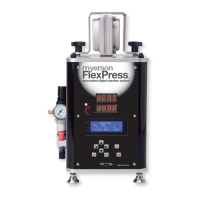
To prevent damage, the myerson FlexPress™ has been shipped
with the heat guard not installed. To install the heat guard, place
the heat guard over the corner posts with the warning label UP.
Install the (4) black acorn nuts nger tight. The acorn nuts are
simply holding the heat guard down, so they do not need to be
wrenched tight.
The heat guard can be removed periodically for cleaning.
Just follow the above steps in reverse order to remove the
heat guard.
Thank you for your purchase. Feel free to call myerson with
any questions.
2


 To Next Page