- 7 -
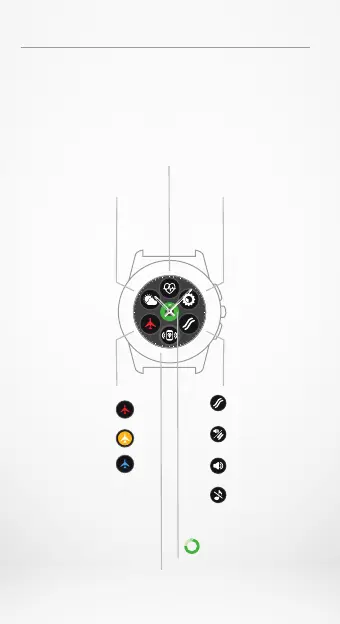
SHORTCUTS
Swipe down from the main watch face
to access ZeTime shortcuts.
Weather
Instantly access the local
weather conditions and
next 3 days forecast.
Flight mode and
Bluetooth status
Brightness
Set screen brightness
for better visibility.
Vibration
Buzzer
Mute all notifications.
Turn on vibration
(default).
Turn on vibration & buzzer.
(Also enable customized setting
from the mobile app).
Turn on buzzer.
Flight mode is disabled.
Bluetooth is not connected.
Flight mode is enabled.
Flight mode is disabled.
Bluetooth is connected.
Helps you find your phone
as long it is in range
with your ZeTime.
Shows the remaining battery
level of your watch.
Heart rate
Keep track of your heart rate.
Monitor it.
Battery level
Find my phone






 To Next Page