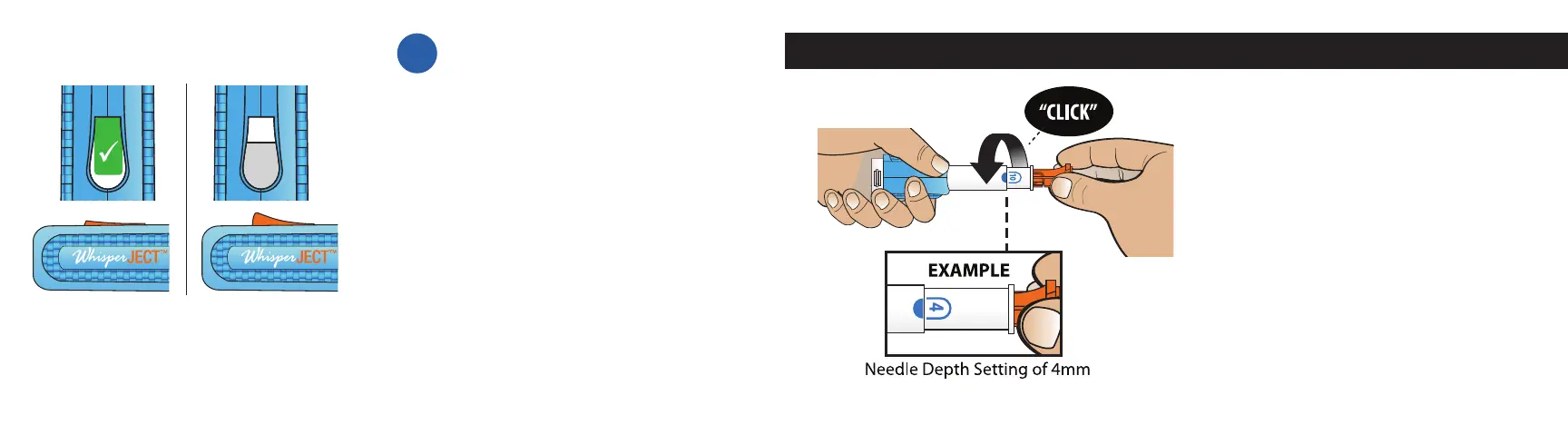
Rotate the Orange Needle Cap Remover
until the desired depth value (4, 6, 8 or 10)
is aligned with the blue semi-circle (see
image left). You will hear a slight “CLICK”
sound when a Needle Depth Setting
Value correctly lines up with the Needle
Depth Indicator.
Note: Smaller values (4 and 6) will result
in a shallow injection. Higher numbers
(8 and 10) will result in a deeper injection.
Check with your healthcare provider to
determine your correct needle depth setting.
DO NOT unscrew the white Needle
Depth Adjuster from device.
Step 3 – Set the Needle Depth
Con rm the Autoinjector is reset.
When the Autoinjector is reset:
• The white check mark inside a
green box will no longer be visible
and the white Plunger will occupy
about half of the Viewing Window.
• The Orange Injection Button will
pop up.
2C
DO NOT proceed to Step 3 until you
have con rmed the Autoinjector has
been fully reset.
AFTERBEFORE
14 15



 To Next Page