To Next Page
J
Jamie BarrettJul 28, 2025
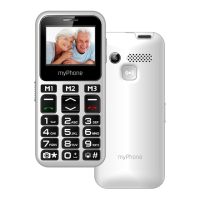
What to do if no one can call my myPhone Maestro?
- NNicole WoodJul 28, 2025
If no one can call you on your myPhone Cell Phone, ensure that your phone is turned on and within GSM network reach.

What to do if no one can call my myPhone Maestro?
If no one can call you on your myPhone Cell Phone, ensure that your phone is turned on and within GSM network reach.
What to do if I cannot hear the caller on my myPhone Maestro, or the caller cannot hear me?
If you can't hear the caller or the caller can't hear you on your myPhone Cell Phone, make sure the microphone is close to your mouth and not covered. Also, check that the built-in speaker isn't covered. If using a headset, ensure it's correctly connected.
What to do if my myPhone Maestro Cell Phone has network fail?
If your myPhone Cell Phone shows a network failure, try moving to another location and attempt to connect again.
Why my myPhone Maestro Cell Phone connection cannot be established?
If the connection cannot be established on your myPhone Cell Phone, verify that the phone number you entered is correct, both when dialing directly and in your phonebook. Correct the phone number if needed.
How to fix poor sound quality on myPhone Cell Phone during calls?
If you experience poor sound quality during calls on your myPhone Cell Phone, check that the speaker and microphone are not covered.
Avoid using the device where prohibited or when it may cause interference or danger.
Switch off the device in airplanes and medical facilities due to potential interference.
Turn off the device during refueling and near chemicals to prevent hazards.
WLAN networks can be used indoors in EU Member States without restrictions.
Only authorized personnel should install or repair the product to avoid damage and warranty loss.
Children and disabled individuals should use the device under supervision due to potential risks.
Protect the device from moisture to prevent damage to electronic components.
Do not use the device while driving any kind of vehicle for safety reasons.
Avoid extreme temperatures, liquids, and metal contact with the battery; dispose of properly.
Avoid prolonged use of high volume to prevent hearing damage.
Do not look directly at the flashlight beam to avoid permanent eye damage.
Lists all items included in the phone box for user verification.
Provides details on GSM bands, display, camera, battery, dimensions, and weight.
Information on phonebook capacity, message storage, and SD card use for enhanced features.
Instructions on how to power the phone on and off using the red handset button.
Step-by-step guide on how to insert SIM, memory cards, and the battery into the phone.
Guide on how to connect the charger and charge the phone battery correctly.
How to select, activate, or customize sound profiles and ringtones on the device.
Instructions on how to lock and unlock the phone's keypad to prevent accidental use.
Procedures for initiating, answering, and ending phone calls on the device.
Guide to composing SMS and MMS messages, including character input modes.
How to access and read incoming text messages from the inbox.
Instructions for adding new contacts to the phonebook.
Steps to find existing contacts in the phonebook by entering their initial letters.
How to remove individual contacts from the phonebook.
Instructions to reset the phone to its original factory settings using a password.
How to turn the phone's built-in flashlight on and off.
Solutions for problems like incorrect SIM installation or entering the PIN code.
Resolving network failures and poor sound quality during phone calls.
Troubleshooting issues where calls cannot be made or heard correctly.
Guidelines for charging the battery to prolong its lifespan and avoid damage.
Instructions for keeping the phone and accessories in good condition and avoiding damage.
Adherence to legal regulations and safety practices while using the phone.
Guidelines for safe mobile phone use while driving, including headset recommendations.
Awareness of legal regulations and potential interference with medical devices.
Instructions for disposing of used electrical and electronic equipment according to WEEE directive.
Guidelines for proper disposal of batteries and accumulators as per EU directives.
 General
| Pixel density | 143 ppi |
|---|---|
| Display diagonal | 2.8 \ |
| Display resolution | 240 x 320 pixels |
| Internal memory | 64 MB |
| Flash card support | Yes |
| Compatible memory cards | SD |
| Maximum memory card size | 32 GB |
| Subscription type | No subscription |
| Form factor | Bar |
| Personal info management (PIM) | - |
| SIM card capability | Dual SIM |
| Talk time (2G) | - h |
| Battery capacity | 1000 mAh |
| Rear camera resolution (numeric) | 2 MP |
| Product color | Gold |
| Multimedia Messaging Service (MMS) | Multimedia Messaging Service (MMS) is a standard way to send messages that include multimedia content to and from a mobile phone over a cellular network |
 Weight and Dimensions
| Depth | 9 mm |
|---|---|
| Width | 58 mm |
| Height | 138 mm |
| Weight | 118 g |