11FINESSEFINESSE10
7.0 Operation (cont...)
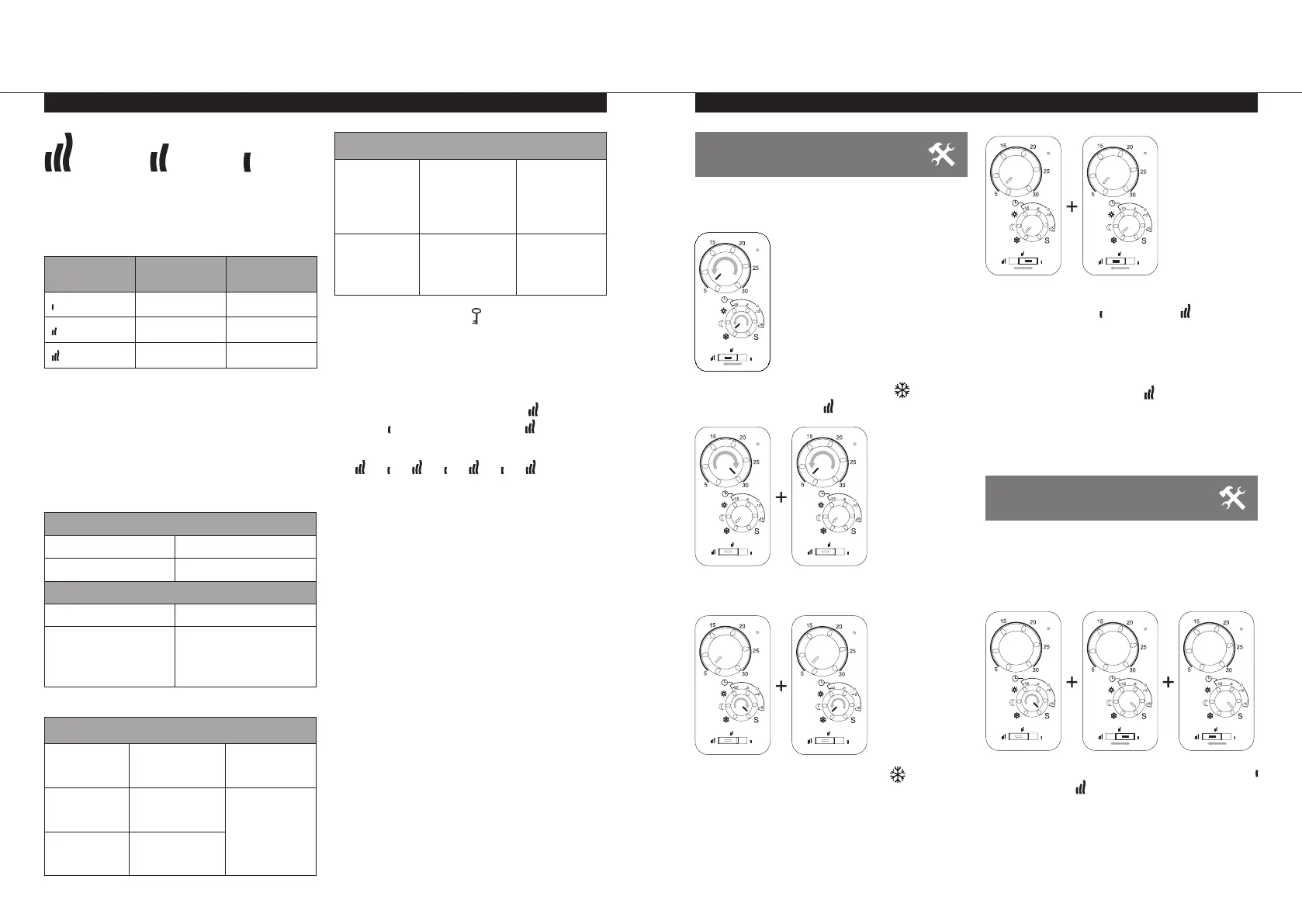
8.1 HOW TO ENTER THE
PARAMETER MENU
The thermostat has a parameter menu. In order
to enter this menu, follow the below steps:-
l
Rotate dial B to 5, turn dial D to , and slide
switch E to the left .
l
Rotate dial B to 30 then back to 5.
l
Rotate dial D to S then back to
l
Slide switch E to then back to
Note: LED A & C will both flash green while in the
top level of the parameter menu.
Note: When in the parameter menu, switch E
should always be in the left position when not
in use.
Note: The position of dial B has no influence in
the top level of the parameter menu.
8.1 HOW TO ENTER THE
PARAMETER MENU
To exit from the top level of the parameter menu
and return to normal operation, either do not
manipulate any of the controls for 60 seconds,
or follow the below steps:-
l
Rotate dial D to S, then slide switch E to
then back to to confirm.
l
LED A & C will flash red 5 times.
Note: Dial B & D, and slide switch E will need to
be set to the normal operation positions.
~ 60°C MAX~ 75°C MAX
~ 90°C MAX
Note: When considering the permanent use
of the radiator at 60°C or 75°C maximum, the
following correction factor should be applied for
the output.
E SWITCH SURFACE
TEMP.
DOUBLE PANEL
~ 60°C max ~ 0.80
~ 75°C max ~ 0.90
~ 90°C max 1
E.g. A 1,000 Watt double panel with the E switch
on the 60°C position will deliver max. 800
Watts. These values should be considered when
selecting the number and type of panels to cover
the calculated heat losses.
l
Two LED indicators (A and C, figure 6)
indicate the working mode of the radiator.
LED A
GREEN Radiator switched on
RED Radiator heating
LED C (only when external programmer connected)
OFF Comfort mode
GREEN BLINKING
(CYCLE OF 4-BLINKS
THEN PAUSE, 4-BLINKS,
REPEATED).
Reduced mode
TROUBLESHOOTING
LED A
RED
BLINKING
Sensor problem
Contact the
manufacturer or
service agent
ORANGE/
GREEN
BLINKING
Open window
detected -
Radiator not
heating
See section 8.3.6
Select additional
features
ORANGE/RED
BLINKING
Open window
detected -
Radiator heating
LED A and C
LED A
BLINKING
ORANGE
LED C
BLINKING
ORANGE
Key lock active
De-activate
key lock
LED A OFF
LED C
BLINKING
GREEN/RED
Change to “Power
break (when
dial “D” is set to
Automatic mode)”.
See section 8.3.3
Setting the time
KEY LOCK FUNCTION
Use the Key Lock function to prevent any
changes to your settings (in a child’s room,
public area… etc.)
l
To activate the Key Lock function, slide the
switch (E, figure 6), to the left , then to the
right , then back to the left . Repeat this
sequence 3 times.
l
LED A & C will both flash orange 5 times.
l
Repeat the same procedure to unlock the
keypad.
Note: When unlocking the Key Lock function,
LED A & C will flash orange during the unlock
sequence. When successfully unlocked, LED A &
C will flash green 5 times.
Note: If any alterations are made to dials B or D,
or to switch E, when the Key Lock is active, LED A
& C will flash orange 5 times to indicate the Key
Lock is active.
This function is available in all operating modes.
To check the actual settings, that were stored
before the key lock was activated, slowly move
dials B or D, or switch E.
When dial B is moved to the stored setting, LED
(A) will flash orange/green.
When dial D is moved to the stored setting, LED
(C) will flash orange/green.
When switch E is moved to the stored setting,
LED (C) will flash orange/red.
8.0 Parameter Menu


 To Next Page