13FINESSEFINESSE12
8.0 Parameter Menu (cont...)8.0 Parameter Menu (cont...)
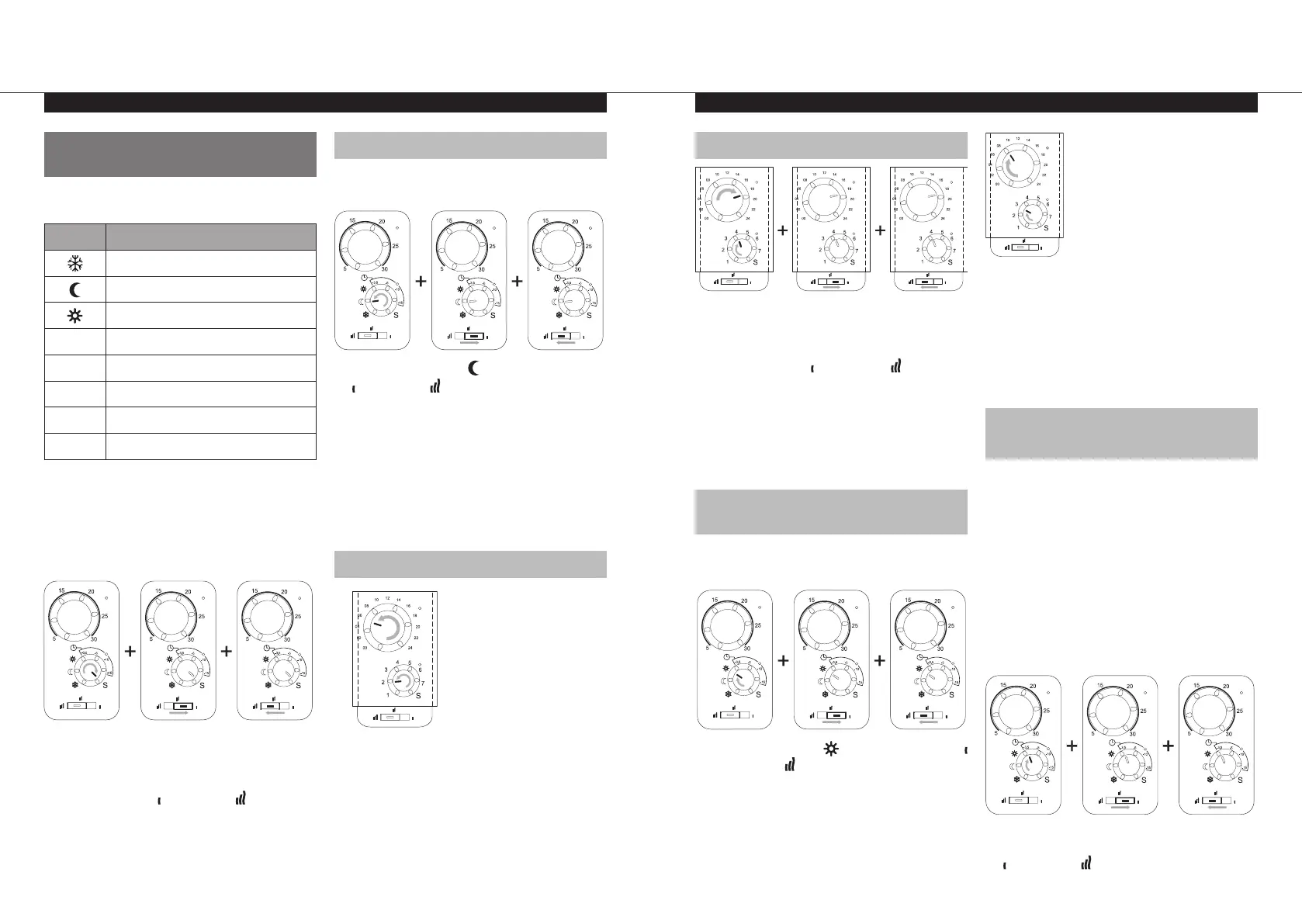
8.3 FUNCTIONS AVAILABLE IN
THE PARAMETER MENU
When in the top level of the parameter menu,
the below functions can be accessed:-
Symbol Parameter Function
No function
Check and set time
Check programme heating times
-3,5
Define user programme heating times
-5
Select additional features
-10
Select programmes
-15
No function
S
Exit parameter menu
Note: After entering the above functions, if you
wish to return to the top level of the parameter
menu, either do not manipulate any of the
controls for 60 seconds, or follow the below
steps:-
l
Rotate dial D to S.
l
LED A & C will both flash orange.
l
Slide switch E to then back to to confirm.
l
LED A & C will flash green.
8.3.1 CHECK AND SET TIME
To enter into this function, follow the below
steps:-
l
Rotate dial D to the then slide switch E to
then back to to confirm.
l
LED A & C will stop flashing green and change
to solid red or solid green.
Note: The time template, located in the rear of
the user manual, will be needed to set the day
and time.
l
Cut out the time template from the manual,
and place it over the control.
8.3.2 CHECKING THE TIME
l
Rotate dial B until LED A changes from solid
red to solid green, and rotate dial D until
LED C changes from solid red to solid green.
l
In the above example, the time values are
Day 2 and the time is approximately 05:30.
8.3.3 SETTING THE TIME
l
To set the time, rotate dial B to the current
time and rotate dial D to the current day of
the week.
l
Slide switch E to then back to to save the
time setting.
l
LED A & C will both change to solid green.
Note: If power is lost, from a power cut or the
product is switched off, even just for a few
seconds, the time and day setting will be lost.
8.3.4 CHECK PROGRAMME
HEATING TIMES
To enter into this function, follow the below
steps:-
l
Rotate dial D to the then slide switch E to
then back to to confirm.
l
LED A will stop flashing green and change
to solid red or solid green.
l
LED C will be off.
Note: The time template, located in the rear of
the user manual, will be needed to set the day
and time.
l
Rotate dial D to the day of the week that is to
be checked.
l
Rotate dial B from 00hrs to 24hrs, taking note
of at what time LED A changes between red
and green.
Red = Reduced mode
Green = Comfort mode
8.3.5 DEFINE USER PROGRAMME
HEATING TIMES
Note: Once saved, the user defined programmes
are not lost in the event of a power cut. However,
the time will reset to 00:00 and Day 1 when the
power returns, if not set, so the product may not
heat at the expected times.
ATTENTION: If a user defined programme has
already been created and saved, it will be lost as
soon as the “define user programme” function is
entered.
To enter into this function, follow the below
steps:-
l
Rotate dial D to the -3,5 then slide switch E to
then back to to confirm.


 To Next Page