15FINESSEFINESSE14
8.0 Parameter Menu (cont...)8.0 Parameter Menu (cont...)
l
LED A will be off.
l
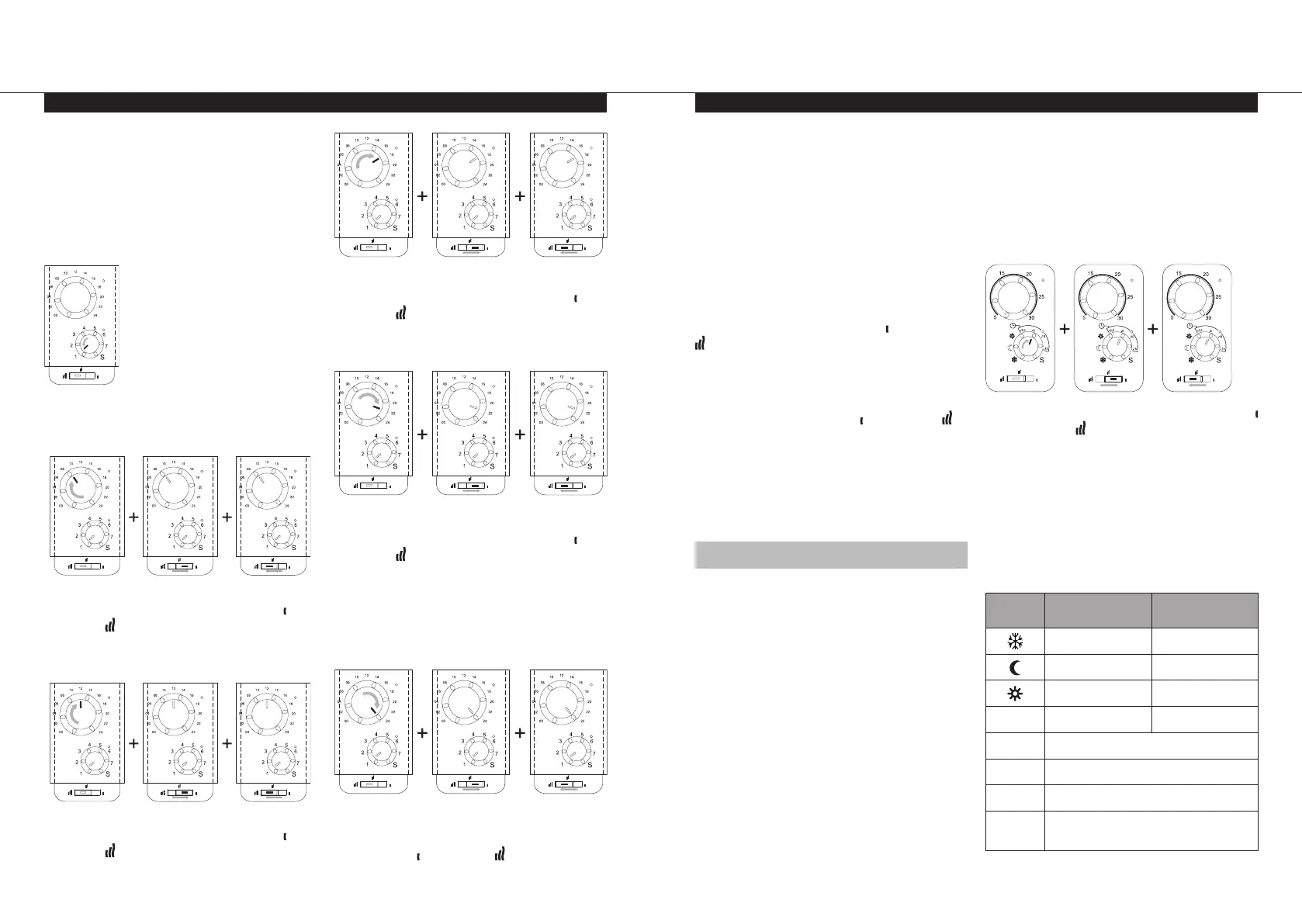
LED C will stop flashing green and change to
flashing orange/green, indicating that dial D
must now be set to Day 1.
Note: The time template, located in the rear of
the user manual, will be needed to set the day
and time.
l
Rotate dial D to 1.
l
LED A will start flashing red.
l
LED C will be off.
l
Rotate dial B to the start time of the first
comfort period, then slide switch E to then
back to to confirm.
l
LED A will change from flashing red to
flashing green.
l
Rotate dial B to the end time of the first
comfort period, then slide switch E to then
back to to confirm
l
LED A will change from flashing green
flashing red.
l
Rotate dial B to the start time of the second
comfort period, then slide switch E to then
back to to confirm.
l
LED A will change from flashing red to
flashing green.
l
Rotate dial B to the end time of the second
comfort period, then slide switch E to then
back to to confirm.
l
LED A will change from flashing green to
flashing red.
l
If more than two Comfort periods are
required, repeat the previous steps for the
start and end time of each comfort period.
l
If all comfort periods have been defined for
Day 1, rotate dial B to hour 24, then slide
switch E to then back to to confirm.
l
LED A will be off.
l
LED C will start flashing orange/green,
indicating that dial D must now be set to Day 2.
l
Rotate dial D to Day 2.
l
Repeat the previous steps for setting all
desired comfort periods for Day 2 to Day 7.
Note: If LED A was flashing green at the end
of the previous day (comfort), LED A will flash
green at the start of the following day, signifying
that the comfort period will continue into the
following day. Rotate dial B to the end of this
comfort period, and switch E to then back to
to confirm. LED A will change from flashing
green to flashing red.
l
When dial D is set to hour 24 on Day 7,
signifying all comfort periods have been
defined, slide switch E to then back to to
confirm.
l
The user defined programme will be stored
and the thermostat will automatically exit,
and return to the parameter menu.
l
LED A & C will flash green.
8.3.6 SELECT ADDITIONAL FEATURES
The thermostat has Adaptive Start and Open
Window Detection functions.
ADAPTIVE START
Disabled - Heating up to reach the Comfort set
temperature will start at the programmed time.
Enabled - Heating up will start at the predicted
optimal time to reach the Comfort set
temperature at the programmed time.
Note: This feature will only function when the
radiator follows the built in programmer.
OPEN WINDOW DETECTION
This function will switch the radiator from any
active mode to “Frost Protection” mode when
an open window is detected (room temperature
drops within a certain time. LED A will flash
orange/red when heating, or flash orange/green
when not heating.
To return to previous mode, turn Dial B or D and
then turn it back to the original position. If no
manual intervention has been detected within 30
minutes, the radiator will return automatically to
the previous operation mode.
To enter into this menu and select these
additional features, follow the below steps:-
l
Rotate dial D to -5 then slide switch E to
then back to .
l
LED A will stop flashing green and change to
solid orange.
Orange = feature not selected.
Green = feature currently selected.
l
LED C will be off.
Note: Adaptive Start and Open Window
Detection are both set to enabled by default.
Symbol Adaptive Start
Window Open
Detection
Disabled Disabled
Disabled Enabled
Enabled Disabled
-3,5
Enabled Enabled
-5
No function
-10
No function
-15
No function
S
Exit (return to top level of
parameter menu)


 To Next Page