17FINESSEFINESSE16
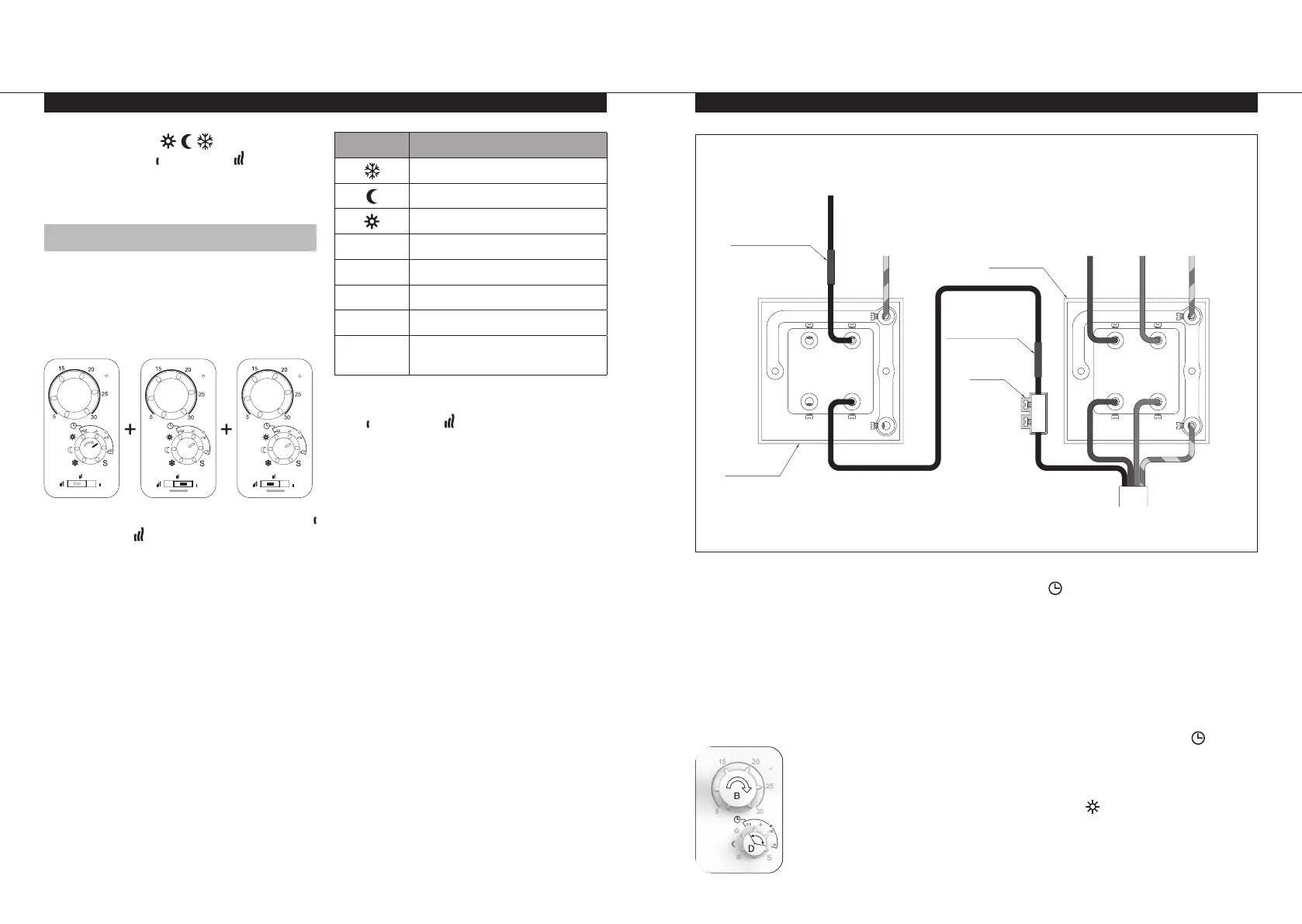
9.0 Radiator Connected to the TOUCH4 Programmer
N
L
N
LOAD
L
LOAD
N
L
N
LOAD
L
LOAD
230V 50Hz SUPPLY
NEUTRAL
LIVE EARTH
G/Y
BRBL
BL
BR
G/Y
BK
Fused Spur
Electric
Radiator
Cable
Terminal
Block
Mark switched live
pilot wire with brown
insulation tape
Mark switched live
pilot wire with brown
insulation tape
EARTH
BK
BK
Fused Spur
PILOT WIRE FROM
PROGRAMMER
(switched live)
G/Y
Figure 7.
Wire Colours
BR = Brown
BK = Black
BL = Blue
G/Y = Green/Yellow
8.0 Parameter Menu (cont...)
When connected to the TOUCH4 (figure 7),
select the automatic operation mode.
l
A suitable means of local isolation of the
radiator from both the electrical supply and
the pilot wire signal must be provided.
l
The fused spurs must be clearly marked to
indicate that two sources of electrical supply
may be present.
AUTOMATIC MODE
l
Select the desired
room temperature
during periods of
normal occupancy
between 5 and 30°C
using dial “B”.
l
Rotate dial “D” within the area covered
by the symbol. The value on this scale
indicates the desired temperature reduction
during the night or during shorter periods of
absence.
l
When the house is unoccupied for longer
periods (e.g. holiday) you can override the
clock programme by rotating dial “D” around
to “Reduced” or “Frost protection” mode.
l
The section highlighted with symbol
should only be used when connected to the
TOUCH4. If the radiator is set in this position
when not connected, then it will only work in
comfort mode
.
l
The TOUCH4 has an IP20 rating.
l
Rotate dial D to
or -3,5 and then
slide switch E to then back to to confirm.
l
LED A will change to solid green to indicate
the currently selected option.
8.3.7 SELECT PROGRAMMES
The thermostat has 6 preset heating
programmes, P1 – P6 (page 20) and 1 user
defined heating programme, U1. To enter into
this menu and select one of these heating
programmes, follow the below steps:-
l
Rotate dial D to -10 then slide switch E to
then back to to confirm.
l
LED A will stop flashing green and change
to solid orange or solid green.
Orange = programme not selected.
Green = programme currently selected.
l
LED C will be off.
Symbol Programme Number
P1
P2
P3
-3,5 P4
-5 P5
-10 P6
-15 U1
S
Exit (return to top level of
parameter menu)
l
Rotate dial D to the symbol relating to the
desired programme, and then slide switch E
to then back to to confirm.
l
LED A will change to solid green to indicate
that this programme is now selected.


 To Next Page