EasyManua.ls Logo

Nabco GT-500 - User Manual

Default Icon
32 pages
Print Icon
To Next Page IconTo Next Page
Loading...
S82 W18717 Gemini Drive
Muskego, Wisconsin 53150
Phone: (877) 622-2694
Fax: (888) 679-3319
www.nabcoentrances.com
Technical Support: (866) 622-8325
Part #C-00084
Rev. 9/09/16
WARNING
• Turn OFF all power to the Automac Door if a Safety System is not working.
• Instruct the Owner to keep all power turned OFF unl correcve acon can be achieved by a NABCO
trained technician. Failure to follow these pracces may result in serious consequences.
• NEVER leave a Door operang without all Safety detecon systems operaonal.
Swing Door Operator
Wiring and Adjustment Manual
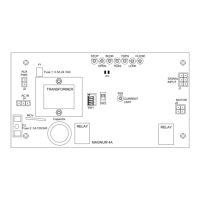
** with Magnum 4A Control*
DN 0557
LED
TRANSFORMER
AUX
PWR
J2
J5
AC IN
SW2
SW1
F1
RELAY
RELAY
J4
TDAS
SIGNAL
INPUT
TDPG
LCHK
CLOSE
Fuse 1: 0.5A 24 VAC
STOP
OPEN
BCHK
CURRENT
LIMIT
MOTOR
J1
R28
MAGNUM 4A
F2
Fuse 2: 5
A
120/240
Capacitor
MO
V
1234O
F
F

Table of Contents

Questions and Answers

  • J
    Jeffrey FieldsAug 20, 2025
    What to do if Nabco GT-500 Gate Opener safety sensor does not function?
    • J
      Jennifer BryantAug 20, 2025
      If the safety sensor on your Nabco Gate Opener isn't working, there could be a few reasons. First, check the wiring on the harness and the power to the sensor to ensure it's receiving power. Next, ensure the sensor is properly connected to the Terminal Block, connecting the output of the sensor to the correct terminals (Terminals 5 (Red) and Terminal 4 (White) for header-mounted sensors, or Terminals 5 (Red) and Terminal 3 (Violet) for door-mounted sensors). Finally, verify that Dip Switch (2) Safety is set correctly: turn Dip Switch ON for sensors using N.O. Contacts, and turn Dip Switch OFF for sensors using N.C. Contacts.
  • J
    Jordan MurphyAug 22, 2025
    Why Nabco GT-500 Gate Opener door slams closed?
    • S
      Susan GillespieAug 22, 2025
      If your Nabco Gate Opener door slams closed, here are some potential causes: For GT-710 models, the main speed on the Hydraulic Closer may need adjustment; turn the main speed adjustment on the Hydraulic Closer clockwise to decrease the closing speed. For GT-300/400/500 models, the closing speed on the Magnum control may need adjustment; turn it counterclockwise to decrease the closing speed. Another cause could be an open motor circuit, so check the connections on Pin (1) and Pin (2). Lastly, the Latch Check may be set too high; decrease the speed by turning counterclockwise for GT-300/400/500 models or clockwise for GT-710 models.
  • B
    Blake MartinAug 25, 2025
    What to do if Nabco GT-500 door slams open?
    • J
      jonathan87Aug 26, 2025
      If your Nabco Gate Opener door slams open, it might be due to the Back Check being set too high. For GT-300/400/500 models, decrease the speed by turning the BCHK Potentiometer on the Magnum 4A Control board counterclockwise. For GT-710 models, adjust the Back Check speed on the hydraulic closer clockwise to decrease the speed. Another cause could be a misplaced back check magnet on GT-710 models; reposition the magnet to its proper location. Also, the operator may not be correctly preloaded; pre-load the operator by correctly installing the arm on the operator spindle.
  • T
    Tiffany HoltAug 27, 2025
    Why Nabco Gate Opener motor spins but the door doesn't open?
    • C
      Cynthia WrightAug 27, 2025
      If the motor spins when activated but the door doesn't open on your Nabco Gate Opener, the issue might be that, for GT-300/400/500 models, the motor is connected backwards; reverse the motor leads on the motor. Alternatively, the Motor/Operator coupling or spider coupling may be loose between the motor and operator. In this case, remove the motor and operator from the Header, separate the motor from the operator, and inspect the couplings for looseness.
  • H
    Hannah HartAug 29, 2025
    Why Nabco Gate Opener header mounted swing side presence sensor is activated by opening or closing door?
    • S
      Sarah MackAug 30, 2025
      The issue might be the connection of the Sensor to the Terminal Block was to “Continuous Safety” not “Safety w/Lockout”. Rewire Safety Sensor to “Safety w/Lockout” and connect the output of the Sensor to Terminal (5) Red Wire and Terminal (4) White Wire.
  • M
    Michael VillanuevaSep 1, 2025
    Why Nabco Gate Opener sensor shows activation signal was sent, but door does not open?
    • D
      Debra AlexanderSep 1, 2025
      If the sensor shows an activation signal was sent, but the door doesn't open, it could be due to the sensor not being properly connected to the activation circuit; check the wiring on the harness. Alternatively, a safety signal might be preventing the door from opening; correct the cause of the safety signal.
  • C
    Christine HicksSep 4, 2025
    How to fix Nabco GT-500 Gate Opener with no back check?
    • N
      newmanjenniferSep 4, 2025
      The absence of Back Check on your Nabco Gate Opener could stem from: the Back Check switch not closing at the correct position, so pre-load the operator by correctly installing the arm on the operator spindle; or, for GT-710 models, the magnets on the main sprocket not being in the correct position, so align the magnets.
  • C
    Craig GarrettSep 6, 2025
    Why Nabco GT-500 Gate Opener back check adjustment on Magnum 4A has no effect?
    • C
      carlosgarciaSep 6, 2025
      If the Back Check adjustment on your Magnum 4A control board has no effect, it could be because the door isn't going into Back Check at the 80° position. Pre-load the operator by correctly installing the arm on the operator spindle. Alternatively, for GT-710 models, the back check resistance on the Hydraulic closer might be set too high, preventing the motor from powering the door through back check to the open position; adjust the Back Check screw on the bottom of the header out one turn.
  • H
    Hannah MyersSep 9, 2025
    What to do if Nabco GT-500 Gate Opener door does not stay tightly closed?
    • S
      Stacy LeeSep 9, 2025
      If your Nabco Gate Opener door isn't staying tightly closed, it could be due to incorrect preload; pre-load the operator by correctly installing the arm on the operator spindle. For GT-710 models, the closing spring tension on the Hydraulic Closer may be too light, so adjust the spring tension. Also, for GT-710 models, excessive building stack pressure could be the cause; consider upgrading the Operator Unit to GT-500 or install a power close module.
  • D
    Danielle MooreSep 12, 2025
    What happens if Fuse 1 (F1) opens in Nabco Gate Opener?
    • B
      Benjamin WheelerSep 12, 2025
      If Fuse 1 (F1) opens, it indicates a current consumption overload. Check the current consumption at Terminals 1 & 2. If the power exceeds 0.5 amps at 24 VAC, disconnect auxiliary devices such as sensors from terminals 1 and 2 and install an alternate power supply such as a transformer.

Summary

Warning Labels Overview

General Safety Recommendations

Safety Guidelines and Compliance

Provides essential safety advice, electrical precautions, and compliance with governing agency codes.

Magnum 4 A Control Board Terminals

Power Harness Wiring

Motor Harness and Fuse Information

Adjustments and Status LEDs

Dip Switch, Slide Switch, and Potentiometer Adjustments

Specific Potentiometer Adjustments

Time Delay, Latch Check, Closing Speed, and Current Limit Adjustments

Connecting Incoming 120 VAC Wires

Wiring Safety Devices

Panic Breakout Wiring (Open Loop Safety)

Instructions for wiring the panic breakout feature using an open loop circuit.

Panic Breakout Wiring (Closed Loop Safety)

Instructions for wiring the panic breakout feature using a closed loop circuit.

GT-300;400;500 Simultaneous Pair w;One Control Wiring

GT-300;400;500 Pair w;One Control Y-Harness

GT-710;8310;8710 Single Door Wiring

GT-710;8310;8710 Simultaneous Pair Wiring

GT-710;8310;8710 Pair w;One Control Wiring

GT-1400 Single Fold w;One Control Wiring

GT-1400 Bi-Fold w;Two Controls Wiring

GT-1400 Bi-Fold w;One Control Wiring

Troubleshooting Common Issues

Troubleshooting: Operator Non-Function

Addresses issues where the door operator fails to activate or run.

Troubleshooting: Door Slams Closed

Diagnoses and resolves problems causing the door to close abruptly.

Further Troubleshooting for Door Operation

Troubleshooting: Door Slams Open

Resolves issues where the door opens too quickly or forcefully.

Troubleshooting: Fuse 1 (F1) Blown

Steps for diagnosing and resolving issues related to Fuse 1 opening.

Troubleshooting: Motor Spins, Door Stalled

Diagnoses motor operation without door movement.

Troubleshooting: Back Check Adjustment Ineffective

Addresses situations where Back Check adjustments have no impact.

Troubleshooting: No Back Check Function

Resolves issues where the Back Check feature is not engaging.

Troubleshooting Safety and Sensor Functions

Troubleshooting: Safety Sensor Malfunction

Steps to resolve issues with safety sensors not working.

Troubleshooting: Sensor Signal, No Door Response

Diagnoses sensor signals without corresponding door activation.

Nabco GT-500 Specifications

General IconGeneral
BrandNabco
ModelGT-500
CategoryGate Opener
LanguageEnglish

Related product manuals