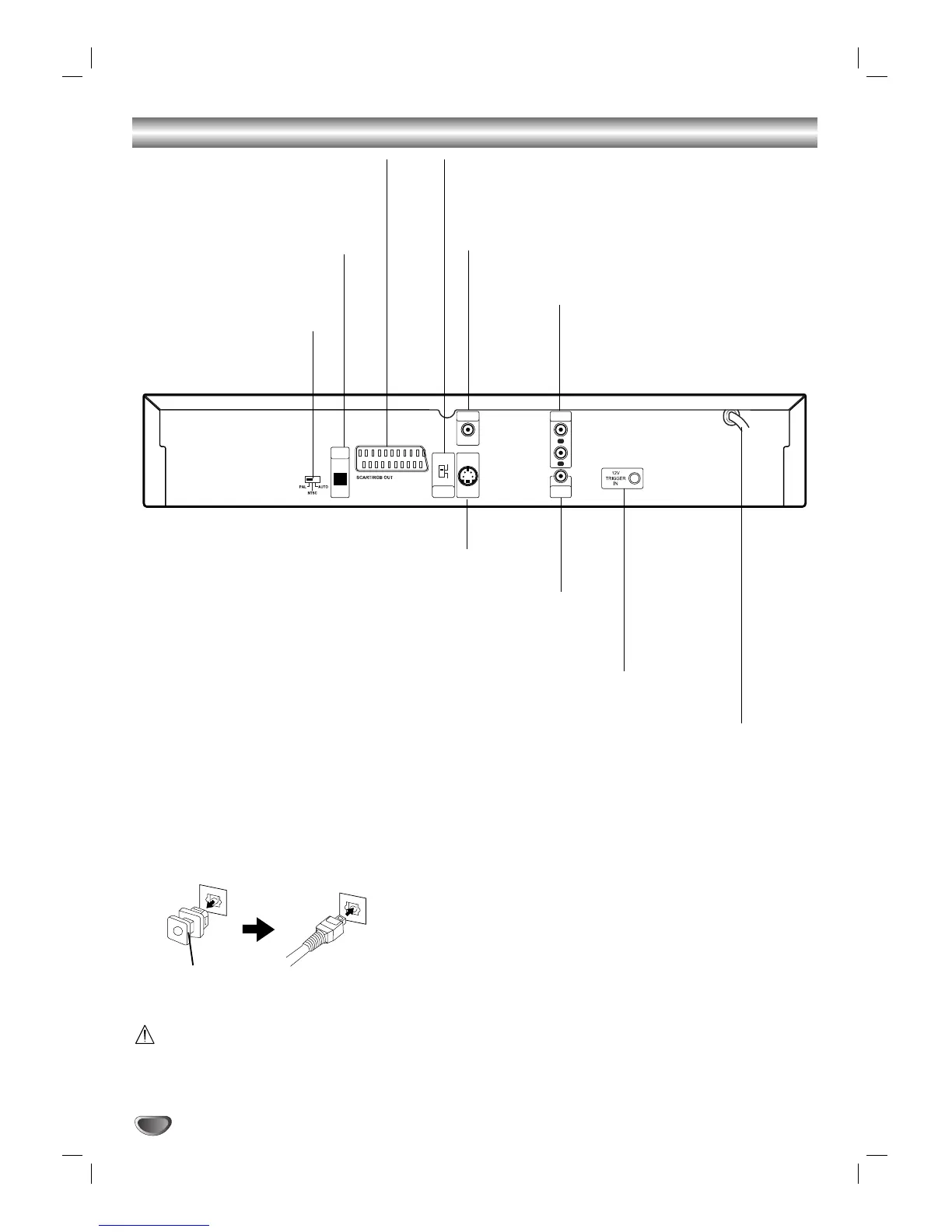
COAXIAL (Digital audio out jack)
Connect to digital (coaxial) audio equipment.
VIDEO OUTPUT Switch
Select either S-VIDEO OUT or SCART’s RGB signal,
depending on how you connected the DVD Player to
the TV.
OPTICAL (Digital audio out jack)
Connect to digital (optical) audio
equipment.
AUDIO OUT (Left/Right)
Connect to an amplifier, receiver, or stereo
system.
*System Select switch
SCART/RGB OUT Jack
Connect to a TV with SCART jack.
Do not touch the inner pins of the jacks on the rear
panel. Electrostatic discharge may cause permanent
damage to the unit.
Dust protection cap
Remove the dust protection cap from the OPTICAL
DIGITAL OUT jack and connect the optical digital cable
(not supplied) securely so that the configurations of
both the cable and the connector match. Keep the dust
protection cap and always reattach the cap when not
using the connector to protect against dust intrusion.
Dust protection cap
* System Select switch
You can enjoy NTSC or PAL discs by using System
Select switch to choose the appropriate system.
PAL: Select when DVD player is connected with
PAL-TV.
NTSC: Select when DVD player is connected with
NTSC-TV.
AUTO: Select when DVD player is connected with
Multi system TV.
• When the selected System Select switch does not
coincide with the system of your TV, normal color
picture may not be displayed.
• Set System Select switch when the power is turned
off.
12V TRIGGER IN (T 532 only)
By connecting this DVD player to another NAD audio component
or system controller equipped with a 12V trigger output, you can
remotely operate the T572 power ON/OFF.
VIDEO OUT
Connect to a TV with video inputs.
AC Power Cord
Plug into the power source.
S-VIDEO OUT
Connect to a TV with S-Video inputs.


 To Next Page