27
⑰WELDING
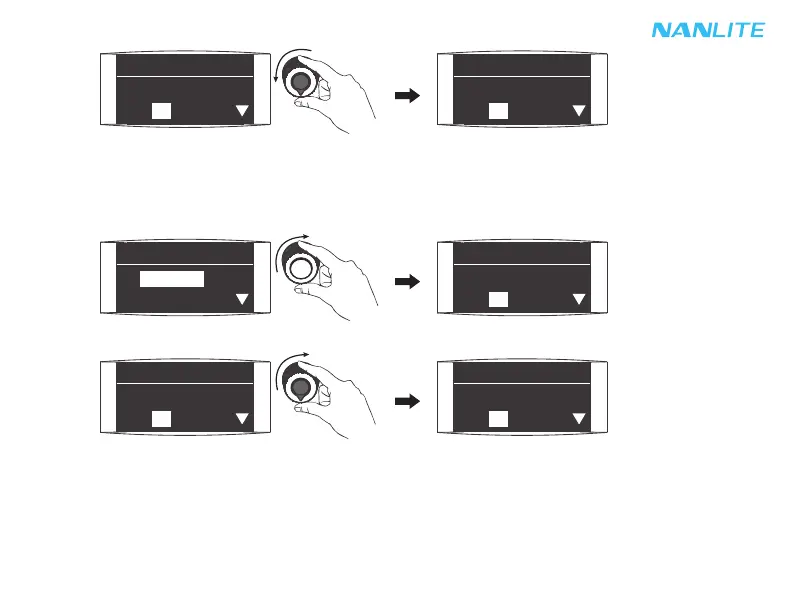
To set the WELDING, rotate "Right knob" to select from DIM, CCT, G/M, SPD (range: 001…100) and
PAUSE (ON/OFF), then rotate "Left knob" to set the corresponding parameters.
Rotate "Right knob" to select from DIM, CCT, G/M, SPD and PAUSE.
Rotate "Left knob" to set the corresponding parameters.
·Special effects may be upgraded based on the firmware update. Please refer to the latest firmware function
description for reference.
Rotate "Left knob" to set the corresponding parameters.
EFFECT CH: 512
FX: CANDLE/FIRE
DIM: 000% - 100%
EFFECT CH: 512
FX: CANDLE/FIRE
DIM: 001% - 100%
EFFECT CH: 512
DIM: 000% - 100%
FX: WELDING
EFFECT CH: 512
FX: WELDING
DIM: 000% - 100%
EFFECT CH: 512
FX: WELDING
DIM: 000% - 100%
EFFECT CH: 512
FX: WELDING
DIM: 001% - 100%



 To Next Page