Need help?
Do you have a question about the NanoCam Plus NCP-DVR720 and is the answer not in the manual?
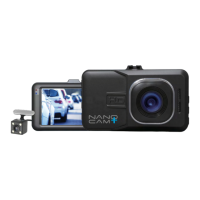
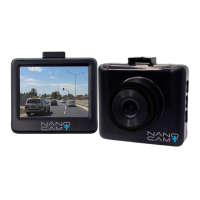
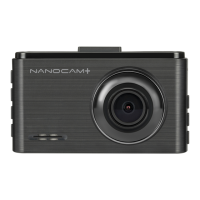
The NanoCam Plus HD Dash Cam DVR (NCP-DVR720) is a compact and versatile in-car recording device designed to enhance driving safety and provide a record of events on the road. It captures high-definition video footage with a wide-angle lens and includes several features to ensure reliable operation and useful data capture.
The primary function of the NanoCam Plus HD Dash Cam DVR is to record video footage while a vehicle is in operation. When connected to the vehicle's 12V power supply, the device automatically powers up and begins recording as soon as the vehicle accessories are activated. This ensures that recording starts without manual intervention, capturing events from the moment the journey begins. The device is equipped with a 1.5-inch color screen, allowing for real-time viewing of the recording area and easy navigation through menus.
A key safety feature is the Emergency Recording function, which automatically saves footage when an impact is detected. This is managed by a built-in G-Sensor (Gravity Sensing) that triggers the emergency recording, protecting the current video file from being overwritten by normal loop recording. These emergency files are stored separately, ensuring critical incident footage is preserved. If the memory card fills up with emergency recording files, the oldest emergency file will be automatically deleted to make space for new ones.
The device also supports Motion Detection, which pauses recording when no motion is detected in front of the camera and resumes when motion is present. This can be useful for capturing events when the vehicle is stationary but still powered. Additionally, a Park Mode feature monitors the G-Sensor after the vehicle is turned off. If an impact is detected in park mode, the DVR will power up and record a 60-second clip, providing surveillance even when the vehicle is unattended, provided the internal battery is fully charged.
Beyond video recording, the NanoCam Plus DVR can also capture still images in Photo Mode. This mode allows users to take photos with various settings, including capture delay, resolution, and image quality.
The NanoCam Plus DVR is designed for straightforward installation and operation. It is recommended to install the device near the rear-view mirror, at the top center of the windshield, to ensure an optimal field of view. The suction mount securely attaches the camera to the windscreen, and its position can be adjusted vertically and horizontally to achieve the desired angle. Power is supplied via the included 12V charger, which plugs into the vehicle's cigarette lighter.
Memory Card Management: The device uses a Micro SD card (Class 6 or higher, up to 32GB) for storing recordings and photos. Users are advised to format the Micro SD card before initial use to ensure compatibility and optimal performance. The device employs Loop Recording, which means it records video in segments (e.g., 1, 3, or 5 minutes) and, once the memory card is full, automatically overwrites the oldest files with new ones. This ensures continuous recording without the need for manual deletion, unless specific files are locked.
Video and Photo Settings: Users can customize various recording parameters through the device's menu system. In Video Mode, settings such as Resolution (e.g., 720P) can be adjusted to control video quality and file size. Exposure settings allow manual control over light sensitivity, while WDR (Wide Dynamic Range) enhances the dynamic range of the camera for improved image clarity in varying light conditions. The Recording Audio setting allows users to mute or enable the microphone during recording. The Date Stamp feature can overlay the current date and time onto the footage, providing a chronological reference.
In Photo Mode, settings like Capture Mode (for delayed timers), Resolution, Sequence (to take multiple photos in quick succession), Quality, Sharpness, White Balance, Colour, and ISO can be adjusted to optimize still image capture.
Playback and File Management: Video files can be played back on a PC by connecting the Micro SD card directly to the computer using a USB Micro SD card reader or an SD card converter. For optimal playback, it is recommended to transfer video files to the computer before viewing. On the device itself, the Playback Screen allows users to review recorded videos and photos. Files can be cycled through, played, paused, and playback speed can be adjusted. The Playback Menu provides options to Delete unlocked photos and videos (either individually or all at once) and to Lock or Unlock files, protecting important footage from accidental deletion or overwriting.
System Settings: The device includes a Settings Menu where users can configure the Date/Time, Auto Power Off duration, Key Beeps (to mute button sounds), Language, TV Mode, Frequency, Screen Saver duration, Image Rotate (to flip the display), Format the SD card, and restore Default Settings. The Number Plate setting allows users to stamp their vehicle's number plate onto the footage for identification.
The NanoCam Plus DVR requires minimal maintenance to ensure continued performance.
Charging: Always use the provided charger to power and charge the Car DVR. Improper charging can lead to internal battery failure.
Lens Care: Avoid touching the lens with fingers, as fingerprints can cause blurred videos or photos. If the lens becomes dirty, gently clean it with a microfibre cloth.
Environmental Considerations: The device should not be left in direct sunlight for extended periods in an unventilated space, as this can cause it to get warm, which is considered normal operation but prolonged exposure to extreme heat should be avoided.
Troubleshooting: If the Car DVR does not function normally, a reset option is available by pressing a small button on the underside of the device with a flattened paper clip.
Memory Card Management: Regularly reviewing and managing files on the Micro SD card is important, especially if the G-Sensor sensitivity is set high, as frequent emergency recordings can quickly fill the card. Formatting the card periodically helps maintain optimal performance and frees up space.
Safety: Users are reminded to be familiar with local road legislation regarding the use of in-car recording devices. The device is intended for non-commercial use and should not be dismantled or exposed to fire. Disposal should follow local regulations, with awareness of the internal battery.
 General
| Loop Recording | Yes |
|---|---|
| G-Sensor | Yes |
| Night Vision | Yes |
| Memory Card Type | MicroSD |
| Battery | Rechargeable |

 To Next Page