
 Need help?
Do you have a question about the NAPCO Magnum Alert 1016e and is the answer not in the manual?
Instructions for arming the security system by entering a personal code and leaving.
Instructions for disarming the security system by entering the personal code.
Steps to change the user's personal security code, up to 4 digits.
Procedure to add new user codes, supporting up to 15 codes.
How to bypass a specific zone using the bypass key and zone number.
Activate or deactivate the chime feature using key 5 for door/window alerts.
Monthly check procedure for siren and battery status by holding key 1.
Hold key 2 to display any currently bypassed zones on the keypad.
Use key 9 to reset the system, clear alarm history, or reset smoke detectors.
Hold key 4 during arming to remove the entry delay for immediate exit.
Press and hold the bypass key to view zone numbers from past alarm events.
Press * and # simultaneously to trigger the alarm instantly.
Handling fire alarms, smoke detectors, and system trouble indicators.
Find the control panel and power source for emergency system disabling.
Interpreting keypad lights and codes to understand system status and issues.
Details on connecting the alarm system to a central monitoring service.
Contact details for service or monitoring issues with CIVA Inc.
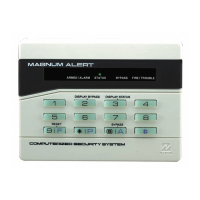
The Napco Magnum Alert 1016E is a security system designed for residential or small commercial use, offering a range of features for arming, disarming, code management, zone bypassing, and alarm troubleshooting.
The primary function of the Napco Magnum Alert 1016E is to provide security by monitoring various zones (e.g., doors, windows) and triggering an alarm if a breach is detected. It allows users to arm and disarm the system using personal codes, manage multiple user codes, and bypass specific zones temporarily. The system also includes features for panic alarms, fire/trouble detection, and a chime function for monitoring entry/exit when disarmed. It can be connected to a central monitoring station for professional police or fire department dispatch.
To arm the system, ensure a steady green light is visible on the keypad. If so, enter your personal code and exit the premises within 30 seconds. This delay allows you to leave through programmed delay zones (typically front and garage doors) without triggering an immediate alarm. If the green light is flashing, it indicates an open zone (e.g., a door or window). The keypad will display a red flashing number along with text to identify the open zone (e.g., "07 kitchen door"). If the zone is closed but the light persists, you may need to bypass the zone. To bypass a zone, press the bypass key (b/a, which is also the zero key) twice, then enter the two-digit zone number (e.g., bypass-bypass-7 for zone 07). Once all zones are closed or bypassed, and you have a steady green light and a steady amber light, enter your code and leave.
To disarm the system, simply enter your personal code. The red light on the keypad will turn green, indicating the system is disarmed. If the system does not disarm, wait 5 seconds and retry.
To change your personal code:
To add additional user codes (the system supports up to 15 codes): Follow the same steps as changing a personal code. When you reach step 3, instead of pressing "#1," press the number corresponding to the user you want to add (e.g., "2" for user #2, "3" for user #3, etc.).
To temporarily bypass a zone:
The chime feature provides an audible tone from each keypad whenever a door or window is opened, even when the system is disarmed. This helps monitor activity within the premises. To activate or deactivate this function, press and hold button 5 for 3 seconds.
To arm the system without the 30-second entry delay (useful if you want immediate alarm activation upon entry):
To trigger a panic alarm instantly, press the "*" and "#" buttons simultaneously. If the system was not armed when the panic buttons were pressed, your personal code will need to be entered twice to silence the sirens.
Key 9 is the reset button. It must be pressed and held for 3 seconds to reset the system. A tone will confirm the reset. This button is used to clear the alarm history or to reset smoke detectors after a fire alarm. The fire/trouble light on the keypad may take up to 1 minute to clear.
After an alarm has been violated, the zone number will continue to flash on the keypad until the system is reset. To check for alarm history, press and hold the bypass key. Note that this can be confused with an open zone; an open zone will show a steady green light, while an alarm history will show a flashing zone number.
If the smoke alarm has been activated and the sirens are sounding:
This should be performed monthly. Press and hold key 1. The sirens will sound for 3 seconds and then stop. If no sound or a low sound is heard, the backup battery likely needs replacement. These batteries typically last 3-5 years.
To view any zones that have been bypassed, hold down key 2 until it beeps.
Smoke detectors, if part of the security system, need to be cleaned at least once a year. This can be done with a vacuum or a can of spray air. Note that some smoke detectors are standalone and powered by 9-volt batteries, and are not integrated into the security system.
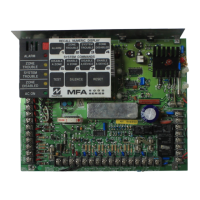
It is crucial to know the location of the control panel to disable the alarm in emergencies (e.g., keypad failure, power surge). The control panel is typically found in a white metal box hanging on a wall in a basement or closet area. You will need a screwdriver to open the box. Inside the box, you will find the backup battery. Remove the plastic terminals from the battery. Next, locate the transformer (a small 2-inch black or tan plug) plugged into an electrical outlet near the panel box. It may be screwed into the outlet. Once both the transformer and battery are unplugged, the security system will shut down, and the keypads will have no lights. The system will remain deactivated until power is restored. Only the date and time information will be lost from memory.
The Napco Magnum Alert 1016E has a digital communicator built into its control panel, allowing connection to a monitoring company. This service typically involves a monthly fee (e.g., $25) and may offer discounts for annual billing. Residents in certain areas (e.g., Fayette County) may need to obtain a False Alarm Reduction Permit before monitoring service can be activated. The monitoring company, such as Affiliated Central (offered through Vacuflo), does not require long-term contracts.
For service or monitoring issues, contact CIVA Inc. / Vacuflo Of Kentucky during business hours (Monday-Friday 8:30 to 4:00).
 General
| Brand | NAPCO |
|---|---|
| Model | Magnum Alert 1016e |
| Category | Control Panel |
| Language | English |




 To Next Page
