Page 18 / 28
INFO: Cooking duration and end time cannot be accessed and adjusted if a meat probe is connected
into its receptacle. Upon entering the cooking menü, the meat probe related adjustments will be
accessable instead.
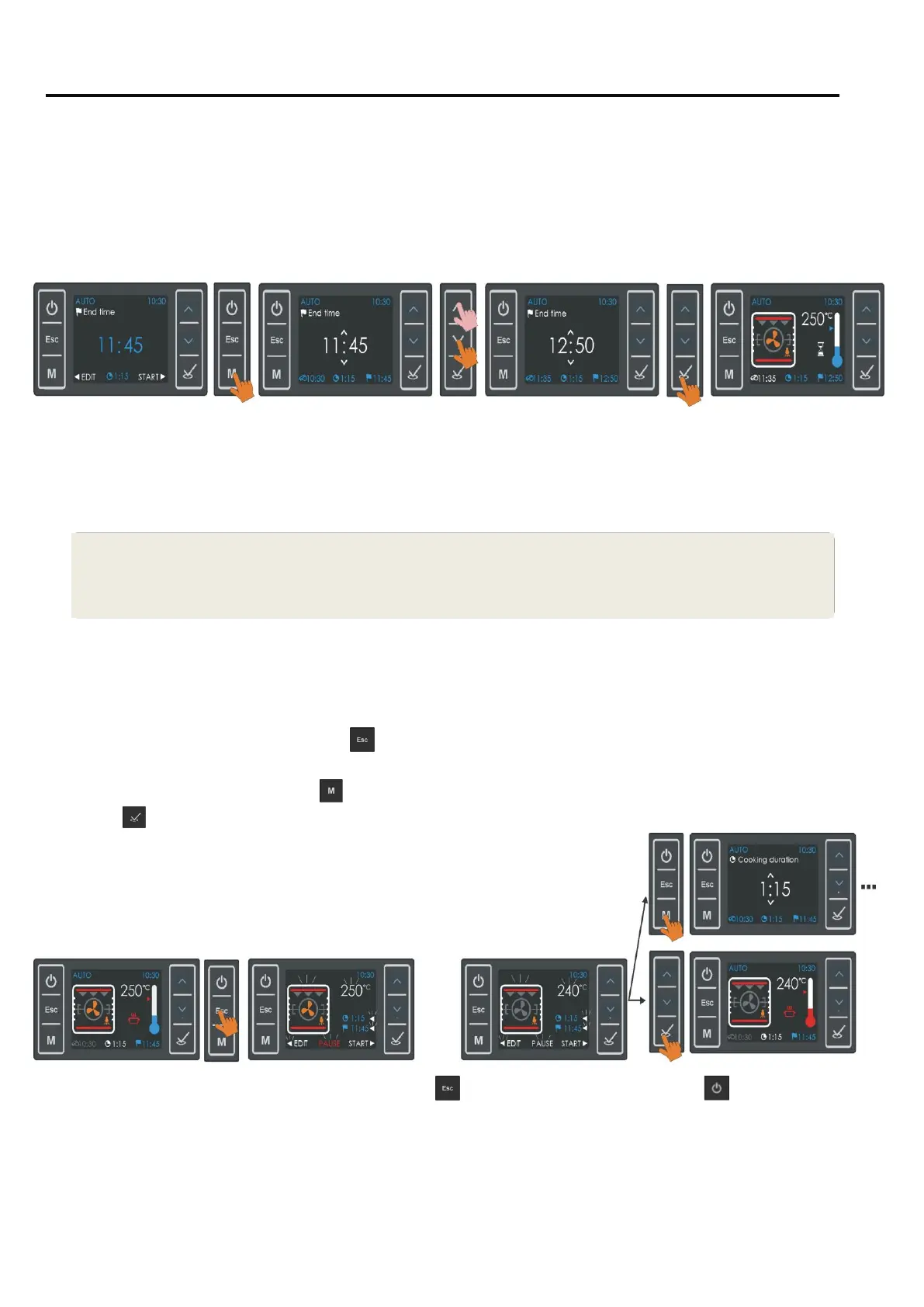
In the example below, it is explained how a previously entered 1h:15 min duration cooking is
delayed so that cooking will be terminated automatically at 12:50 . Since the current time of day is
10:30 , the oven will wait until 11:35 , at that time start cooking for 1 hour 15 minutes and automatically
stop cooking at 12:50 .
.
Note: In the bottom line of the screen , you will see the cooking start time , cooking duration and the
cooking end time.
Pause , Edit or Cancel an Automatic Cooking :
During an Auto Cooking , pressing
will pause it, PAUSE , cooking function and Temperature will
start flashing. Touching the related buttons on both sides , the cooking function and Temperature can
be
changed. . You may also press
to enter the menus for editing the cooking duration and end time.
Pressing
will resume auto cooking with the changes made if any.
At any time during auto cooking , by pressing ( results in the idle screen ) or ( screen will turn
off ) for 2 seconds , you may cancel the cooking . The cooking program will be erased. .


 To Next Page