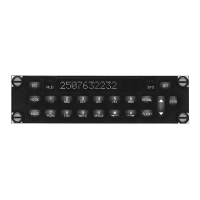
SM55 Rev. 4.00 PTA12-100 POTS Telephone Adapter with Display Manual
3.5.3 Edit Mode
From default mode, press the ENTR key to select Edit mode. An Edit Mode message is
displayed for approximately 2-3 seconds, and then a message is displayed on how to
continue:
↑ ↓ or Address. . It is not necessary to wait for this message before continuing.
If the up or down arrow is pressed, the complete list of addresses scrolls up or down.
This is identical to scrolling operation in Recall mode. In Edit mode, if an address
number is keyed, the corresponding address number and name will be displayed
without the need for scrolling; for example if the 0 key followed by the 1 key is pressed,
the contents of location 01 are displayed.
Each name line starts with a two-digit address number (01 to 16) followed by a colon,
and has 13 character spaces available to store the alphanumeric name. There are 16
character spaces for the phone number. Any character shown on keys 0 to 9 may be
used to store a name. The relevant key is pressed until the required character is
displayed, and the ← or → keys are used to move to the previous or next character if
required (for instance if the relevant letters are both on the same key). The phone
number can consist of up to 16 digits, in numerical form only, and each entered number
will automatically index on to the next space. The display only shows name or number
information at one time. Pressing the ← or → keys will toggle from name to number or
number to name.
3.5.3.1 Keypad Functions in Edit Mode
In Edit mode (hook switch inactive) the keypad buttons do not provide DTMF tones. In
Edit mode the lower text portion of these buttons is also implemented. This means that
the characters 0 to 9, A to Z, -, ., /, and space are displayed when the corresponding
key is pressed. The desired character for each button is displayed by pressing the key
button. Each key press will scroll through the viewable characters for the corresponding
key pressed. The → and ← keys provide horizontal cursor movement in Edit mode. The
up/down key provides number scrolling in Recall and Edit modes and provides phones
volume adjustment in Call mode. For a summary of the front panel key functions
available in Edit and Call mode see Table 2 in section 3.6.
3.5.3.2 Editing or Entering Address Information
If there is nothing stored in the selected address Empty!will be displayed, and pressing
ENTR will bring up the prompt Enter Name. Using the keypad, characters are entered
using the 0 – 9 keys, and edited using the ← and → keys. When entering name
information, alphanumeric characters are available, and are selected by pressing the
appropriate key. The alpha characters are displayed first, and then the numbers - i.e.
for the key marked 2ABC, the display order will be A, then B, then C, then 2, and will
then wrap around to A again. Each time a different key is pressed, the cursor
automatically advances by one position. If it is necessary to use the same key for two
adjacent characters, the right arrow must be used to advance the cursor. See Table 1
in section 3.6 for a complete key summary for Edit mode.
Sep 21, 2004 Page 3-7
ENG-FORM: 806-0106.DOT
CONFIDENTIAL AND PROPRIETARY TO NORTHERN AIRBORNE TECHNOLOGY LTD.


 To Next Page