Need help?
Do you have a question about the National Geographic 900X and is the answer not in the manual?
Basic steps for microscope setup, including stability and cleaning lenses.
Guide on using the built-in light source and color filters for viewing.
Procedure for correct positioning and focus, starting with lowest magnification.
Steps for focusing on specimens and increasing magnification.
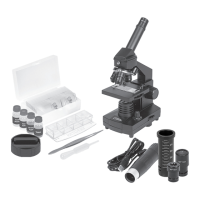
This document describes a 900x microscope set, designed for observing and investigating at a cellular level. It's suitable for children aged 8 and above, with adult supervision recommended, especially given the presence of sharp points and chemicals.
The primary function of this device is to magnify small objects, revealing their hidden details. It allows users to view everyday items like sand, onion skin, hair, and pollen at magnifications ranging from 100x to 900x. The microscope achieves this through a combination of an eyepiece and objective lenses (5x, 20x, 45x), which, when paired with the 20x eyepiece, provide total magnifications of 100x, 400x, and 900x. The device includes an illumination system, featuring both a mirror and a light source, to properly illuminate specimens from below. A color filter wheel is integrated into the stage to assist in observing very bright or clear specimens, allowing users to adjust brightness levels and colors for better recognition of colorless or transparent objects.
To begin using the microscope, ensure it is placed on a stable surface free from vibration. When moving the microscope, hold it by the arm and base. After installing batteries correctly (observing polarity and avoiding mixing old/new or different types), check that the light source illuminates.
Operating the Illumination: Locate the mirror/light on the base and flip it to the "on" position with the light facing up. The incandescent light will then illuminate the specimen from below. The color filter wheel can be used to enhance observations of bright or clear specimens by adjusting brightness and color.
Adjusting the Microscope: Always start observations with the lowest magnification (100x). Position the microscope stage at its lowest point, farthest from the turret head. Rotate the objective turret until the 5x objective clicks into place. Before changing objectives, always ensure the stage is at its farthest point from the turret to prevent damage to the slide or microscope.
Observing a Specimen:
For transparent objects, light from below passes through the stage, objective, and eyepiece to the eye. Opaque specimens, however, require preparation (treatment, penetration, or slicing) to become transparent for viewing. The set includes various accessories like prepared slides, blank slides, collection vials, a test tube, a petri dish, scalpel, needle, tweezers, stirring rod, slicer, blue dye, red dye, sea salt, brine shrimp eggs, and a hatchery to facilitate experiments and observations.
Regular maintenance ensures the longevity and optimal performance of the microscope.
In case of a defect, do not attempt to disassemble the device; contact your dealer for repair.
 General
| Magnification | 900X |
|---|---|
| Type | Compound Microscope |
| Head | Monocular |
| Illumination | LED |
| Objective Lenses | 4x, 10x, 40x |
| Focusing System | Coarse focus |
| Body Material | Plastic |
| Power Supply | Battery |
| Stage | Plain stage with clips |
| Included Accessories | Slides, cover slips, tools |
| Eyepiece | WF10X |

 To Next Page