Larger MXI-Express Gen-3 x16 Systems
There are several ways to connect multiple chassis to a host system. Which you choose
depends on your design goals and requirements.
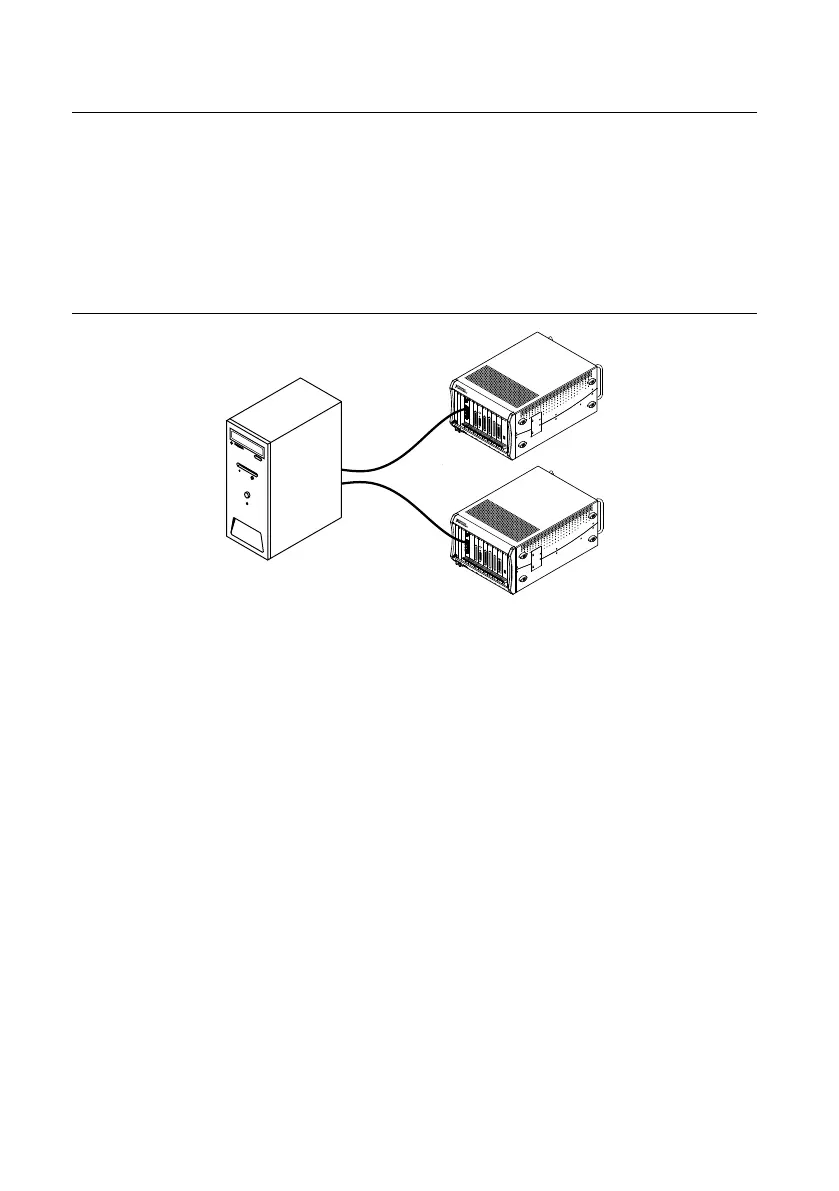
If you are using a PC to control the chassis, and if multiple x16 PCI Express slots are available
in the host PC, you can use multiple PCIe-8398 modules to connect to the PXIe-8398 in each
chassis ("star" topology). This method offers the most bandwidth and lowest latency to the
host for all the chassis.
Figure 5. Example of a Star MXI-Express Gen-3 x16 System Expansion Topology
If you are using a PC to control multiple chassis but do not have additional PCI Express slots
in the PC, you can use a PXIe-8399 to daisy-chain to an additional chassis ("daisy-chain"
topology). The PXIe-8399 supports two x16 links on its front panel, and you can connect the
second link to an additional chassis. For example, you could set up two chassis using a
PCIe-8398 in the host PC cabled to a PXIe-8399 in the first chassis. The PXIe-8399 in the first
chassis would also be cabled to a PXIe-8398 in the second chassis. If a third chassis is desired,
the second chassis could use another PXIe-8399.
MXI-Express Gen-3 x16 User Manual | © National Instruments | 7


 To Next Page
 Loading...