36
Note
●
You can connect up to 10 push button switches to
one HotButton controller.
●
Use UTP cables or cables with a diameter greater than
AWG 24.
●
Make sure that the total cable length does not exceed
328 feet (100 meters).
●
Additional push button switches (#GXXX001426) and
wall plates (#GXXX001427) can be purchased through
Navien.
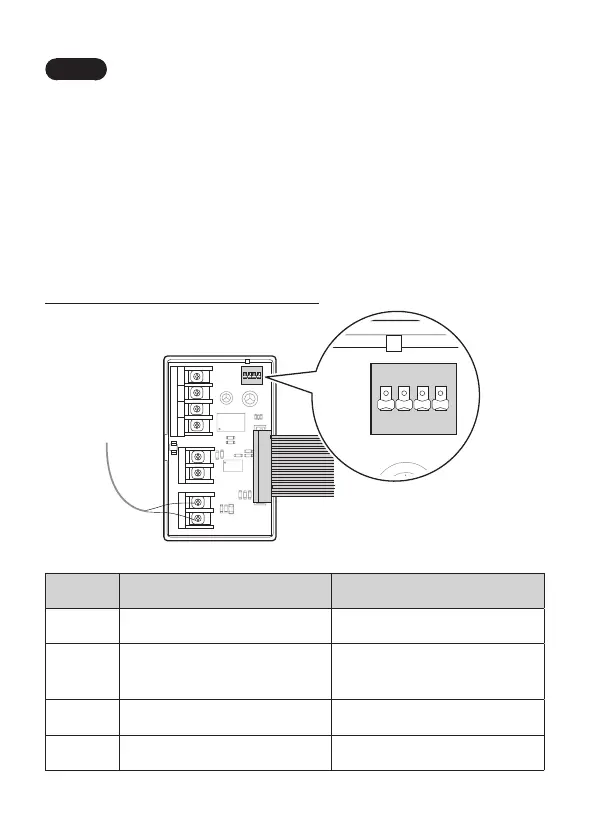
HotButton DIP Switch Information
CE1
CE2
U1
C1
C2
C7
R6
PC1
12 V 5 V SIGNAL
SIGNAL 1
GND
R5
R9
R8
C3
R1
R2
R7
D1
CON3
CON5
CON2
CON1
SIGNAL 2
SENSOR I
RA1
1 2 3 4
ON
SW1
CE1
CE2
U1
12 V SIGNAL
SIGNAL 1
GND
CON1
RA1
1 2 3 4
ON
SW1
DIP SW OFF ON
1 Enable the HotButton. Disable the HotButton.
2
Enable the energy saver
function.
Disable the energy saver
function.
3 Reserved Reserved
4 Reserved Reserved


 To Next Page
 Loading...