Need help?
Do you have a question about the Naxa NE-984 and is the answer not in the manual?
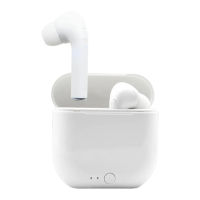
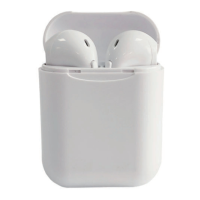
The Naxa NE-984 True Wireless Earphones offer a convenient and untethered audio experience, designed for users seeking freedom from cables while enjoying music and managing calls. These earphones come with touch controls and a dedicated charging case, making them ideal for on-the-go use.
The primary function of the NE-984 earphones is to provide high-quality audio playback from a Bluetooth-enabled device, such as a mobile phone. They operate as a pair of true wireless earbuds, meaning each earbud functions independently but can also be paired together for a stereo sound experience. The integrated touch controls allow users to manage various functions directly from the earphones without needing to interact with their connected device. This includes controlling music playback (play, pause, skip tracks), adjusting volume, and handling phone calls (answering, ending, rejecting, and calling back). The built-in microphone facilitates hands-free communication. The accompanying charging case serves as both a protective storage unit and a portable power bank for the earphones, ensuring they remain charged and ready for use.
Getting started with the NE-984 earphones involves a straightforward pairing process. Upon removal from the charging case, the earphones automatically power on and attempt to pair with each other, indicated by flashing red and blue LED lights. An audible sound confirms successful inter-earphone connection, after which one earphone's LED will cease flashing, while the other continues to flash red and blue, signifying readiness for device pairing. Users then activate Bluetooth on their mobile device, search for "Naxa NE-984," and select it to establish a connection. A successful connection is indicated by the blue LEDs on both earphones turning off. Once paired, the earphones will automatically reconnect to the last paired device when turned on and within range, provided Bluetooth is enabled on the mobile device. The earphones can also be connected separately to other Bluetooth devices, offering flexibility for different usage scenarios.
Controlling music playback is intuitive with the multi-function touch buttons. A single press plays or pauses a song. To navigate tracks, users press the right earphone button three times to return to the previous song, or the left earphone button three times to advance to the next song. Volume adjustments are also managed via touch controls: a long press on the right earphone button for two seconds decreases the volume, while a two-second long press on the left earphone button increases it.
Call management is equally simple. To answer an incoming call, a single press of the multi-function button suffices. To end a call, the multi-function button is pressed again. For quick redialing, pressing the multi-function button four times initiates a call back. Incoming calls can be rejected by pressing and holding the multi-function button. Additionally, the earphones support voice control activation by pressing either the left or right multi-function button twice.
The power on/off functionality is designed for convenience. Removing the earphones from the charging case automatically turns them on. Alternatively, users can manually turn them on by pressing and holding the earphone buttons for three seconds. To power off, the earphones can be placed back into the charging case, or the earphone buttons can be pressed and held for three seconds. A useful power-saving feature ensures that the earphones automatically power off if they are not connected to any external devices within five minutes of being turned on. Even if only one earbud is used, it will still operate via Bluetooth with a connected mobile device, whether it's in or out of the charging case.
Proper maintenance of the NE-984 earphones and their charging case is crucial for longevity and optimal performance. Before initial use, it is recommended to fully charge both the earphones and the case. The charging case can be charged first, or the earphones can be inserted into the case to charge both simultaneously using the provided micro-USB charging cable. After charging is complete, the USB cable should be disconnected.
The charging case itself provides approximately 1.5 full charges for the earphones when fully charged, extending their usage time significantly. To charge the case, the micro-USB connector is inserted into the charging port located at the back of the case. The USB-A plug on the cable is then connected to a computer or a USB power adapter plugged into a wall socket. Once charging is complete, the USB cable should be disconnected.
For cleaning, it is explicitly warned against using detergents, solvents, abrasive products, scouring pads, abrasive cleaners, sharp objects, or wire brushes, as these can damage the product. Gentle cleaning methods should be employed to maintain the device's condition.
Storage recommendations include keeping the earphones in their charging case when not in use. This not only protects them but also ensures they are charged. For extended periods of non-use (e.g., more than six months), it is advisable to regularly recharge the case to maintain battery health. This prevents deep discharge and prolongs the overall lifespan of the internal batteries.
The device contains non-replaceable batteries, and users are cautioned against exposing batteries to excessive heat, such as sunshine or fire. While the battery must be removed from the appliance before proper disposal, this should only be done by trained professionals when the appliance is being disposed of. Users are also warned about the risk of explosion if the battery is replaced with an incorrect type and are instructed to dispose of used batteries according to environmental guidelines.
 General
| Connectivity Technology | Wireless |
|---|---|
| Wireless Technology | Bluetooth |
| Bluetooth Version | 5.0 |
| Impedance | 32 Ohms |
| Driver Size | 40mm |
| Frequency Response | 20Hz - 20kHz |
| Charging Time | 2 Hours |
| Standby Time | Up to 200 Hours |
| Built-in Microphone | Yes |
| Charging Port | Micro USB |
| Operating Distance | 10 meters |
| Controls | Call Answer |
| Ear Coupling | Circumaural |

 To Next Page