Need help?
Do you have a question about the Naxa NE-985 and is the answer not in the manual?
This document is an instruction manual for the Naxa True Wireless Earphones & Charging Case, model NE-985. It provides comprehensive guidance on the operation, maintenance, and safety aspects of the device.
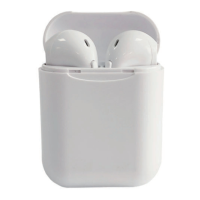
The Naxa True Wireless Earphones are designed to provide a wireless audio experience, connecting to mobile phones and other external Bluetooth-enabled devices. They come with a dedicated charging case that not only stores the earphones but also recharges them, ensuring extended usage. The earphones are equipped with multi-function buttons, allowing users to control various aspects of audio playback and call management directly from the earphones. A built-in microphone facilitates hands-free calling. The device is intended for personal audio consumption and communication.
The manual outlines a straightforward process for setting up and using the earphones. Before initial use, it is crucial to fully charge both the earphones and their charging case. The charging case can be charged independently or simultaneously with the earphones inserted. Once charged, the earphones are removed from the case, at which point they automatically power on and enter a pairing mode. Users then activate Bluetooth on their mobile device, search for "Naxa E-985," and connect. A successful connection is indicated by slow blinking blue LEDs on both earphones. The earphones are designed to automatically reconnect to previously paired devices when within range and when Bluetooth is enabled on the mobile device. This feature enhances user convenience by eliminating the need for repeated manual pairing. The manual also notes that the wireless earphones can be connected separately to other Bluetooth devices, offering flexibility in usage.
Powering the earphones on and off is simple. Removing them from the case automatically turns them on. Alternatively, users can press and hold the earphone buttons for 3 seconds to manually power them on. To turn them off, the earphones can be placed back into the charging case, or the earphone buttons can be pressed and held for 3 seconds. An automatic power-off feature is included: if the earphones are not connected to any external devices within 5 minutes of being turned on, they will power off to conserve battery.
Audio playback is controlled via the multi-function buttons. A single press of the multi-function button will play a song from a connected mobile phone. Pressing it once again will pause the song. For navigation between tracks, the right earphone button is pressed three times to return to the previous song, while the left earphone button is pressed three times to advance to the next song. Volume adjustment is also managed through the earphones: pressing the right earphone button twice decreases the volume, and pressing the left earphone button twice increases it.
Call management is integrated into the earphone controls. To answer an incoming call, the multi-function button is pressed once. To end an active call, the multi-function button is pressed again. If a user wishes to reject an incoming call, they can press and hold the multi-function button. These features allow for seamless control of calls without needing to access the connected mobile device.
The charging case plays a vital role in the device's functionality. When fully charged, the case provides 2.5 full charges to the earphones, significantly extending their operational time. Charging the case involves inserting the micro-USB connector into the micro-USB charging port located at the back of the case. The USB-A plug on the cable is then connected to a computer or a USB power adapter plugged into a wall socket. Once charging is complete, the USB cable should be disconnected.
The manual emphasizes several key aspects of maintenance and safety to ensure the longevity and proper functioning of the device. Users are advised to unpack all parts and inspect for any damage incurred during transportation. If any parts are damaged or missing, contact the after-sales service team. Cleaning the appliance and its components is recommended, but with specific precautions.
A critical warning is issued against using detergent, solvents/abrasive products, scouring pads, abrasive cleaners, sharp objects, or wire brushes to clean the product. This indicates that the device's materials may be sensitive to harsh chemicals or abrasive cleaning methods, which could cause damage.
For storage, the earphones should be kept in their charging case. This not only protects them but also ensures they are ready for use. Furthermore, the manual advises recharging the case regularly, even when not in use for extended periods (e.g., more than 6 months). This practice helps maintain the battery health of the charging case and, by extension, the earphones.
Safety instructions are provided to prevent damage to the device and harm to the user. The appliance should only be used for its intended purpose. It must not be exposed to extreme temperatures, strong temperature fluctuations, direct sunlight, or humidity. These conditions can degrade the device's components and affect its performance. To prevent potential auditory damage, users are cautioned against listening to music at high volumes for prolonged periods. The manual also states that no naked flame sources, such as lit candles, should be placed on the appliance, and the device should only be used in temperate climates.
Regarding battery safety, the manual highlights that the appliance contains non-replaceable batteries. Batteries (whether the battery pack or installed batteries) should not be exposed to excessive heat, such as sunshine, fire, or similar conditions. Before disposing of the appliance, the battery must be removed properly. This removal should only be performed when intending to dispose of the appliance, and by trained professionals, as there is a risk of explosion if the battery is replaced with an incorrect type. Finally, users are instructed to dispose of used batteries according to the provided instructions, drawing attention to the environmental aspects of battery disposal.
The manual also includes a "CAUTION ON MODIFICATIONS" section, stating that any changes or modifications not expressly approved by the grantee of the device may void the authority granted by the FCC to operate the equipment. This underscores the importance of using the device as intended and avoiding unauthorized alterations.
 General
| Wireless Technology | Bluetooth |
|---|---|
| Bluetooth Version | 5.0 |
| Impedance | 32 Ohms |
| Driver Size | 40 mm |
| Frequency Response | 20 Hz - 20 kHz |
| Microphone | Yes |
| Charging Time | 2 Hours |
| Standby Time | Up to 200 Hours |
| Charging Port | Micro USB |
| Operating Distance | 10 meters |

 To Next Page