12 13
Enjoy
1. ConnecttoHDMIPlaybackDevices
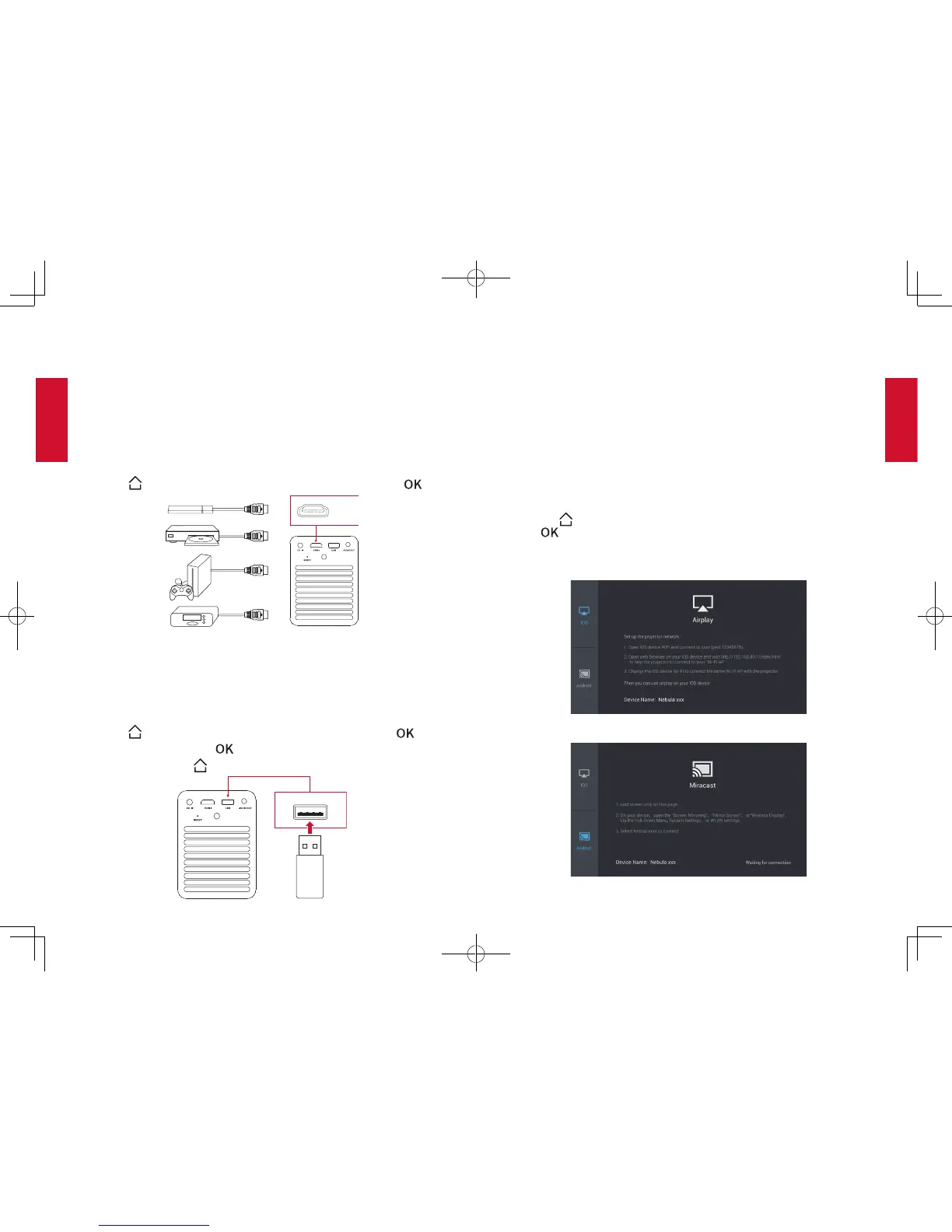
This device supports connections with various HDMI playback devices
such as TV stick, TV box, DVD player, set-top box (STB), game machine
or other devices.
①
Connect this device to an HDMI playback device with an HDMI cable
(not provided).
②
Press to access the home menu, select [HDMI] and press .
HDMI
2. ConnecttoUSBStorageDevice
With this device, you can enjoy music, video, and pictures that are
stored on a USB storage device.
①
Plug the USB storage device to the USB socket of the device.
②
Press to access the home menu, select [USB] and press .
③
Select a file, then press .
④
To stop play, press .
3. ConnectHeadphones
①
Before connecting headphones, turn down the volume on this
device.
②
Connect headphones (not provided) into the AUDIO OUT connector
of the device to enjoy music through the headphones.
4. WirelessCast
You can wirelessly mirror the screen of your smartphone or tablet onto
the projection surface.
①
Press to access the home menu, select [Wirelesss Cast] and
press .
② Follow the on-screen instructions to complete the connection.


 To Next Page