EasyManua.ls Logo

NEC ITX-1615 - User Manual

NEC ITX-1615
2 pages
Print Icon
To Next Page IconTo Next Page
Loading...
Camosun College NEC IP Phone ITX-1615 Quick Start Guide
Making Phone Calls -
Handset, Speaker and Headset Mode
You can make calls using the handset, headset or speaker by pressing the respective keys.
Take the handset off its hook to switch to handset; press the HEADSET key to switch to headset; or press the
SPEAKER key to switch to speaker.
Making Phone Calls -
Completing Calls
On hook dialing.
1. When the phone is idle, enter the number to be dialed out.
2. Take handset off its hook or press SPEAKER key or press HEADSET key with headset plugged in or choose an
available LINE key.
3. The call will now dial out.
Off hook and dial.
1. Take handset off hook or press SPEAKER key or press HEADSET key with headset plugged in or press an available
LINE key to activate Speaker. You will hear dial tone after going off hook.
3. Enter the number.
4. Press SEND key or # to dial out.
Redial. Redial the last dialed number.
1. Take handset off hook or press SPEAKER key or press HEADSET key with headset plugged in; or press an available
LINE key to activate speaker; or when the phone is in idle.
2. Press SEND key, or the REDIAL soft key.
Via Call History. Dial the number logged in phone's call history.
1. Press MENU key to bring up the main menu.
2. Enter Call History.
3. Select the entry you would like to call using the navigation arrow keys.
4. Press SEND key to dial out.
Via Contacts. Dial the number from the Contacts.
1. Press MENU key to bring up the main menu.
2. Enter "Contacts" using the navigation arrow keys..
3. Under Contacts, enter Local Phonebook using the navigation arrow key.
4. Select the contact you would like to call using the navigation arrow key.
5. Press SEND key to dial the selected contact.
Question and Answer IconNeed help?

Do you have a question about the NEC ITX-1615 and is the answer not in the manual?

Summary

Making Phone Calls

Handset, Speaker, and Headset Modes

Make calls using handset, headset, or speaker by pressing respective keys.

Completing Calls On Hook

Dial number first, then pick up handset or use speaker/headset to complete.

Completing Calls Off Hook

Pick up handset/speaker/headset first, then dial number to complete.

Redialing Last Number

Redial the last dialed number using SEND or REDIAL softkey.

Dialing Via Call History

Dial numbers from the phone's call history using navigation keys.

Dialing Via Contacts

Dial numbers from the phone's contact list using navigation keys.

Answering Phone Calls

Receiving Calls

Answer single or multiple incoming calls using LINE key, handset, speaker, or headset.

Do Not Disturb Feature

Enable/disable Do Not Disturb mode via Keypad Menu to block incoming calls.

Rejecting Incoming Calls

Reject an incoming call by pressing the "Reject" softkey when the phone is ringing.

Actions During A Phone Call

Call Hold and Resume

Place a call on hold using HOLD key and resume it by pressing the blinking LINE key.

Muting the Microphone

Mute or unmute the microphone during an active call using the MUTE key.

Call Transfer

Transfer an active call to another number using TRANSFER and SEND keys.

Conferencing - Start Call

Establish a conference call with multiple parties by pressing CONFERENCE and LINE keys.

Conferencing - Cancel Call

Cancel a conference call before established by pressing Cancel or active LINE key.

Conferencing - End Call

Terminate a conference call by pressing the "EndCall" softkey or hanging up.

Easy Conference Mode

Initiate a conference call by making a second call and pressing CONFERENCE or ConfCall.

Easy Conference Mode - Cancel

Cancel the second call in Easy Conference Mode to return to the first call.

Overview

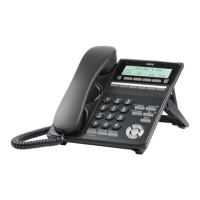
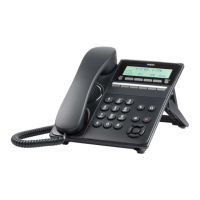
The Camosun College NEC IP Phone ITX-1615 is a business-grade IP phone designed for efficient communication. It features a clear LCD display, a standard numeric keypad, and dedicated function keys for various call management tasks. The phone supports multiple modes of operation, including handset, headset, and speakerphone, catering to different user preferences and work environments.

Function Description:

The primary function of the ITX-1615 is to facilitate voice communication over an IP network. It allows users to make and receive calls, manage multiple calls simultaneously, and utilize advanced features such as call transfer, conferencing, and call history. The phone integrates with an IP PBX system, enabling features like internal extensions, voicemail, and directory services.

Usage Features:

Making Phone Calls:

  • Handset Mode: To make a call using the handset, simply lift the handset off the hook.
  • Headset Mode: Connect a headset to the phone and press the dedicated HEADSET key to activate headset mode.
  • Speakerphone Mode: Press the SPEAKER key to use the built-in speaker and microphone for hands-free communication.

Dialing Methods:

  • On-hook Dialing: When the phone is idle, enter the desired number. Then, lift the handset, press the SPEAKER key, or press the HEADSET key (if a headset is connected) or choose an available LINE key. The call will automatically dial out.
  • Off-hook Dialing: Lift the handset, press the SPEAKER key, or press the HEADSET key (if a headset is connected) or an available LINE key to get a dial tone. Enter the number and press the SEND key or '#' to initiate the call.
  • Redial: To redial the last dialed number, lift the handset, press the SPEAKER key, or press the HEADSET key, or ensure the phone is idle. Then, press the SEND key or the REDIAL soft key.
  • Via Call History:
    1. Press the MENU key to access the main menu.
    2. Navigate to "Call History."
    3. Use the navigation arrow keys to select the desired entry.
    4. Press the SEND key to dial the selected number.
  • Via Contacts:
    1. Press the MENU key to access the main menu.
    2. Navigate to "Contacts" using the navigation arrow keys.
    3. Under "Contacts," select "Local Phonebook" using the navigation arrow key.
    4. Select the desired contact using the navigation arrow key.
    5. Press the SEND key to dial the selected contact.

Answering Phone Calls:

  • Single Incoming Call: When the phone rings, the corresponding LINE key will flash red. To answer, lift the handset, use the Speaker/Headset, or press the flashing LINE key.
  • Multiple Incoming Calls (Call Waiting): If another call comes in while on an active call, the phone will produce a Call Waiting tone (stutter tone), and the other LINE key will flash red. To answer the incoming call (which automatically puts the current call on hold), press the flashing LINE key.

Do Not Disturb (DND):

  • Enabling/Disabling DND:
    1. Press the MENU key and select "Preference" using navigation keys.
    2. Press the MENU key a second time to enter Preference options.
    3. Select "Do Not Disturb" and press the MENU key.
    4. Use arrow keys to select and press the MENU key to enable or disable the "Do Not Disturb" feature.
  • Note: When DND is active, a DND icon will appear on the right side of the LCD, and incoming calls will not be accepted.
  • Rejecting a Call: To reject an incoming call, press the "Reject" softkey when the phone is ringing.

Actions During a Phone Call:

  • Call Hold: To place an active call on hold, press the HOLD key. The active LINE key will blink green.
  • Resume Call: To resume a call on hold, press the blinking LINE key.
  • Mute: Press the MUTE key to mute or unmute the microphone during an active call. The LCD will display a Mute icon when the call is muted.
  • Call Transfer:
    1. During the first active call, press the TRANSFER key.
    2. Dial the number to transfer the active call.
    3. Press the SEND key or '#' to complete the transfer.
  • Conferencing:
    • Starting a Conference Call:
      1. Establish calls with two parties separately.
      2. While one call is active, the other call(s) will be on hold with its LINE key blinking green.
      3. Press the CONFERENCE key and then press the desired LINE key on hold to establish the conference.
    • Canceling Conference (during setup): If, after pressing the CONFERENCE key, the user decides not to conference, press the Cancel soft key or the current active LINE key (LED in solid green). This will resume the two-way conversation with the current line.
    • Ending Conference: Press the "EndCall" softkey or simply hang up the call to terminate the conference call.
    • Easy Conference Mode:
      1. Make the first call.
      2. Press the CONFERENCE key; a new line will be brought up using the same account.
      3. Dial the number and press the SEND key to establish the second call.
      4. Press the CONFERENCE key a second time or press the "ConfCall" softkey to establish the conference.
    • Canceling Conference (Easy Conference Mode): If users decide not to conference after establishing the second call, press the EndCall softkey instead of the "ConfCall" softkey/CONFERENCE key. This will end the second call, and the screen will show the first call on hold.
  • Menu/OK Key: Used to access the main menu and confirm selections.
  • Navigation Keys: Arrow keys (up, down, left, right) are used to navigate through menus and lists.

Important Technical Specifications (Inferred from image and typical IP phone features):

  • Connectivity: IP-based (Ethernet connection, likely RJ-45).
  • Display: LCD screen (monochrome, based on typical NEC IP phone designs of this generation).
  • Audio: Handset, Speakerphone (full-duplex likely), Headset jack.
  • Keys:
    • Line Keys: For managing multiple lines/calls.
    • Soft Keys: Context-sensitive keys that change function based on the phone's state.
    • Dedicated Function Keys: Home, Phonebook, Message, Page/Intercom, Hold, Mute, Headset, Transfer, Conference, Send/Redial, Speaker, Volume.
    • Menu Cursor Keys: For menu navigation.
    • Numeric Keypad: Standard 0-9, *, #.
  • Power: Likely Power over Ethernet (PoE) or an external power adapter.
  • Protocols: SIP (Session Initiation Protocol) is the industry standard for IP phones.

Maintenance Features:

While the manual does not explicitly detail maintenance features, typical IP phones like the ITX-1615 would have:

  • Firmware Upgrades: Ability to update the phone's software to improve performance, add features, or fix bugs, usually managed by the IT administrator.
  • Configuration Management: Settings can be configured locally via the phone's menu or remotely via a web interface or provisioning server. This includes network settings, account details, and user preferences.
  • Troubleshooting: Basic troubleshooting steps might involve checking network connectivity, restarting the phone, or resetting to factory defaults (with administrator guidance).
  • Cleaning: Regular cleaning of the handset, keypad, and display with a soft, damp cloth is recommended for hygiene and to prevent dust buildup.

The Camosun College NEC IP Phone ITX-1615 is designed to be a reliable and user-friendly communication tool, providing essential and advanced telephony features for a productive office environment.

NEC ITX-1615 Specifications

General IconGeneral
BrandNEC
ModelITX-1615
CategoryIP Phone
LanguageEnglish

Related product manuals