110
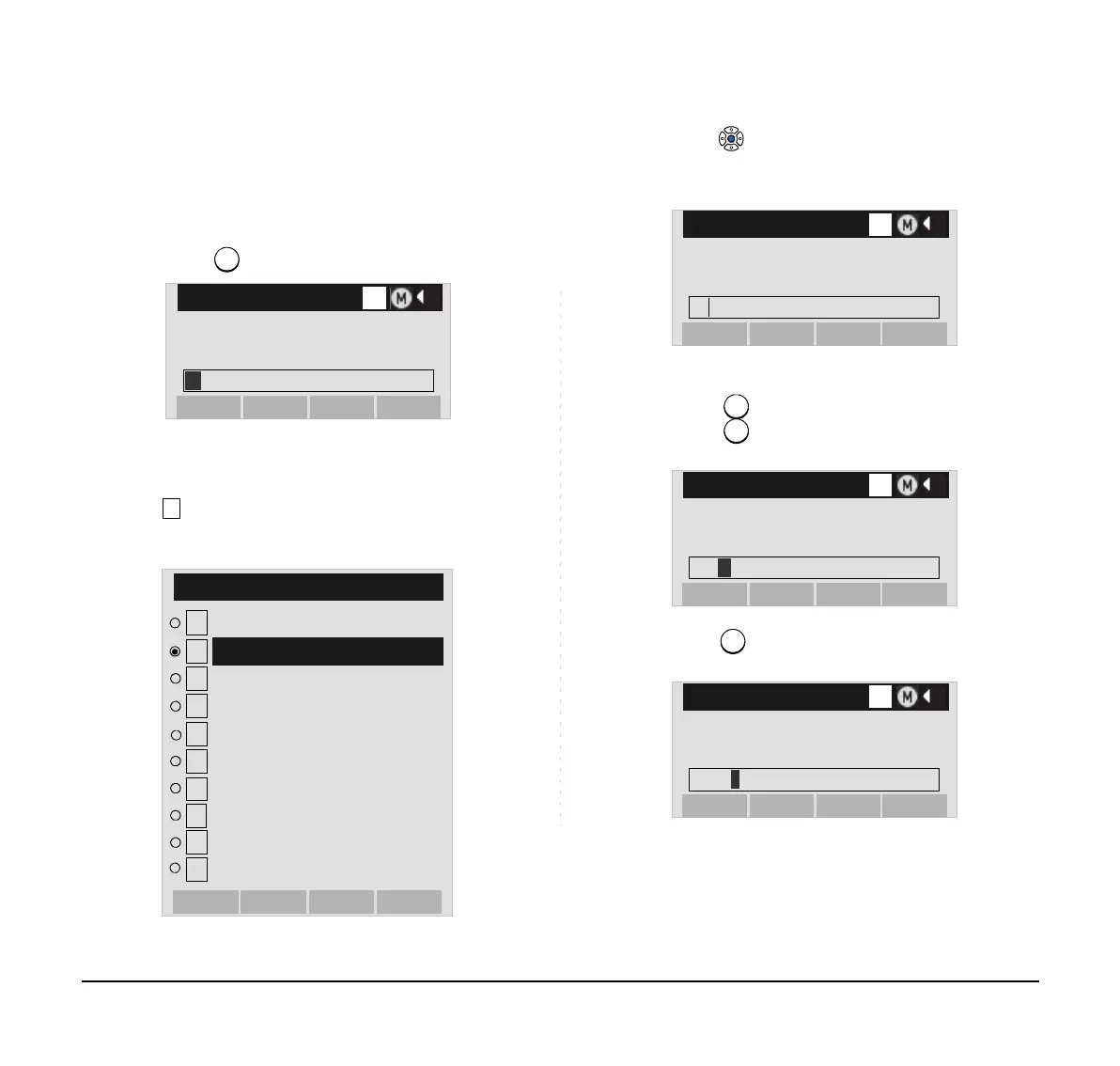
• Character Entry Method
As an example of character entry method, the fol-
lowing shows how to enter “Ken Kobus”.
STEP 1: Press key twice to enter “K”.
STEP 2: Press the Help key or Option soft key to dis-
play Sub Menu screen, and then select
Word-case to switch the text input mode
from uppercase to lowercase.
STEP 3: Press or the OK soft key on the Sub Menu
to go back to text input screen.
STEP 4: Enter “en” by using digit keys.
Press key twice to enter “e”.
Press key twice to enter “n“.
STEP 5: Press key once to enter a space.
Input a name.
[Name]
OKBack
OptionBK
A
K
1
2
Word-width
SubMenu
3
4
5
6
7
8
Paste
Space
Change-word
OKCancel
Cut
Delete
Copy
Return
Overwrite/Insert
9
10
Word-case
Input a name.
[Name]
OKBack
OptionBK
a
K
Input a name.
[Name]
OKBack
OptionBK
a
Ken
Input a name.
[Name]
OKBack
OptionBK
a
Ken





 To Next Page