To Next Page
S
sestradaAug 17, 2025
Why does my NEC DT820 ITY-8LDX not ring?
- Ggary02Aug 17, 2025
If your NEC Telephone isn't ringing, first, try turning up the ringer volume. Also, check to ensure the phone isn't set to ring only through a headset.

Why does my NEC DT820 ITY-8LDX not ring?
If your NEC Telephone isn't ringing, first, try turning up the ringer volume. Also, check to ensure the phone isn't set to ring only through a headset.
How to reset the language on my NEC Telephone?
To reset the language on your NEC Telephone, press the Menu key, select '3 User Settings', then '4 Language'. Choose the desired language and press Enter on the cursor pad or the OK softkey to confirm the setting.
What to do if my NEC DT820 ITY-8LDX Telephone does not have a dial tone?
If your NEC Telephone lacks a dial tone, try restarting it. Press the Menu key, select '5 Reboot', and then press the OK softkey or the Enter key on the cursor pad to reboot the phone.
How to fix the LCD if it's too light or dark on my NEC DT820 ITY-8LDX Telephone?
To adjust the LCD contrast on your NEC Telephone, press the Menu key and select '3 User Settings', then '6 LCD Settings', and finally '1 LCD Contrast'. Use the softkeys to adjust the LCD contrast to your preference.
What to do if my NEC Telephone cannot make any calls?
If your NEC Telephone cannot make calls, press the Menu key, go to '6 Status', then '2 Network Information', and check that the phone has an IP address, Subnet Mask, Default Gateway, and DNS Server listed.
What to do if dial pad and buttons are not working on my NEC Telephone?
If the dial pad or buttons on your NEC Telephone aren't working, try restarting the phone. Press the Menu key and select '5 Reboot'.
What to do if I cannot see a softkey on my NEC DT820 ITY-8LDX Telephone?
If you cannot see a particular softkey on your NEC Telephone, and the 'More' softkey is visible on the LCD, press it to reveal additional softkeys for your screen.
What to do if a Speed Dial entry is not working on my NEC DT820 ITY-8LDX?
If a Speed Dial or Personal Directory entry isn't working correctly on your NEC Telephone, verify that you have the outside calling code programmed at the beginning of the number and that your account is authorized to make external calls.
What to do if there is no audio to my handset on NEC DT820 ITY-8LDX Telephone?
If there is no audio to your handset on the NEC Telephone, verify that the handset is firmly plugged into the HANDSET jack on the back of the telephone.
What to do if there is no audio to my headset on NEC DT820 ITY-8LDX?
If there is no audio to your headset on the NEC Telephone, verify that the headset is firmly plugged into the HEADSET jack on the back of the telephone.
Core procedures for making and answering calls on the phone.
Procedures for transferring calls and setting up conference calls.
Configuring and using programmable keys for speed dialing and other functions.
General steps to identify and resolve common phone issues.
Troubleshooting issues related to phone network registration and connectivity.
Troubleshooting problems with making calls, including dial tone and external calls.
 General
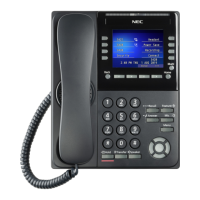
| Programmable Keys | 8 |
|---|---|
| Speakerphone | Yes |
| Headset Jack | Yes |
| Color | Black |
| Wall Mountable | Yes |
| Lines | Up to 8 |
| Display | LCD |
| Compatibility | NEC Univerge SV8100 |
| Type | Digital Telephone |
| Weight | 0.92 kg |