EasyManua.ls Logo

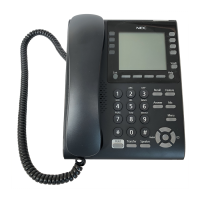
NEC DT820C ITY-8LCGX - User Manual

NEC DT820C ITY-8LCGX
234 pages
Print Icon
To Next Page IconTo Next Page
Loading...
DT820 Phone User Manual
For UNIVERGE 3C Communications
and SIP@Net Platforms

Table of Contents

Questions and Answers

  • L
    Lawrence WilliamsAug 17, 2025
    Why does my NEC DT820C ITY-8LCGX not ring?
    • B
      Brooke RiveraAug 17, 2025
      If your NEC Telephone isn't ringing, first, try turning up the ringer volume. Also, check to ensure the phone isn't set to ring only through a headset.
  • E
    Elizabeth ChenAug 20, 2025
    How to reset the language on my NEC DT820C ITY-8LCGX Telephone?
    • G
      Gary BrownAug 20, 2025
      To reset the language on your NEC Telephone, press the Menu key, select '3 User Settings', then '4 Language'. Choose the desired language and press Enter on the cursor pad or the OK softkey to confirm the setting.
  • M
    Matthew NguyenAug 22, 2025
    What to do if my NEC Telephone does not have a dial tone?
    • K
      Kelsey White MDAug 22, 2025
      If your NEC Telephone lacks a dial tone, try restarting it. Press the Menu key, select '5 Reboot', and then press the OK softkey or the Enter key on the cursor pad to reboot the phone.
  • K
    Kyle WilsonAug 25, 2025
    How to fix the LCD if it's too light or dark on my NEC DT820C ITY-8LCGX?
    • M
      Matthew AlvarezAug 26, 2025
      To adjust the LCD contrast on your NEC Telephone, press the Menu key and select '3 User Settings', then '6 LCD Settings', and finally '1 LCD Contrast'. Use the softkeys to adjust the LCD contrast to your preference.
  • D
    David JonesAug 27, 2025
    What to do if my NEC DT820C ITY-8LCGX cannot make any calls?
    • N
      Natalie SmallAug 27, 2025
      If your NEC Telephone cannot make calls, press the Menu key, go to '6 Status', then '2 Network Information', and check that the phone has an IP address, Subnet Mask, Default Gateway, and DNS Server listed.
  • V
    vfischerAug 30, 2025
    What to do if dial pad and buttons are not working on my NEC DT820C ITY-8LCGX?
    • M
      Matthew LeeAug 30, 2025
      If the dial pad or buttons on your NEC Telephone aren't working, try restarting the phone. Press the Menu key and select '5 Reboot'.
  • Z
    Zachary RichSep 1, 2025
    What to do if I cannot see a softkey on my NEC DT820C ITY-8LCGX Telephone?
    • G
      Gregory MartinSep 1, 2025
      If you cannot see a particular softkey on your NEC Telephone, and the 'More' softkey is visible on the LCD, press it to reveal additional softkeys for your screen.
  • D
    Douglas HensonSep 4, 2025
    What to do if a Speed Dial entry is not working on my NEC DT820C ITY-8LCGX Telephone?
    • P
      pattondavidSep 4, 2025
      If a Speed Dial or Personal Directory entry isn't working correctly on your NEC Telephone, verify that you have the outside calling code programmed at the beginning of the number and that your account is authorized to make external calls.
  • J
    Jennifer OrtegaSep 6, 2025
    What to do if there is no audio to my handset on NEC Telephone?
    • M
      Melanie ChambersSep 6, 2025
      If there is no audio to your handset on the NEC Telephone, verify that the handset is firmly plugged into the HANDSET jack on the back of the telephone.
  • M
    Mark LynchSep 9, 2025
    What to do if there is no audio to my headset on NEC DT820C ITY-8LCGX?
    • J
      Joshua WhiteSep 9, 2025
      If there is no audio to your headset on the NEC Telephone, verify that the headset is firmly plugged into the HEADSET jack on the back of the telephone.

Summary

Overview

Introduction to the DT820 Phones

DT820 Series Phones

General description of DT820 series phones and their platform compatibility.

Keys and Parts

Identifies and explains the function of each key and part on the phone.

Installation

Connecting the Phone

Provides instructions for physically connecting the phone components.

Basic Settings;Configuration

Security Features

Secure Calls

Discusses call security when signaling and media are secure.

Errors and Debugging

Lists common errors and debugging information, particularly TLS errors.

TLS Errors

Details TLS connection errors and fatal alert messages.

Basic Phone Operation

Basic Call Operation

Covers fundamental operations for answering and placing calls.

Programmable Keys

Speed Dial and Programmable Keys

Explains configuration and use of Speed Dial and programmable keys.

Speed Dial Key Configuration

Details how to configure Speed Dial keys on the phone.

Speed Dial Key Operation

How pressing a Speed Dial Key initiates a call.

Microbrowser and Enhanced Programmable Keys

Home Page

Call Recording

Starting, stopping, and indicating call recordings via microbrowser.

Supervise

Accessing the supervise function for monitoring calls.

Hot Desking

To Login using Hot Desking

Steps to log into the Hot Desking feature on the phone.

To Logout of Hot Desking session

Steps to log out of an active Hot Desking session.

Handset Forwarding

To set a Handset Forwarding Condition

Procedure for setting a handset call forwarding condition.

Forwarding

To set immediate forwarding

Configures the phone to forward all incoming calls immediately.

Call Recording

Start Recording Call

Steps to start an on-demand call recording.

Stop Recording Call

Steps to stop an ongoing call recording.

Supervise a Call

Supervise a Call (Barge;Monitor)

Functionality for monitoring or barging into calls with supervisor rights.

View System Call History

Search Directory;Corporate Directory

Enhanced Programmable Keys

Workgroup Features (Enhanced BLF Keys)

Park Extension Key

Call Back Key

Monitor;Supervise Key

Record Key

Send to VM Key

Hot Desk Key

DND Key

Handset Forwarding Key

DT820 Color Microbrowser and Enhanced Programmable Keys

Using the Microbrowser

A guide to using the phone's color microbrowser.

Handset Call Forwarding Settings on the 3 C System

Call History, and the Corporate and Personal Directories

Call History

Viewing call information on the telephone.

Accessing the Call History

Dialing Numbers from the Call History

Deleting a Personal Directory Entry

Accessing the Personal Directory and Entry Details

Searching for an Entry in the Personal Directory

Dialing from the Personal Directory

Adding or Editing a Personal Directory Entry

Phone Troubleshooting

Basic Troubleshooting

Network Connections

My Phone Cannot Register on the Network

Troubleshooting steps if the phone fails to register on the network.

My Phone Cannot Reconnect to the Network after a Local Settings Change

How to resolve network reconnection issues after local settings changes.

I Cannot Connect to the Network Through the PC Port

Troubleshooting steps for PC port network connectivity issues.

Power

The Phone Does Not Power Up

Steps to troubleshoot if the phone does not power on.

Calling

The Phone Does Not Have a Dial Tone

Troubleshooting steps if the phone has no dial tone.

The Phone Cannot Make Any Calls

The Phone Cannot Make Any External Calls

Troubleshooting steps for issues with making external calls.

A Speed Dial;Personal Directory Entry is Not Working Correctly

Telephone Numbers from the Personal Directory or Call History Are Not Dialing Correctly

Troubleshooting dialing issues from directories or call history.

The Phone Does Not Ring

Steps to troubleshoot when the phone does not ring.

I Cannot Reconnect to a Call on Hold;The Call Does Not Terminate

Phone Keypad

Troubleshooting steps if the dial pad or buttons are unresponsive.

Phone Softkeys

The Phone Softkeys Are Not Working

Troubleshooting steps if the phone's softkeys are not functioning.

I Cannot See a Particular Softkey on My Phone

Troubleshooting steps if a specific softkey is not visible.

LCD Screen;Display

Audio

There is No Audio to My Handset

Troubleshooting steps for no audio in the handset.

There is No Audio to My Headset

Troubleshooting steps for no audio in the headset.

3 C System Features

3 C System Telephone Set Star Code Commands

Call Forwarding Setup

Caller ID Blocking

Conditional Handset Forwarding - Busy

Conditional Handset Forwarding - No Answer

Do Not Disturb Activation

Do Not Disturb Deactivation

SIP@Net System Features

Programmable Keys; Speed Dial Keys

How programmable and speed dial keys can be pre-programmed.

Desk Sharing and User Portability

EHS Bluetooth Headset Support

Electronic Hook Switch Headset

Setup and Installation

Steps for installing the headset base station and enabling EHS.

Headset Troubleshooting

Important Safety Information

NEC DT820C ITY-8LCGX Specifications

General IconGeneral
Programmable Keys8
SpeakerphoneYes
Headset JackYes
Wall MountableYes
Lines8
DisplayLCD
Networking ProtocolDigital
Power SourceAC Adapter
Compatible SystemsNEC UNIVERGE SV8100

Related product manuals