200
• To Search by Alphabet
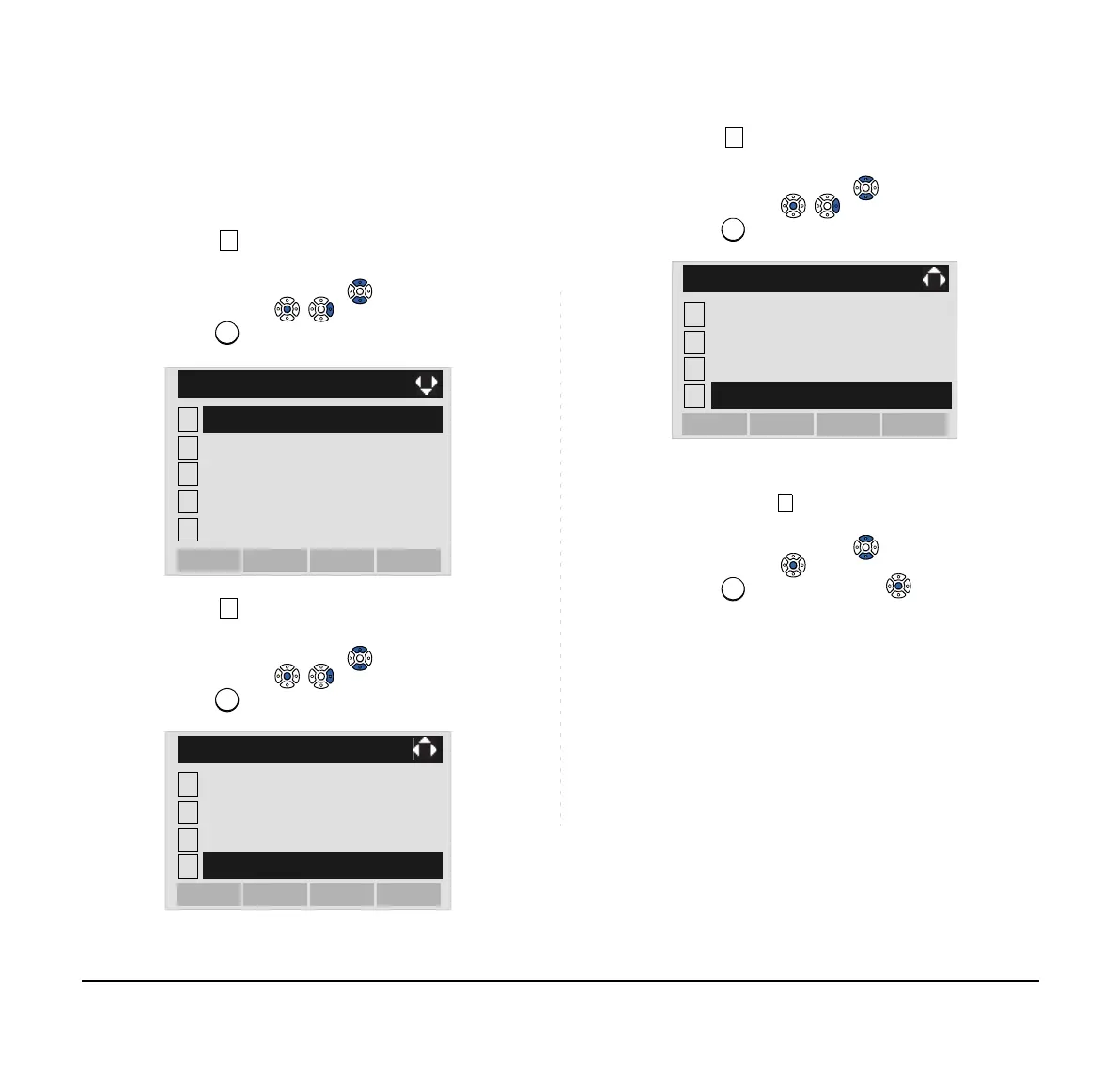
STEP 1: Open the Directory screen (see TO ADD
NEW DATA).
STEP 2: Select Search.
Select an item by either of the following operations.
• Highlight an item by using or UP/DOWN soft key,
and then press , or OK soft key.
• Press key.
STEP 3: Select Others.
Select an item by either of the following operations.
• Highlight an item by using or UP/DOWN soft key,
and then press , or OK soft key.
• Press key.
STEP 4: Select Alphabet.
Select an item by either of the following operations.
• Highlight an item by using or UP/DOWN soft key,
and then press , or OK soft key.
• Press key.
STEP 5: Select a desired group of alphabets.
In this example, ABC is selected.
Select an item by one of the following operations.
• Highlight an item by using or UP/DOWN soft key,
and then press or OK soft key.
• Press key, and then press or OK soft key.
1
2
[Directory]
3
4
0
Own Number
Delete All
Edit
OKMenu
Group Setting
Search
1
2
[Search]
3
4
OKBack
Tel Number
Group
Name
Others
1
2
[Others]
3
4
OKBack
Company
Memory ID
Category
Alphabet





 To Next Page