English-6
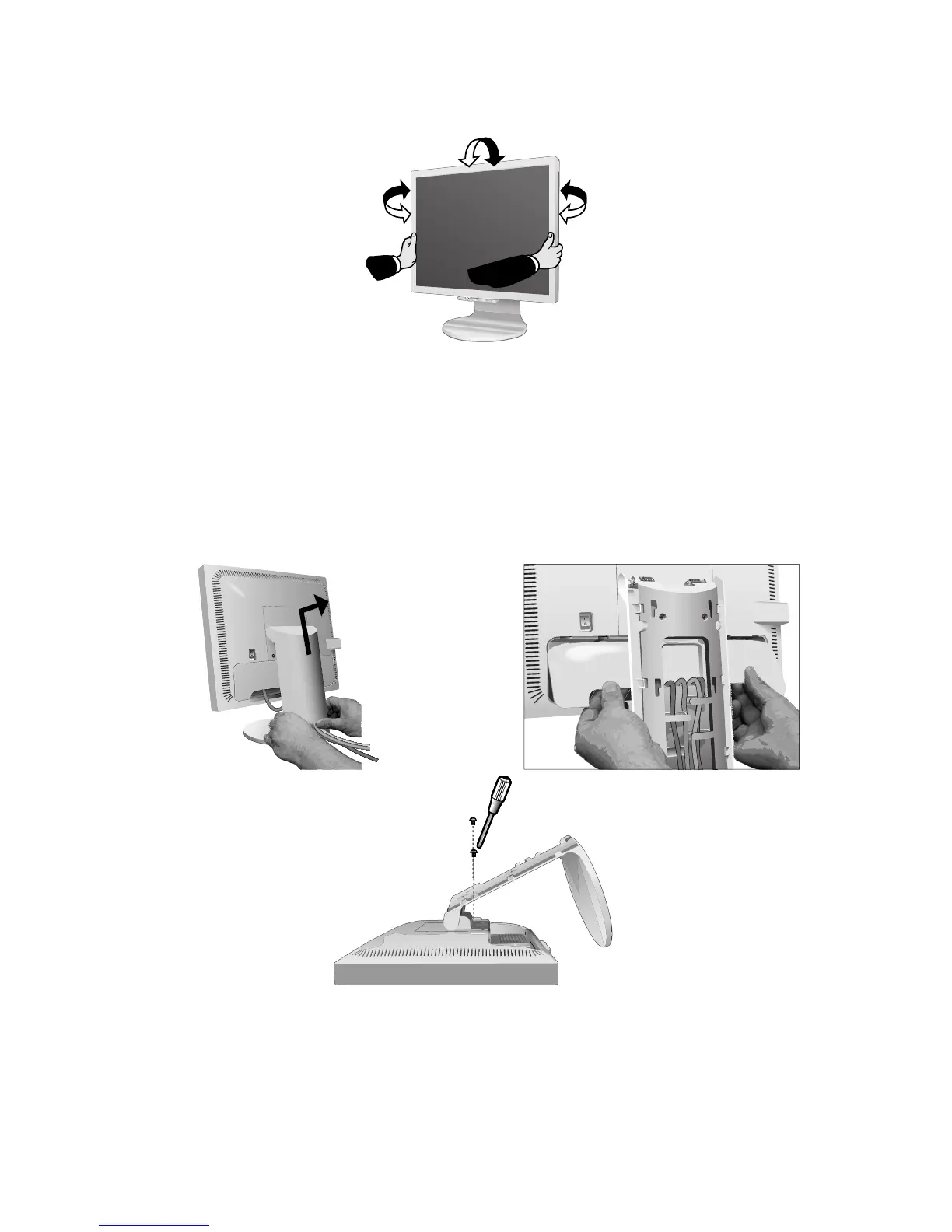
Figure M.1
Remove Monitor Stand for Mounting
To prepare the monitor for alternate mounting purposes:
1. Place hands on each side of the monitor to tilt the LCD panel 5 degrees angles.
Remove the cable cover (Figure M.1).
Remove the connector cover (Figure M.2).
2. Disconnect all cables.
3. Place monitor face down on a non-abrasive surface (Figure M.3).
4. Remove the 2 screws connecting the stand to the monitor (Figure M.3).
Tilt and Swivel
Grasp both sides of the monitor screen with your hands and adjust the tilt and swivel as desired (Figure TS.1).
NOTE: Handle with care when tilting and swivelling the monitor screen.
Figure TS.1
Figure M.2
M
E
N
U/
E
X
I
T
S
E
L
E
C
T
/
1
–
2
RE
S
E
T
/
D
V
M
O
D
E
Figure M.3










 To Next Page