Quick Start
To attach the MultiSync
®
M700
™
monitor to your system, follow
these instructions:
1. Turn off the power to your computer.
2. If necessary, install the display card into your system. For more information,
refer to the display card manual.
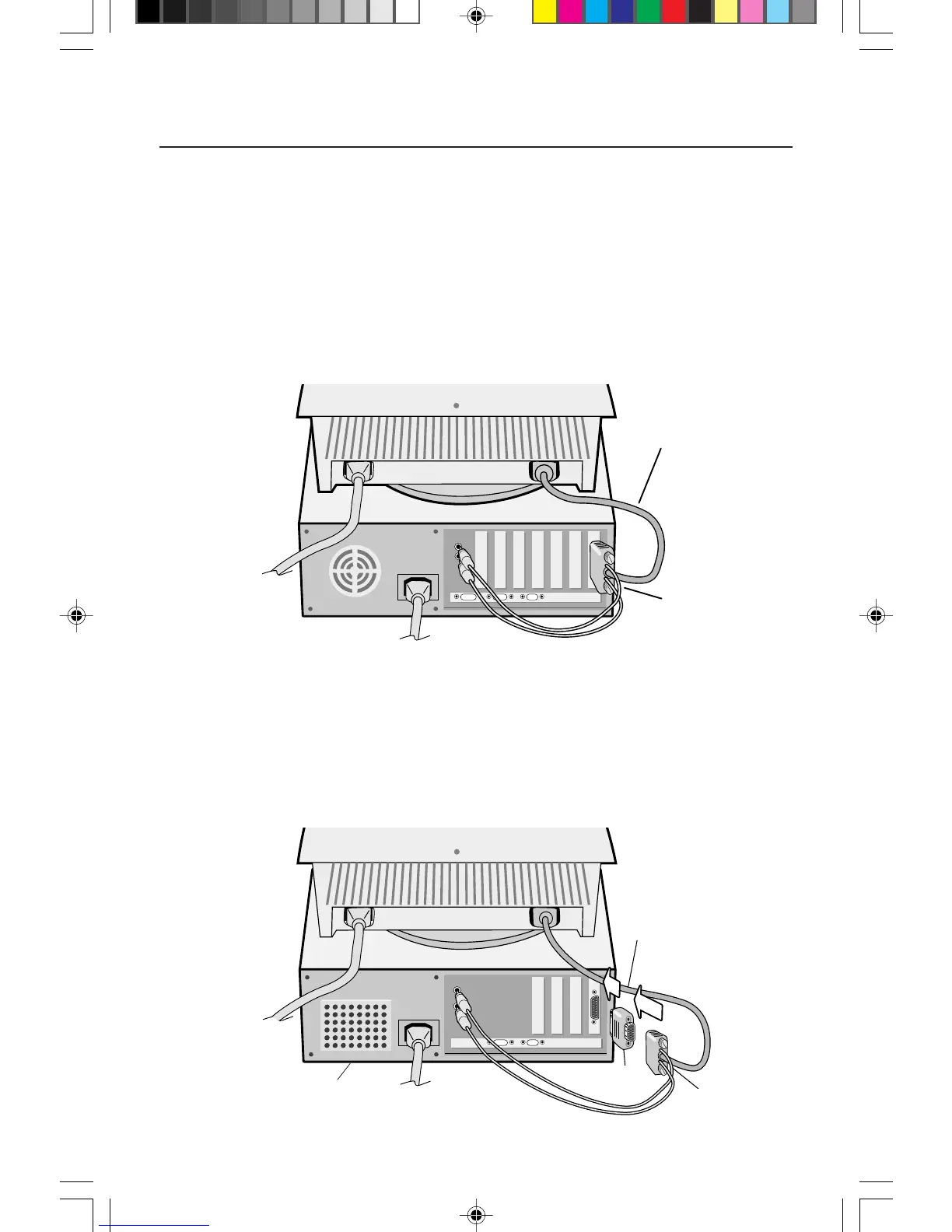
3. For the PC: Connect the MultiSync M
700 15-pin mini D-SUB of the captive
combined signal cable to the connector of the display card in your system
(Figure A.1). Tighten all screws.
3
Figure A.1
For the Mac: Connect the Macintosh cable adapter (not included) to the
monitor connector on the Macintosh (Figure B.1). Attach the 15-pin mini
D-SUB end of the captive combined signal cable to the Macintosh cable
adapter on the computer (Figure B.1). Tighten all screws.
NOTE: To obtain the MultiSync M700 cable adapter, call
NEC Technologies at (800) 820-1230.
Figure B.1
15-pin mini D-SUB
Captive Combined
Signal Cable
Mac Adapter
(Not included)
15-pin mini D-SUB
Computer
Captive Combined
Signal Cable
15500291.wpc 7/27/99, 3:41 PM5








 To Next Page