ba
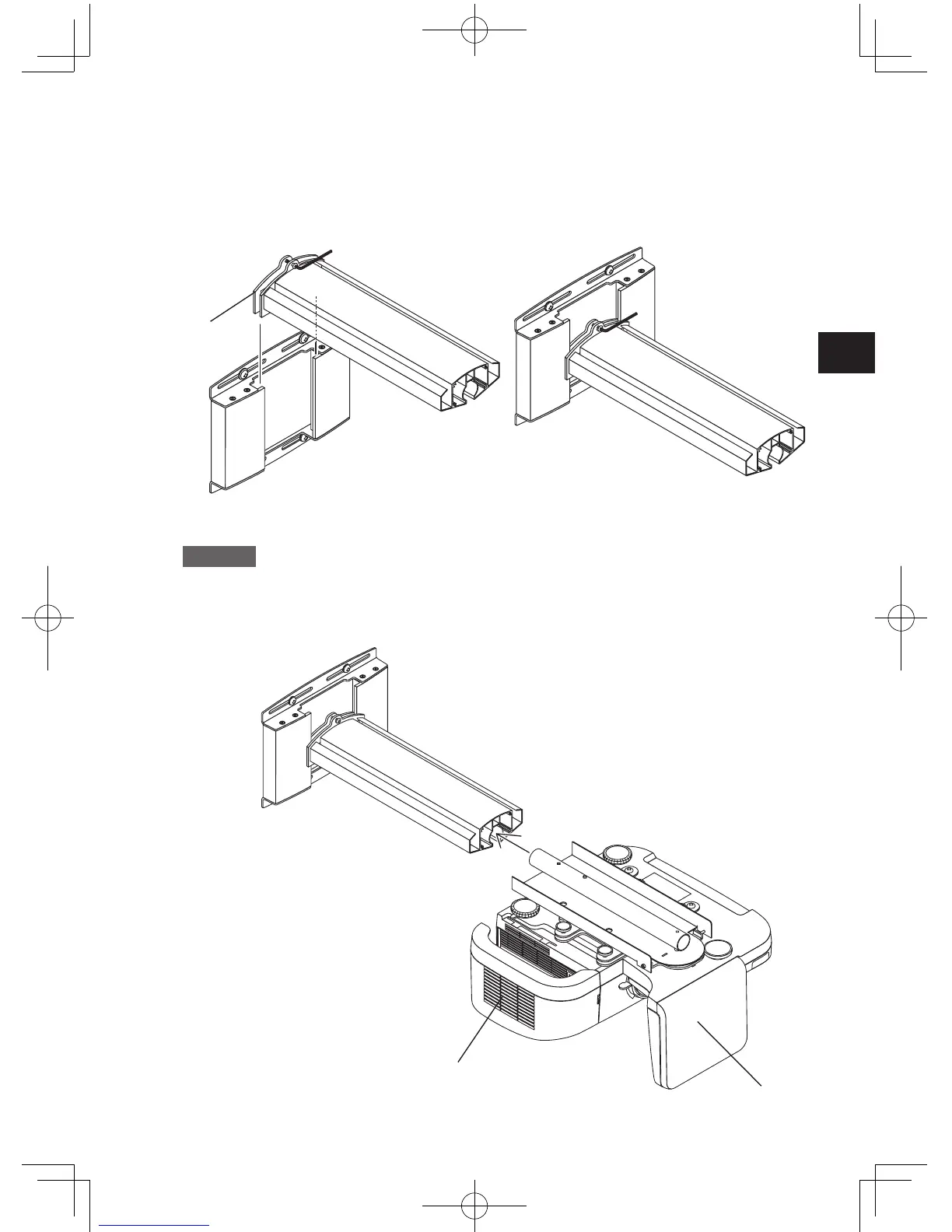
3. Attach the arm to the wall adapter.
a
Loosen the arm fixation screws (top and bottom) with the supplied hex wrench.
b
Insert the arm plate (A) into the wall adapter from the top and tighten the screws (top and
bottom) near the center of the elongated hole.
* The covers (A) and (B) are to be attached after installation and adjustment are completed.
4.
Mount the projector assembled in step 1 on the arm.
Caution
To do this, first remove the packing spacers from the projector. Then hold the
projector body with the help of a second person and insert it carefully into the arm.
Do not hold the projector by the cable cover or the mirror section, and do not touch
the mirror or lens.
a
Insert the central axis of the projector adapter into the arm.
Cable cover
Mirror section
a
Plate(A)


 To Next Page