EasyManua.ls Logo

NEC PF32W503 - Remote Control

NEC PF32W503
18 pages
Print Icon
To Next Page IconTo Next Page
To Previous Page IconTo Previous Page
Loading...
6
BACK
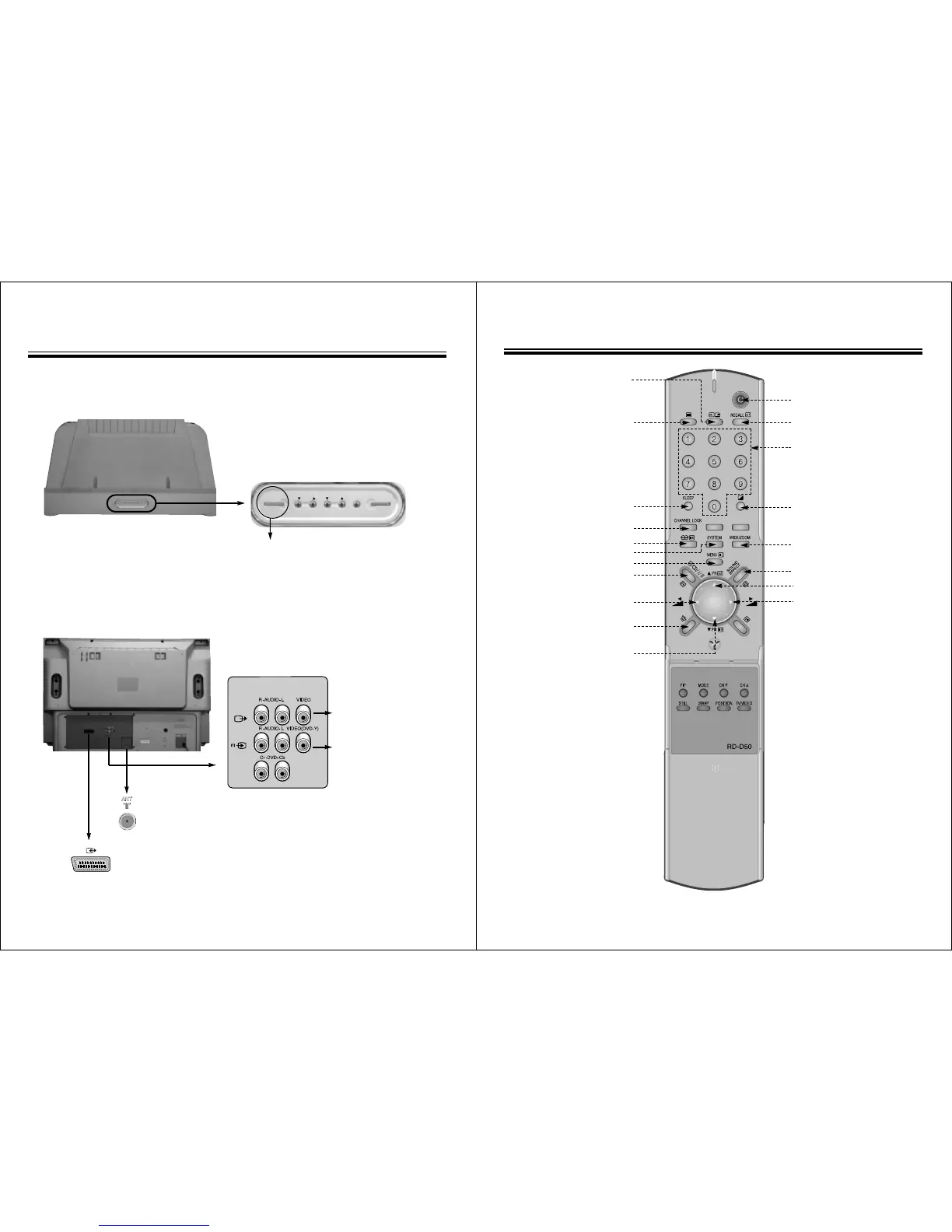
A/V OUTPUT TERMINAL
This always provides with TV
signal output of the selected
channel.
Video 1 input terminals or DVD
input terminals
TOP
VIDEO 2(SCART JACK) input
/
output terminal (SCART does not supports S-VIDEO)
A/V OUT OF SCART TERMINAL
will provide with TV signal output of the selected channel.
(2)
Under this button pressed once, TV
goes to the state of STAND BY.
STANDBY/ON CH VOL MENU TV/AV

7
REMOTE CONTROL
TV
/
VIDEO
/
DVD
INPUT SELECT
TEXT
SOUND MUTE
PR DOWN(PAGE DOWN)
SLEEP TIME SELECT
CHANNEL LOCK
SELECTABLE SOUND
SYSTEM
MENU
STEREO
/
BILINGUAL
SELECT
VOLUME DOWN
POWER ON
/
OFF
RECALL
PR SELECT 0~9
(PAGE SELECTOR 0~9)
SELECTABLE PICTURE
WIDE
/
ZOOM SELECT
SOUND EFFECT
PR UP(PAGE UP)
VOLUME UP

Table of Contents

Related product manuals