1
1
2
2
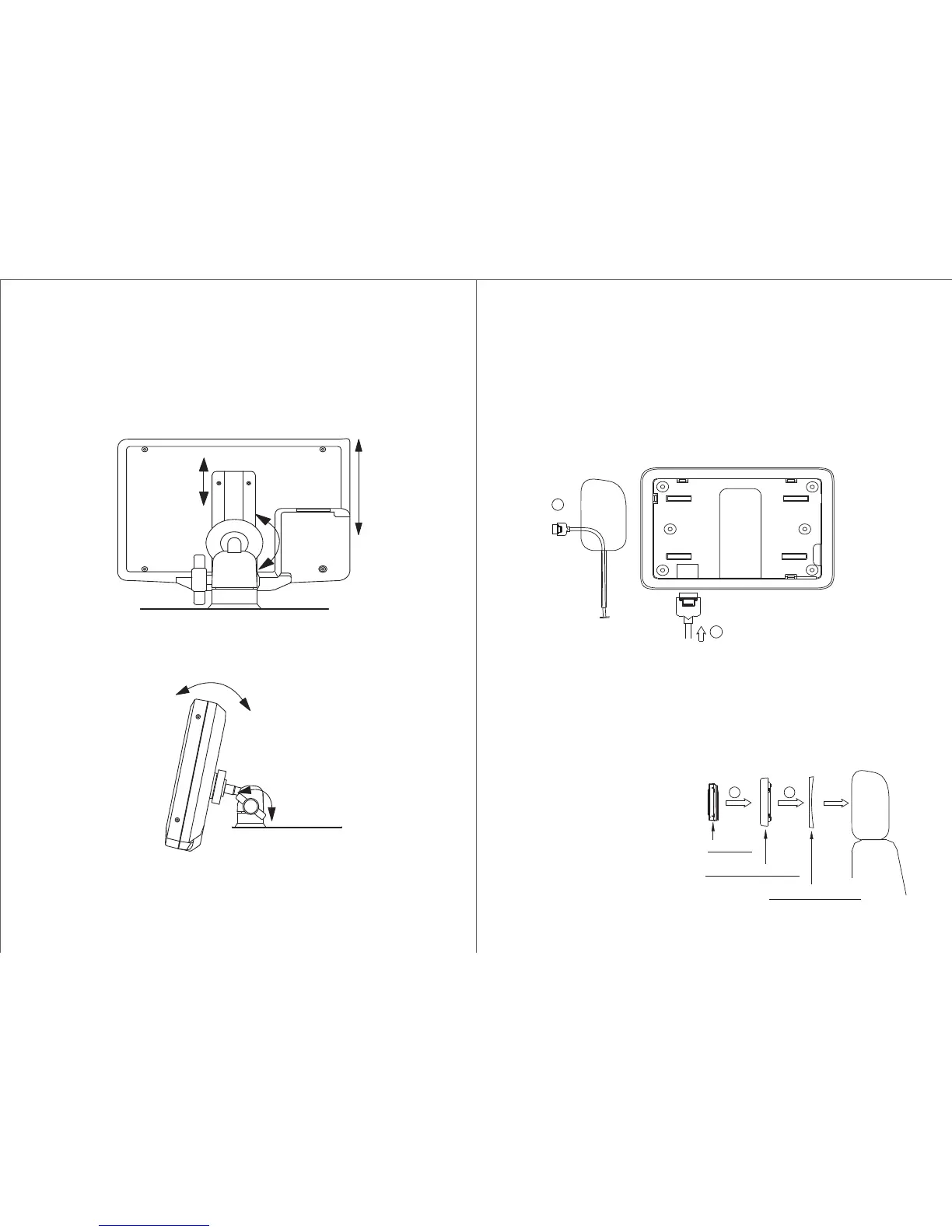
2. Firmly attach dash mount on a flat surface and adjust viewing
angle of monitor by tightening the fastener at the side.
1. Slide monitor onto dash mount S2 and then tighten using
fastener.(Optional)
Installation Guide
1 To install the monitor into the seat head cushion you must ensure
that the monitor connecting cable assembly has already pull through
via the supporting pipe.
2 Before connecting the monitor, pull the connecting cable assembly
through the headrest shroud as shown in diagram 2.
3 Place headrest shroud into the opening and secure it with correct
fasteners.
4 Connect the connecting cable assembly to the monitor.
5 Ensure that there is no
foreign material is trapped
inside theenclosure before
pushing themonitor onto the
headrest shroud.Make sure
that the monitor issecurely
locked in place.
HEADREST SHROUD
MONITOR
5
3
Note : Installing Method of main cable assembly
1. Reeve the main cable assembly through (or beside)
the head rest support tube.
2. Secure and protect the cable assembly from damage
when the head rest is adjusted.
Installation Guide
TRIM RING SHROUD



 To Next Page