5
6
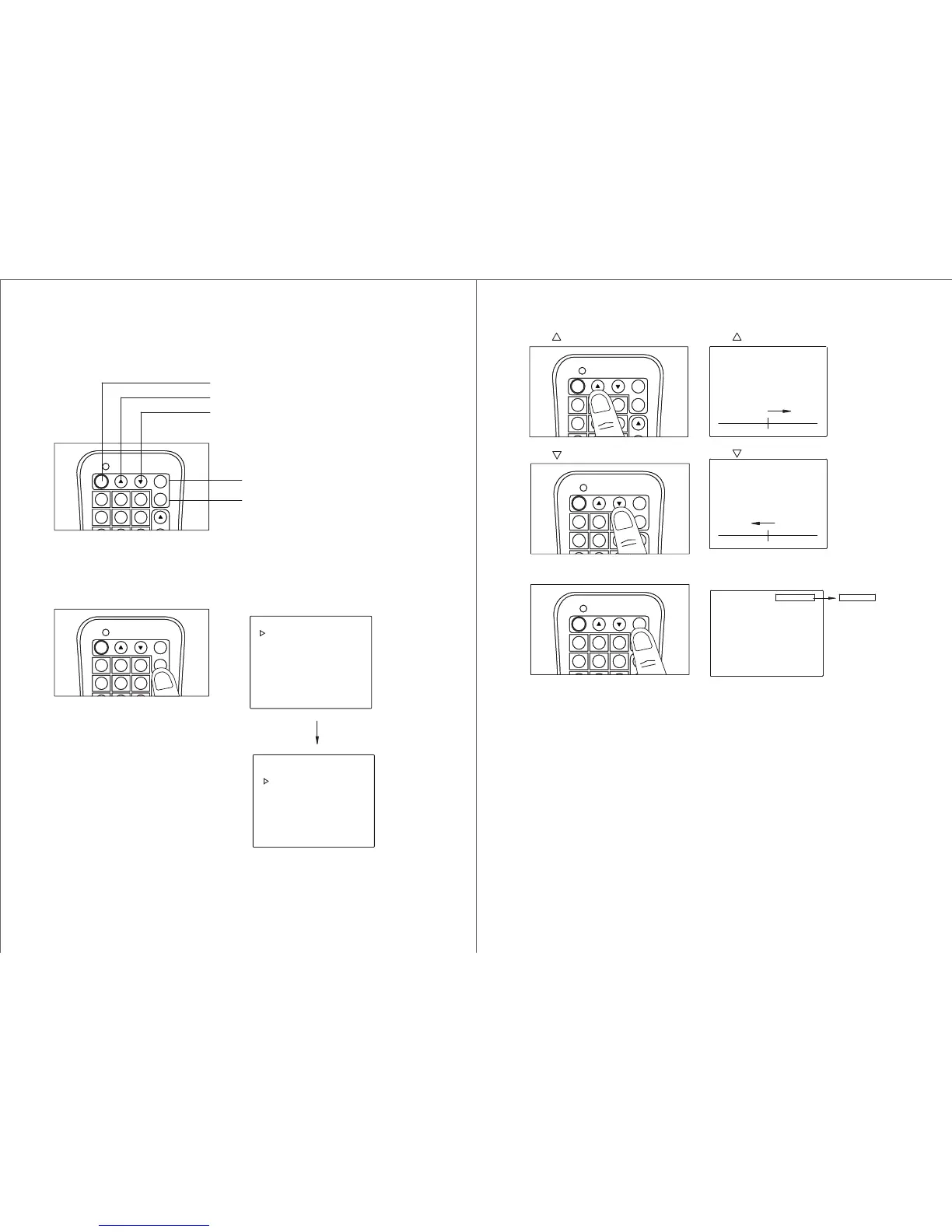
Press Menu Key
Using Menu Function Key :
Press Menu key until OSD indicator
at the correct function mode
OSD will appear on screen
User Guide - Remote Controller:
Menu (Activation of OSD and
Function Selection)
Mode Selection
Down Adjustment
Up Adjustment
POWER ON / OFF
4 5 6
MEMORY
CH/DISC/SET
POWER
1 2 3
MENU
MODE
4 5 6
MEMORY
CH/DISC/SET
POWER
1 2 3
MENU
MODE
COLOR
CONTRAST
BRIGHTNESS
SCREEN MODE
TINT
COLOR
CONTRAST
BRIGHTNESS
SCREEN MODE
TINT
AV1 AV2
MODE Key
Press Mode key to select the
desired video source input
(input 1 or input 2)
Key
Key
Press to the desire setting
COLOR
COLOR
32
32
Press to the desire setting
4 5 6
MEMORY
CH/DISC/SET
POWER
1 2 3
MENU
MODE
4 5 6
MEMORY
CH/DISC/SET
POWER
1 2 3
MENU
MODE
4 5 6
MEMORY
CH/DISC/SET
POWER
1 2 3
MENU
MODE


 To Next Page