mEsstronic 1.0 Operating Instructions 13
2 Models EN
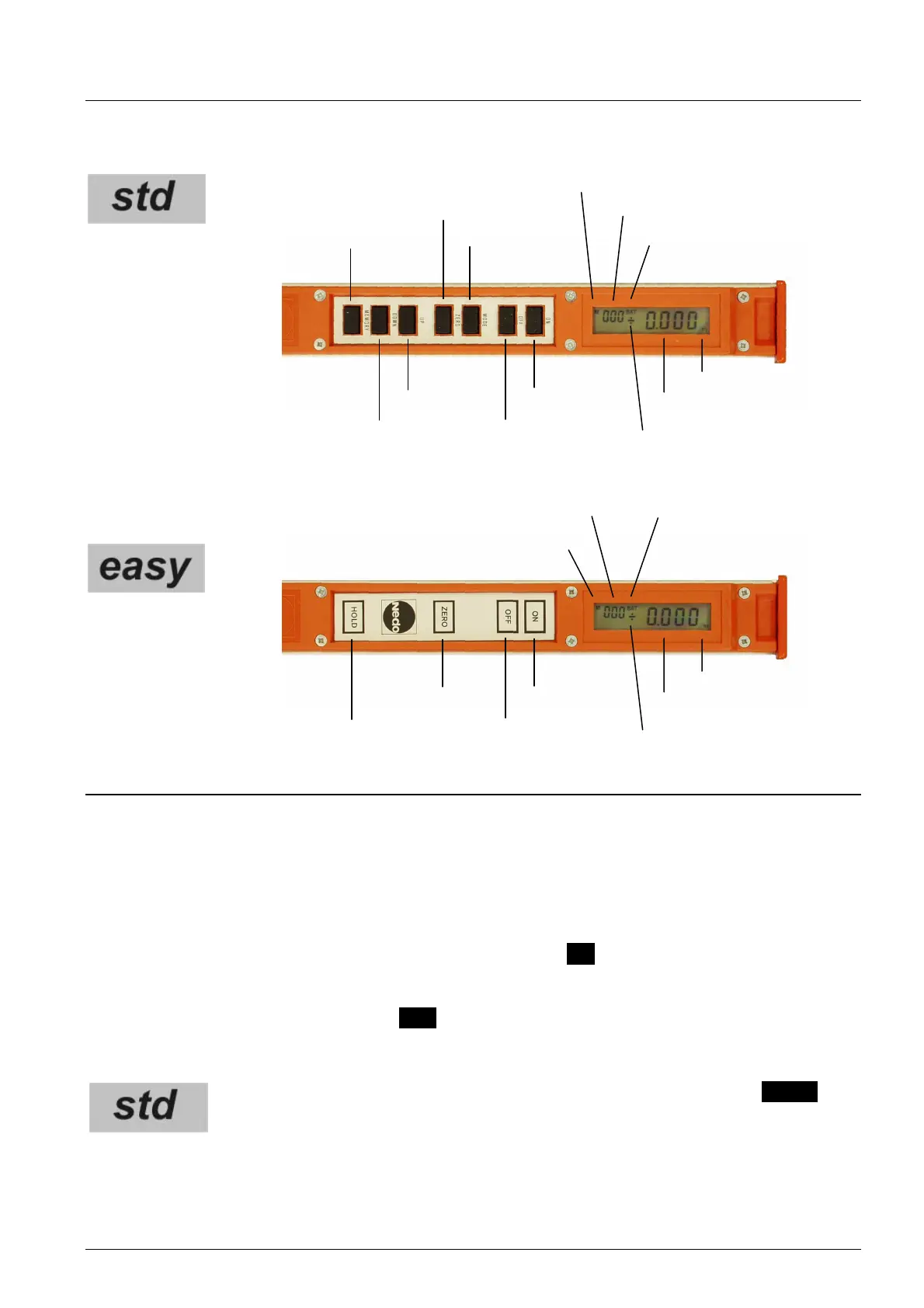
2.2 Control panels
3 Operation
3.1 Initial start-up
o Read operating manual!
o Insert batteries (refer to 3.10).
3.2 Switching on and off, automatic switch-off
The device is switched on when retracted by pressing the ON key. On the display either the
shortest measurable length or the relative value based on the entered zero point are shown
in metres or inches. The device switches automatically off after three minutes of non-use, or
it can be switched off by pressing the OFF key.
3.3 Measuring system
Change from the metric system (m) to inches (in) by pressing the MODE key.
The selected measuring system is shown in the display. The metric system is
preset.
ON key
OFF key
UP key
DOWN key
Memory
Memory display
Memory space
Battery display
ZERO key
Mode key
Measured data
Unit
Sign for relative value
Memory display
Memory space
Battery display
ON key
OFF key
ZERO key
HOLD key
Measured data
Unit
Sign for relative value


 To Next Page