Need help?
Do you have a question about the Needit Park Micro 2 and is the answer not in the manual?
Instructions for activating the device battery.
Initiate settings adjustment by pressing the F button until minutes flash.
Use '+' to change values and 'F' to move to the next setting.
Configure the minutes and hours displayed on the parking disc.
Enable or disable automatic switching to summertime.
Select the display format for the parking start time based on country.
Set the day, month, and year for the parking disc.
Instructions for mounting the parking disc onto the windshield.
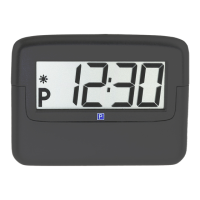
Information about what the display shows when the car is in motion.
How the parking start time appears after parking.
Understanding the BAT indicator for battery and summertime.
How to advance the parking start time using the P button.
 General
| Brand | Needit |
|---|---|
| Model | Park Micro 2 |
| Category | Automobile Accessories |
| Type | Parking Sensor |
| Number of Sensors | 4 |
| Audible Warning | Yes |
| Operating Voltage | 12V |
| Waterproof Rating | IP67 |
| Detection Range | 0.3 - 1.5 m |
| Display Type | LED |

 To Next Page