Short press:
Toggles between menu options or confirms selections in the MENU
Long Press:
Adjusts settings values of the sub-menu or scrolls the MENU up and down
SET Dial
Long Press: Enters MENU
Short Press: Toggles between following modes
CCT/HSI/RGBCW/GEL/FX/XY
MODE/MENU Button
Custom1 settings being saved
02
INT Dial
CH:08
EN
Introduction to Functions Introduction to Functions
/2.4G Button
Short press:
Preset 1, Preset 2, Preset 3, Preset 4
Long press in the
current mode:
Saves the current custom settings Instantly reads the saved custom
settings
—Infinity Connection—
Short press the /2.4G Button until
the screen displays , which relates
to the Infinity connection. To control
with a smartphone, the smartphone
needs to connect to the light via the
NEEWER APP. For detailed
information, please scan the QR code
on the "APP Introduction" page of the
APP prompt card.
—2.4G Connection—
Short press the /2.4G Button until
the screen displays "CH: XX", which
indicates a 2.4G connection. Long
press /2.4G Button to start 2.4G
channel adjustment. Use the SET Dial
to change the channel values.
※ Please reset the Infinity mode before connecting via the APP. To
reset, long press the /2.4G Button or select INFINITY RESET in the
menu.
※ In 2.4G mode, when multiple lights are set on the same channel, i.e.
CH:08, adjusting one light will apply the same settings to the others.
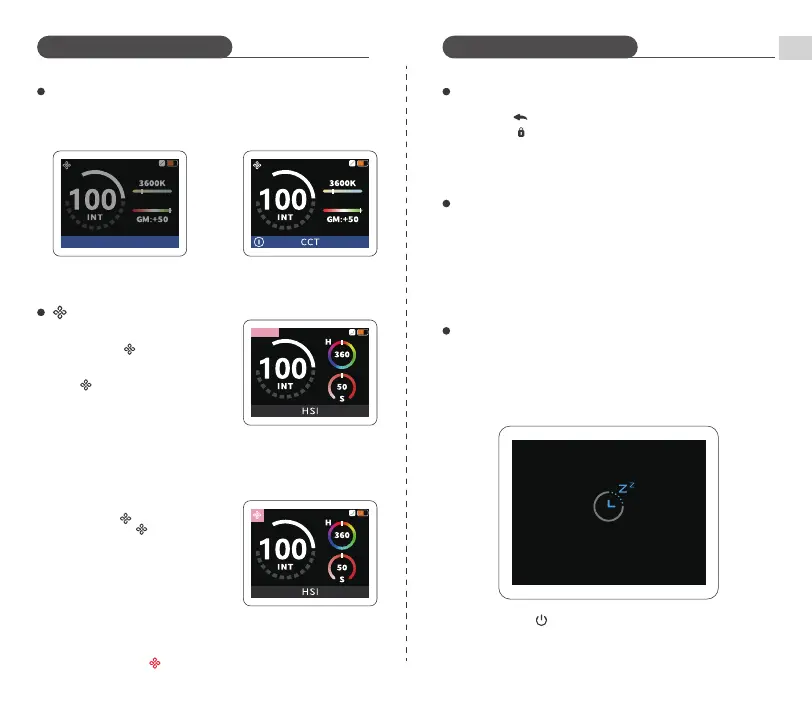
Tap icon in the APP to power the light
off and set to standby mode.
Short press in the menu: Exit menu
Long press: ON/OFF
Turn dial:Adjusts brightness. Turn clockwise to increase, turn
counterclockwise to decrease


 To Next Page
 Loading...