EN
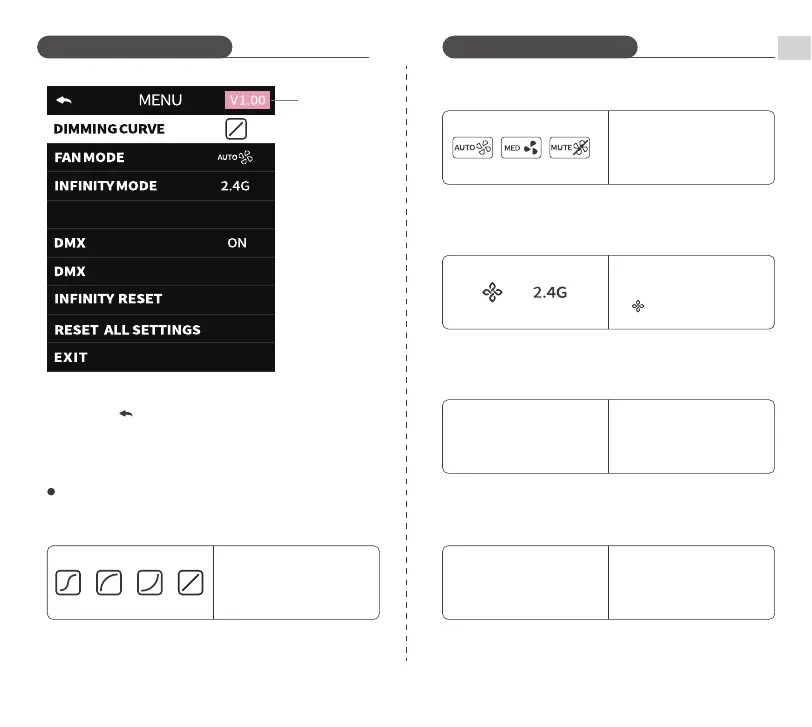
Introduction to MENU screen icons
① DIMMING CURVE
Short press SET Dial, then
turn SET Dial to select
between S type, Log type,
Exp type, and Linear type
② FAN MODE
Short press SET Dial, then turn
SET Dial to select between
Smart/Mid-Level/Silent
modes
③ INFINITY MODE
Short press SET Dial, then
turn SET Dial to select
/2.4GMode
④ CH Channels (2.4G Mode)
CH is only adjustable in 2.4G
mode. Short press SET Dial,
then turn SET Dial to set
channel values
00-99
CH
⑤ DMX ON/OFF
Short press SET Dial, then turn
SET Dial to select ON/OFF. DMX
input will only display when DMX
is activated (shows as ON).
DMX
ON OFF
03
3 ways to exit the MENU:
1. Short press INT Dial
2. Short press MODE/MENU Button
3. Select EXIT and short press SET Dial
ADDR
CH
001
01
Introduction to Functions Introduction to Functions
Version Number


 To Next Page