EN
06
FX
CH:08
XY
CH:08
0.7080
0.2920
Introduction to Mode Functions Introduction to Mode Functions
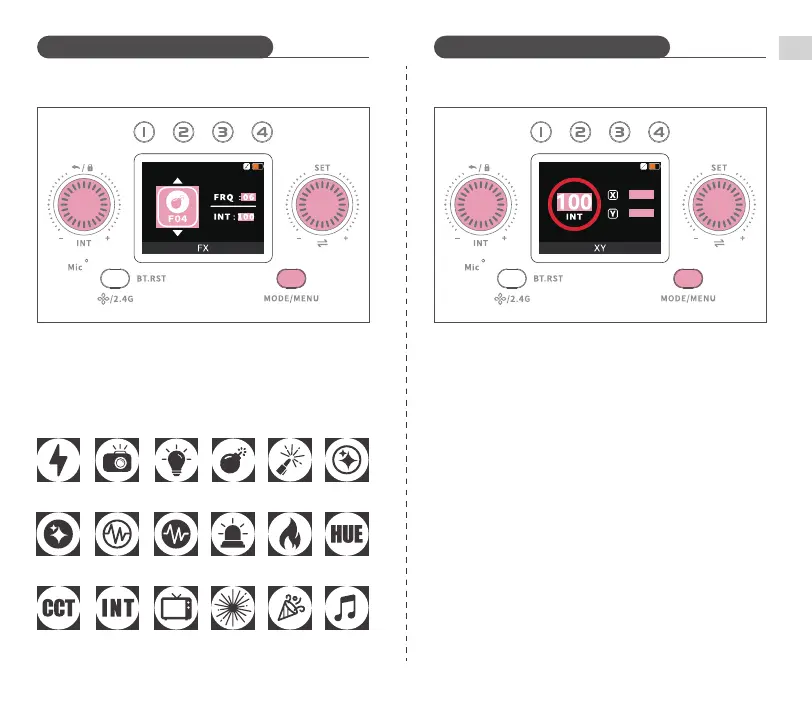
Short press MODE/MENU Button until "FX" appears on the screen. Short
press SET Dial to switch between settings, turn it to select different
lighting scenes and lighting effect speed. Turn INT Dial to adjust
brightness (0~100%).
Short press MODE/MENU Button until "XY" appears on the screen. Short
press SET Dial to switch between settings, turn quicky to adjust X/Y
values (0.0000~0.8000). Turn INT Dial to adjust brightness (0~100%).
Scene modes
Lightning
Hue flash
CCT loop INT loop TV screen PartyFireworks
CCT Pulse HUE Pulse Cop car Candlelight HUE loop
Paparazzi
Defective
bulb
Explosion Welding CCT Flash
Music


 To Next Page