EN
05
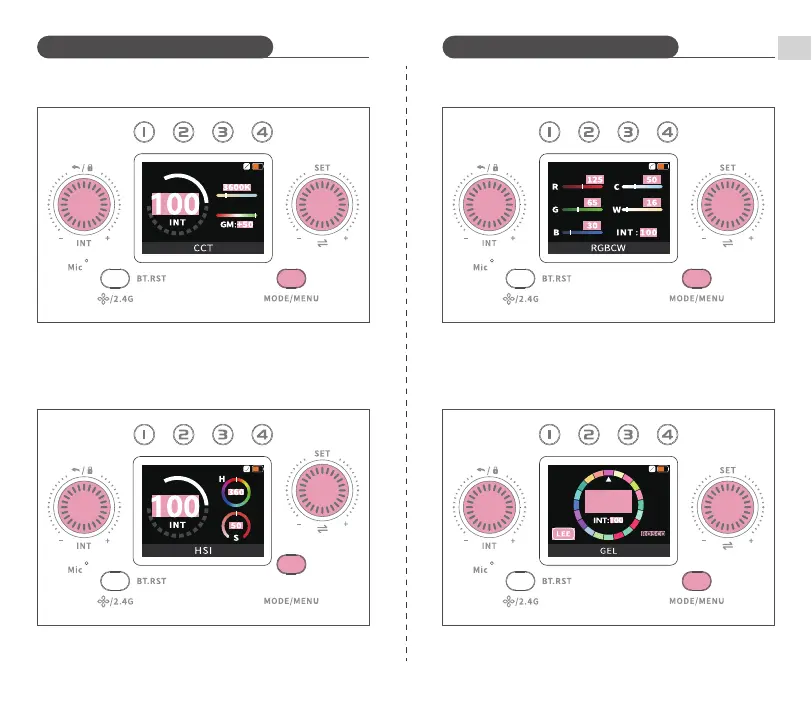
CCT
CH:08
RGBCW
CH:08
GEL
CH:08
HSI
CH:08
002
Introduction to Mode Functions Introduction to Mode Functions
Short press MODE/MENU Button until "CCT" appears on the screen.
Short press SET Dial to switch between settings, turn it to adjust color
temperature (2500K~10000K)/GM correction values (-50~+50). Turn the
INT Dial to adjust brightness (0~100%).
Short press MODE/MENU Button until "HSI" appears on the screen. Short
press SET Dial to switch between settings, turn it to adjust hues
(0~360°)/saturation (0~100%). Turn INT Dial to adjust brightness
(0~100%).
Short press MODE/MENU Button until "RGBCW" appears on the screen.
Short press SET Dial to switch between settings, turn it to adjust
R/G/B/C/W (0~255). Turn INT Dial to adjust brightness (0~100%).
Short press MODE/MENU Button until "GEL" appears on the screen.
Short press SET Dial to switch between settings, turn it to adjust LEE (20
built-in gels) and ROSCO (20 built-in gels). Turn INT Dial to adjust
brightness (0~100%).


 To Next Page