Neff C77V60N2 | 02/2012
English | 47
Informationandsettings
Usei(1) to display information (press briey)
and adjust settings (hold down for at least
three seconds).
Displayinginformation
In the Info menu (pressi briey) you can call
up the following information:
X when it is necessary to descale the
appliance
X when it is necessary to clean the
appliance
X when it is necessary to change the lter
X how much coffee has been dispensed
since the appliance was rst put into
operation
X how many milk drinks have been
dispensed
X how much hot water has been prepared
Displayingsettings
Hold downi(1) for at least 3 seconds; the
different setting options are then displayed:
Settings
Language Cup volume
English
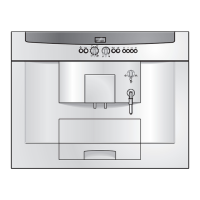
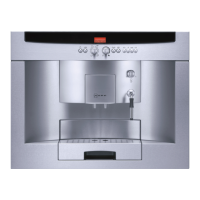
Use Y (2) and Z (5) to switch between the
different setting options. The currently active
setting is always shown in a larger font. You
can change the setting that is currently dis-
played using the navigation button
(4).
To exit the menu, pressi(1) again.
The changes you have made are
saved automatically. It is not neces-
sary to conrm them additionally.
Thefollowingsettingoptionsareavail
abletoyou:
Language: Press the navigation button
(4)
to select the display language.
Cup volume: The per-cup quantity can be
set separately for each type of drink and
each cup size (see “Set per-cup quantity”).
Water hardness: Press the navigation but-
ton
(4) to select the required water hard-
ness (1, 2, 3 or 4) (refer also to “Checking
and setting the water hardness”).
Coffee temperature: Press the navigation
button
(4) to set the coffee temperature.
Auto off after: Press the navigation button
(4) to enter the time span after which the
appliance should automatically switch off
following the last drink preparation. A time
between 5 minutes and 8 hours can be set.
The default time is one hour, but this can be
shortened to save energy.
Contrast: The display contrast can be set
from – 4 to + 4 with the navigation button
(4). The default setting is 0.
Illumination: The lighting can be set to Off,
On (factory setting) or Off after 5 min.
Water filter: Each time a new water lter
is inserted in the water tank (8), it must be
rinsed:
1. Place the water lter in the water tank
(8)and ll the tank with water up to the
“max” mark.
2. Use the navigation button
(4) to select
Press Y and press z (6).
3. Place a container with a capacity of
0.5 litres under the milk frother (19).
4. Press z (6). Water will now run rst
through the lter to rinse it and then into
the container.
Empty the container. The appliance is ready
to use once more.
Rinsing the lter simultaneously activates
the setting for the Service - change filter
display.


 To Next Page