13
Operating the appliance
These instructions apply to several appliance variants. It is
possible that individual features are described which do not
apply to your appliance.
Note: Switch on the extractor hood when you start cooking and
switch it off again several minutes after you have finished
cooking. This is the most effective way of removing the kitchen
fumes.
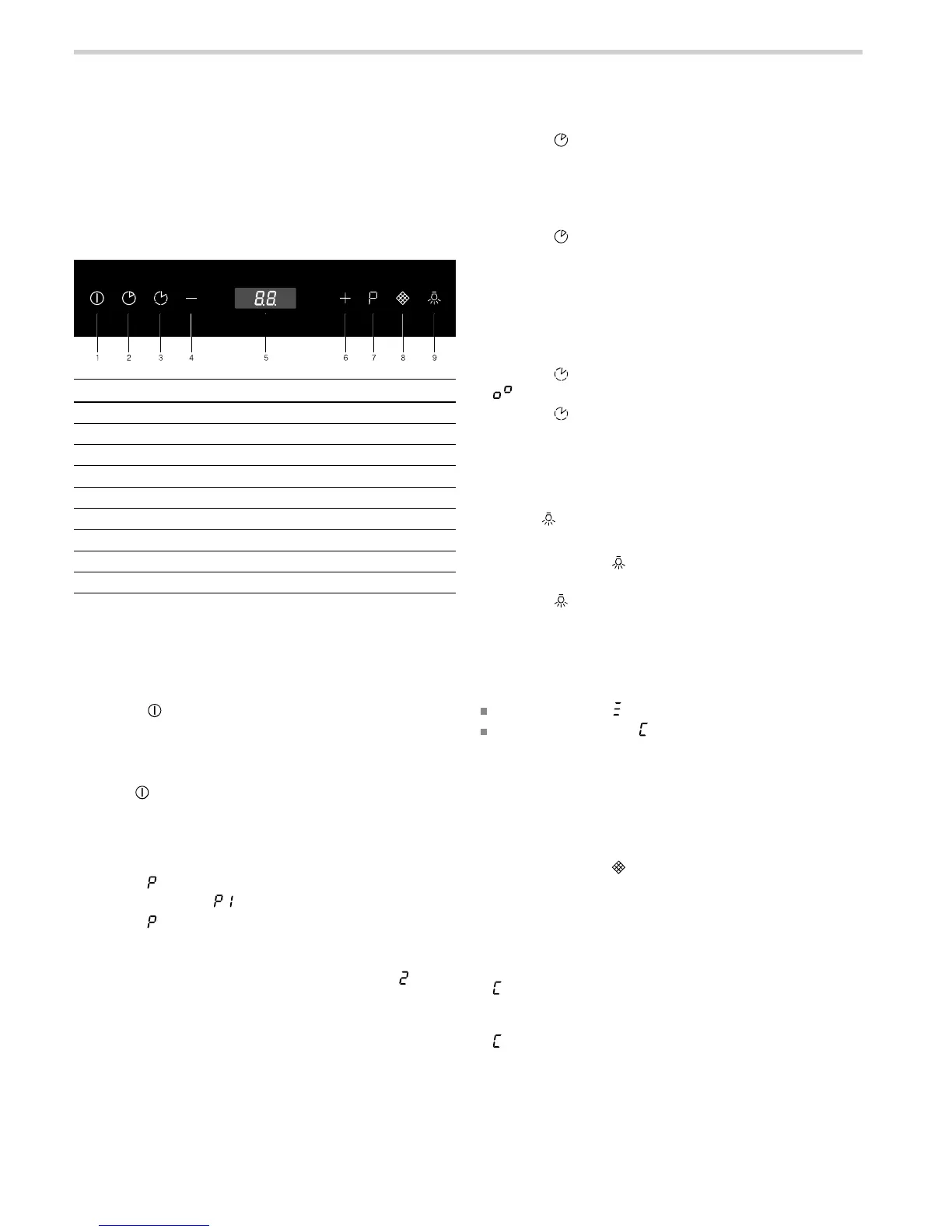
Control panel
Setting the fan
Note: Always adjust the fan strength to meet current conditions.
If there is a large build-up of steam or fumes, select a high fan
setting.
Switching on the appliance
1. Press the button.
The fan starts at setting 1.
2. Press the "+" or "-" buttons to set another fan setting.
Switching off the appliance
Press the button.
Intensive setting
You can use the intensive setting if there is a large build-up of
odours and fumes/vapours.
1. Press the button.
The intensive setting is activated.
2. Press the button.
The intensive setting is deactivated.
Note: The intensive setting run time is 6 minutes. Once this
time has elapsed, the appliance switches back to the fan
setting.
Fan run-on time
1. Press the button.
The current fan setting and the remaining run-on time in
minutes are displayed alternately in the display panel. The fan
continues to run at the previous setting for 15 minutes. Once
this time has elapsed, the ventilation and lighting
automatically switch off.
2. Press the button.
The fan run-on ends before the end of the remaining run-on
time.
Interval ventilation
With intermittent ventilation, the ventilation switches on
automatically for 10 minutes every hour. After 24 hours, the
appliance switches off.
1. Press the button.
is shown on the display.
2. Press the button.
The intermittent ventilation switches off.
Lighting
The lighting can be switched on and off independently of the
ventilation.
Press the button.
Setting the brightness
1. Press and hold the button for two seconds.
The brightness is reduced.
2. Press the button.
The maximum brightness is restored.
Saturation display
When the metal grease filter or activated carbon filter is
saturated, the corresponding symbol flashes:
Metal grease filter:
Activated carbon filter:
If you have not yet done so, clean the metal grease filter or
replace the activated carbon filter immediately.
For instructions on how to clean the metal grease filter, please
refer to the section "Cleaning and maintenance".
Resetting the saturation indicators
1. Switch off the motor.
2. Press and hold the button for two seconds.
Switching over the display for circulating-air mode
For circulating-air mode, the electronic control display must be
switched over accordingly:
1. Check that the extractor hood is connected and switched off.
2. Press and hold the "+" button for two seconds.
flashes twice, i.e. the electronic control is switched over to
circulating-air mode.
3. Press the "+" button.
flashes once, i.e. the electronic control is switched back to
exhaust-air mode.
Explanation
1 Switch the fan on/off
2 Switch on the fan run-on
3 Switch on the interval ventilation
4 Turn the fan down
5 Display panel
6 Switch up the fan setting
7 Switch on intensive mode
8 Reset the saturation indicator
9 Switch on the lighting


 To Next Page
 Loading...