Basic operation en
7
5 Basic operation
5.1 Switching the hob on and off
You can use the main switch to switch the hob on and
off.
Switching on the hob
▶
Press .
a An audible signal sounds.
a The light bar above lights up.
a The displays for the control panel and the power
level display light up.
a The hob is ready for use.
Switching off the hob
▶
Press until the light bar above and the power
level display go out.
a All hotplates are switched off.
a The residual heat indicator remains on until the hot-
plates have cooled down sufficiently.
Notes
¡ The hob switches off automatically if all hotplates
have been switched off for more than 20seconds.
¡ The settings remain stored for 4seconds after the
hob has been switched off. If you switch the hob
back on during this time, it will operate using the
stored settings.
5.2 Setting the hotplates
You can adjust the heat setting of the hotplate on the
control panel.
Power level
1 Lowest setting
9 Highest setting
. Every power level has an intermediate
setting, e.g. 4.
Notes
¡ Dark areas in the glow pattern of the hotplate are
part of the technical design. They do not affect the
functionality of the hotplate.
¡ The hotplate regulates the temperature by switching
the heat on and off. The heat may also switch on
and off when at the highest setting.
– This protects easily damaged components from
overheating.
– The appliance is protected against electrical
overload.
– Better cooking results are achieved.
¡ With multi-circuit hotplates, the heating of the inner
filament circuits and the heating of the connections
may switch on and off at different times.
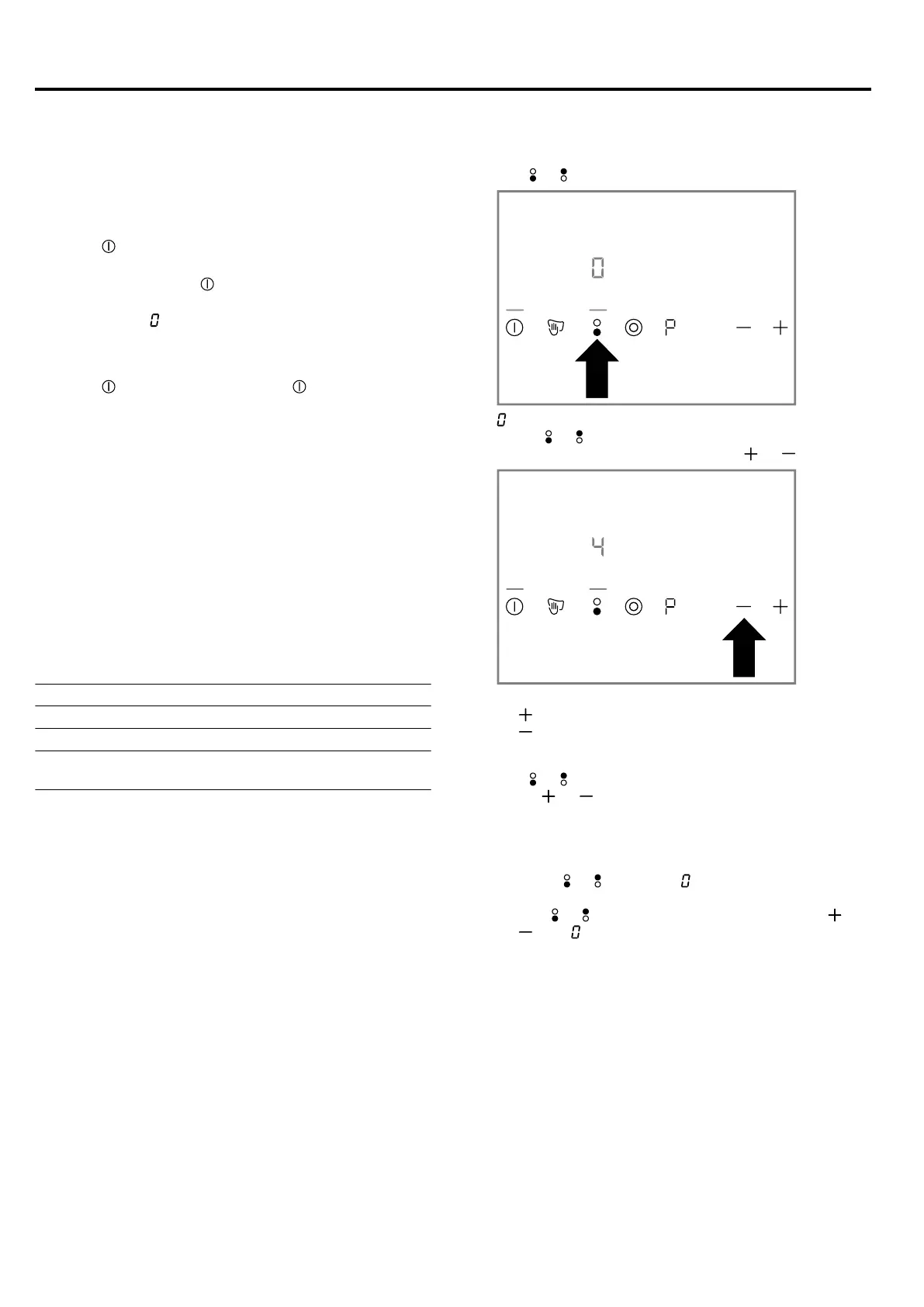
Selecting heat settings
1.
Use or to select the hotplate.
a lights up on the power level display. The light bar
above or lights up.
2.
Within the next 10seconds, press or .
The basic setting appears.
– Power level 9
– Power level 4
Changing heat settings
1.
Use or to select the hotplate.
2.
Press or until the required power level appears.
Switching off the hotplate
There are 2 ways to switch off the hotplate.
▶
If required, select one of the options:
‒ Press or twice until appears on the power
level display.
‒ Use or to select the hotplate, and press or
until appears on the power level display.
a After approx. 10seconds, the residual heat indic-
ator appears.
Note:The hotplate that was last selected remains activ-
ated. You can adjust the hotplate without selecting it
again.
5.3 Recommended cooking settings
You can find an overview of different foods with appro-
priate power levels here.
The cooking time varies depending on the type, weight,
thickness and quality of the food. The ongoing power
level depends on the cookware used.
Cooking tips
¡ To bring food to the boil, use heat setting 9.



 To Next Page