
 Need help?
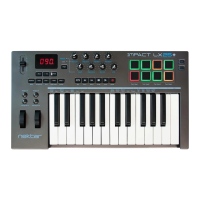
Do you have a question about the Nektar Impact LX61+ and is the answer not in the manual?
Step-by-step guide for setting up the Impact LX+ hardware and software with Reaper.
How to navigate between tracks in Reaper using the Impact LX+ controller.
Using the transport controls on the Impact LX+ for playback functions in Reaper.
Explanation of how the Impact LX+ prevents parameter jumping when controlling Reaper.
How to show or hide the Reaper mixer interface using the controller.
Using faders and pots for channel volume and pan control in Reaper.
Controlling track mute and solo functions via the Impact LX+ buttons.
How to switch between groups of mixer channels for control.
Controlling the overall master volume of the Reaper mixer.
How to view the VST instrument's GUI using the controller.
Navigating through different instrument patches using the Impact LX+.
Mapping and controlling instrument parameters with the Impact LX+ controls.
Function to quickly assign controller knobs/faders to VST parameters.
How to save custom control mappings for VST instruments.
Process for assigning MIDI notes to pads for drum instruments.
 General
| Keys | 61 |
|---|---|
| Aftertouch | No |
| Pads | 8 |
| Faders | 9 |
| Rotary Encoders | 8 |
| Transport Controls | Yes |
| Pedal Inputs | 1 x 1/4" (sustain) |
| MIDI I/O | USB |
| USB | 1 x Type B |
| Computer Connectivity | USB |
| OS Requirements - Mac | OS X 10.7 or later |
| OS Requirements - PC | Windows 7 or later |
| Power Source | USB bus powered |
| Type | Keyboard Controller |
| Software Included | Bitwig 8-Track |
| Compatibility | DAWs and Music Software |


 To Next Page