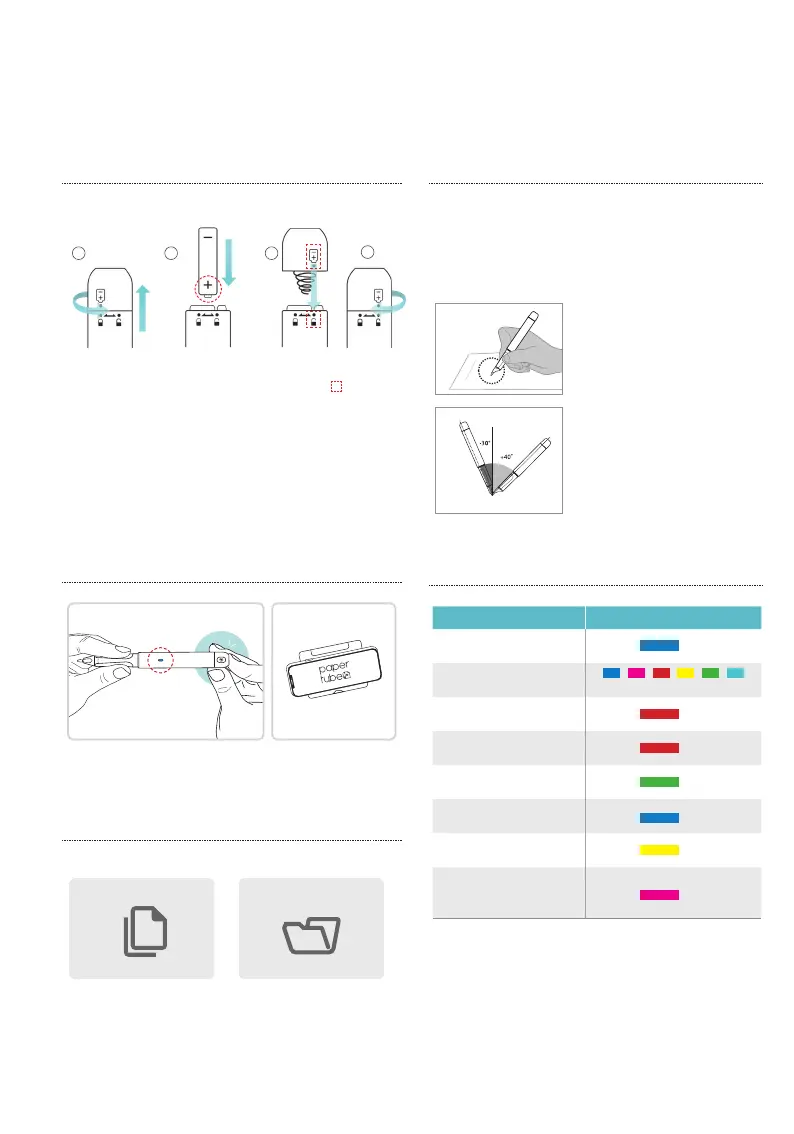
Insert the battery into the pen referring image guide.
Get Ready
Battery Cap Open
(Turn the cap counterclockwise
and open)
Insert the Battery
(With the + mark
facing down)
Battery Cap Close
(Place the mark in a straight line,
close the cap and turn clockwise)
1
4
32
Press the power button for 1 second,
and connect it to PaperTube™ app.
Power On
1
. Make a video only
with handwriting.
(
use a blank notebook
)
2
. Annotate PDF imported
(
use my own material
)
Install App &
connect pen
Select the mode in your preference to make your
lecture video.
click!
Holding the Pen
The recognition rate is affected by the direction of the optical sensor’s
angle. The sensor (oval shaped part adjacent to the pen tip) should
face downwards. Deviating from the appropriate angle, or holding the
pen in the wrong direction could cause difficulties with capturing your
writing or drawing.
Usage Angle
Hold the pen with the ball point nib
facing up
Allowable Recognition Angle
Product’s acceptable recognition
angle is -30º ~ +40º
(90º vertical standard)
LED Color Status Key
Status / 상태 LED Color/Action / 컬러
Power ON / Stand by
light on
light on
light on
light on
flashes
flashes
flashes
and light off
Optical lens on the pen cannot
read the code on the paper
Power OFF
Low battery (lower than 20%)
Low battery (lower than 10%)
Connected to App
Firmware update
Fail to update firmware
- - - - -


 To Next Page