4
Fill the sealing liquid
reservoir
When you want to seal envelopes,
the sealing liquid reservoir must be
filled.
1. Open the system with the
button on the left side.
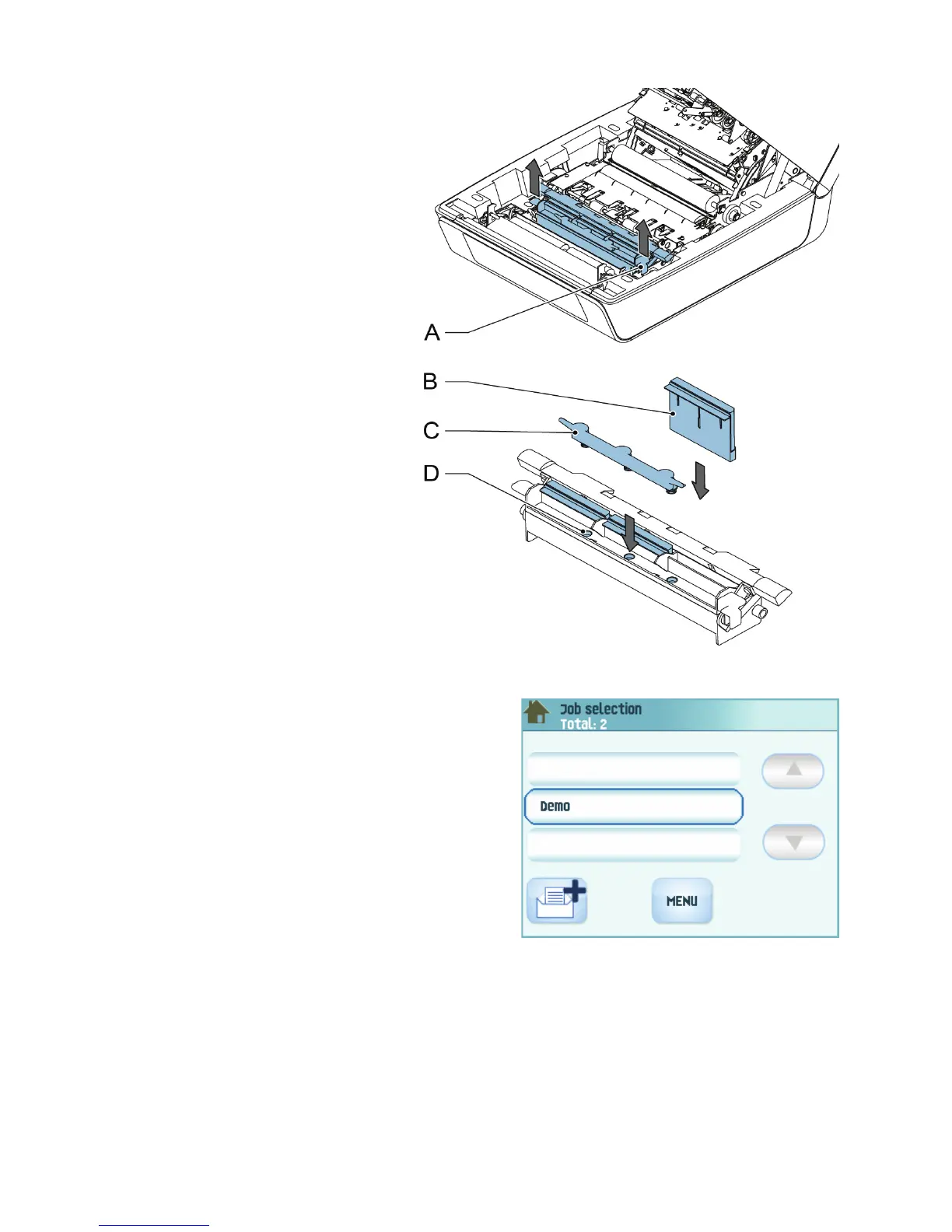
2. Lift the sealing liquid reservoir
D with the blue handles A
carefully out of the system.
3. Remove the strip C from the
reservoir.
4. Fill the three reservoirs with
sealing liquid.
5. Make sure the brushes B are
moistened sufficiently.
6. Replace the liquid reservoir.
7. Close the system.
Before you start the job, wait
approximately 5 minutes for the
brushes to moisten.
Connect the system to the mains power
supply
To start up the system:
1. Connect the system to the mains power
supply.
2. Use the power switch to switch the system
on. The power switch is located at the back of
the system.
3. Press the power button next to the display.
The touch screen shows the home menu.
Set language
1. Press the MENU button.
2. Select the LANGUAGE SETTINGS button.
3. Select the applicable language and press the save button.


 To Next Page