EasyManua.ls Logo

Neoteck 8233D Pro - Technical Specifications and Features; General Device Specifications

Neoteck 8233D Pro
15 pages
Print Icon
To Next Page IconTo Next Page
To Previous Page IconTo Previous Page
Loading...
8233D PRO-EN
4
Push button
Function
Func
FUNC key is the function select key that acts
with trigger. Use the key as switch of DC/AC
current, Diode.
HOLD
Press HOLD to enter and exit the hold
mode in any mode. That act with trigger.
HOLD This key is used control Backlight.
This key is act with trigger. When press and
hold the key over 2 sec, will enable Backlight.
Press the key again , the backlight will disable.

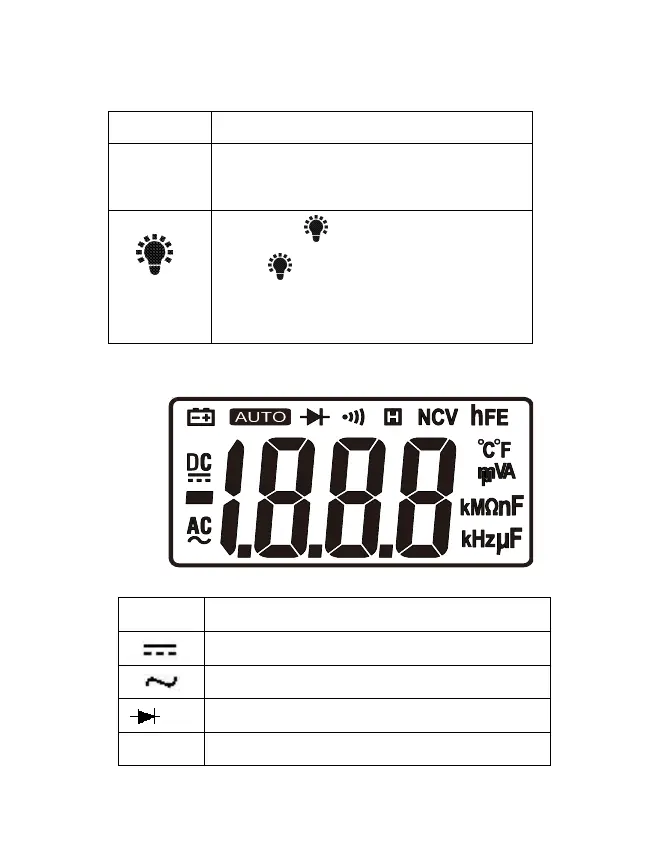
3-3. Display indicators
Fig. 2 LCD
Meaning
DC voltage or current
AC voltage or current
Diode
Data hold