11
1 2 3 4
31 2
CN
EN
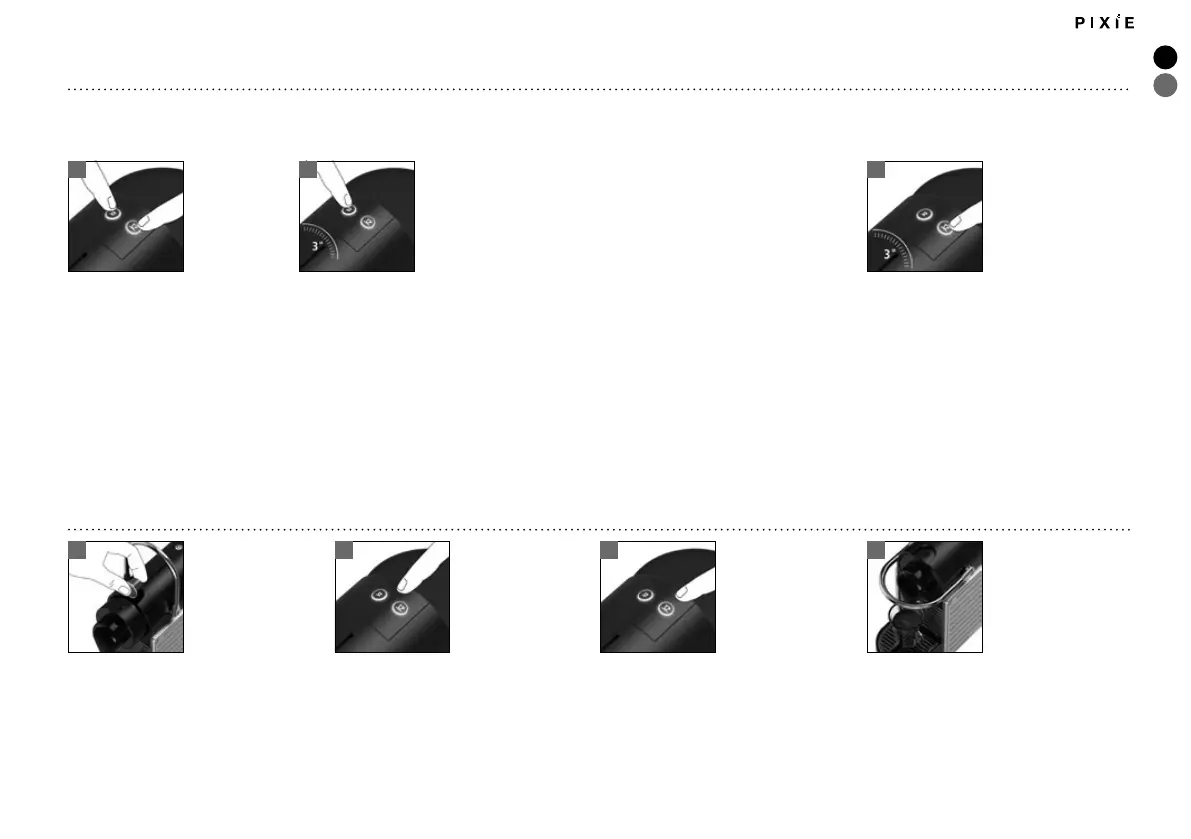
PROGRAMMING THE WATER VOLUME
Press and hold the Espresso or Lungo button.
Release the button once the desired volume is
served.
Water volume level is now stored.
Fill the water tank and insert the capsule.
预设杯量
持续按住小杯或大杯键。
当到达预期的杯量后放开按键。
杯量已经被保存。
加水并放入咖啡胶囊。
节电模式
如需手动关闭电源,同时按
下浓缩咖啡和大杯咖啡按
键即可。
关机状态下,持续按住浓缩
咖 啡 按 键 3 秒 钟 。根 据 浓 缩
咖啡按键指示灯闪烁情况读
取当前设置。
按下浓缩咖啡按键可更改当前设置。
按一下,自动关机时间改为30分钟,
再按一下下,自动关机时间变更为9
分 钟。
指 示 灯 闪 烁 一 次 :表 示 当 前 设 置 为 9
分钟后自动关机。
指示灯闪烁两次:表示当前设置为30
分钟后自动关机。
持续按住大杯咖啡按键3秒钟退出
节电模式。
ENERGY SAVING MODE
To turn the machine o before automatic
Power O, press both the Espresso and
Lungo buttons simultaneously.
With the machine OFF, press and hold
the Espresso button for 3 seconds.
The Espresso button will blink to indicate
the current setting.
To change this setting press the Espresso button:
One time for Auto O mode after 30 minutes.
One more time for Auto O mode after 9 minutes.
1x Single blinking: 9 mins mode
2x Double blinking: 30 mins mode
To exit the energy saving mode press the Lungo
button for 3 seconds.
本咖啡机具有节电模式。咖啡机在未被使用9分钟后会自动断电。
This machine is equipped with an energy saving feature.The machine will automatically enter Auto O mode after 9 minutes.






 To Next Page